
Necessary tools
In order to be able to install firmware, the following tools are required:
- Personal computer with MS Windows
- Network cable to connect the Valuejet wit the pc
- The latest MSA-tool (Mutoh Service Assistance) or MSM-tool (Mutoh Status Monitor)
Detailed instructions how to install the firmware, are described in the maintenance manual.
The latest current firmware can be downloaded below this article.
Release date: 22 december 2020
Current version - 1.11
Changed items
- An error in displaying units on the display has been fixed (m instead of ml). This has been fixed.
- Implementation of a new feature to handle smart-chip related issues, with the new S/C Recovery procedure.
For more information check the following article: TIB818 - Smart Chip Recovery - The ink-end detection has been improved by increasing the accuracy of the soft counters
- The header dump was not printed when multiple files were transmitted continuously with header dump setting turned on. This has been fixed.
- If nozzle check (B) was executed in 6 colors, the printer information was printed in varnish. This has been exchanged with black.
Version history
Release date: 9 december 2019
1.10
Changed items
- Color maintenance menu has been added in user mode (only when using US11 ink)
Color Maint. : On
The printer performs color ink maintenance when waking up after 72 hours of sleep mode to ensure smooth startup after longer sleep times.
Color Maint. : Off
The printer does not perform the color ink maintenance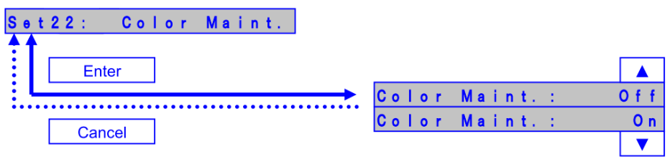
- Added support for UH21 ink cartridges
Release date: 3 september 2018
1.08
New items
- Added "PRINT" menu in Header Dump menu [User mode].
"PRINT" menu: Prints the last header dump.
- Added the menu item in Test > Record > Print menu [Self-diagnosis mode].
(1) Head Height, (2) Media Width are added to the menu.
- Improved the Nozzle Check B [User mode]. Added a white background under the printer information.
- Added the function to save the history of daily maintenance log. The history can be checked with MSA ver.4.1.7.0 or later.
(Cannot be checked on the operation panel)
- Added the function to save the history of daily maintenance log. The history can be checked with MSA ver.4.1.7.0 or later.
(Cannot be checked on the operation panel)
- Added the function to save the history of daily maintenance log. The history can be checked with MSA ver.4.1.7.0 or later.
(Cannot be checked on the operation panel)
- Added the Accum. Print menu in Auto Cleaning menu [User mode].
Perform the auto cleaning at each accumulated print time, when enable the Accum. Print Menu.
- Changed the initial setting menu. Added the confirmation message for wiper installation in initial setting sequence.
- Added the function to update the parameter during the operation.
The parameter is updated (1) after the initial charge, (2) after the head wash, (3) Entering the Sleep mode.
- Added "Data Edge" in Head travel menu. [User mode].
Print head travels up to the edge of print data. - Changed UV lamp operation during printing.
UV irradiation area is changed from Media width to Print width.
- Changed the condition to enter sleep mode.
Even if the lever is up, the printer can enter sleep mode.
Bug fixes
- Corrected the F/W bug that the parameter in MSA cannot be sent to a printer.
If the communication between MSA and the main board is cut off, MSA will automatically retry to sent the parameter.
Release date: 9 november 2017
1.07
New items
- Added daily maintenance function : when entering the sleep mode or turning off the printer, the menu automatically shifts to the daily maintenance menu
- Display the message to prompt users to perform the daily maintenance: when the total printing time reaches 12 hours, the message appears to prompt users to perform the daily maintenance
Release date: 20 january 2016
1.06
Bug fixes
- Changed the replacement cycle of the high-capacity ink pack adapter plug (changed from 240 to 200 times)
- Added the alert buzzer menu; when set to “off”, the beep sound will turn off automatically after several beeps
Diagnostics mode
- Added the shot counter sub menu into the record maintenance menu
- Added the head replacement menu: the head lifetime counter will be automatically reset after updating the head rank
- All T. area: accumulated total printed area in all print modes added
- Added the Cpump menu: select the circulation pump motor to be used:
- Pump A: Old Cpump (default setting)
- Pump B: New Cpump
-
Added the CR maintenance log menu
Release date: 11 january 2016
1.05
Changed items ver 1.03 ► ver 1.04
- “Add y layer” feature added in user type menu for media-dependant adhesion improvement Remark: this feature will be explained in an additional tib
- Optimization of circulation pump lifetime
- Added CCW unidirectional printing (*dn3) for improved curing behaviour ink is jetted when print head moves from left to right
- Modified specs of *uc command, if all parameters in *UC command are set to 0, the initial value for UV control will be applied
Changed items ver 1.04 ► ver 1.05
- Optimization of ink charge/discharge cycles
| NOTE In order to avoid possible issues regarding ink charge/discharge cycles mutoh strongly advises - In case your printer is currently at firmware v1.04 - to upgrade towards v1.05 |
| Attachments |
| VJ-1626UH_V111.jfl 1.85 MB |