
Necessary tools
In order to be able to install firmware, the following tools are required:
- Personal computer with MS Windows
- Network cable to connect the Valuejet wit the pc
- The latest MSA-tool (Mutoh Service Assistance) or VSM-tool (Valuejet Status Monitor)
Detailed instructions how to install the firmware, are described in the maintenance manual.
The latest current firmware can be downloaded below this article.
Release date: 03 january 2019
Current version - 3.05
Bug correction
Fix the bug that it takes time to complete a print job if using Mac OS High Sierra.
Version history
3.04
Release date: 13 june 2018
User Mode
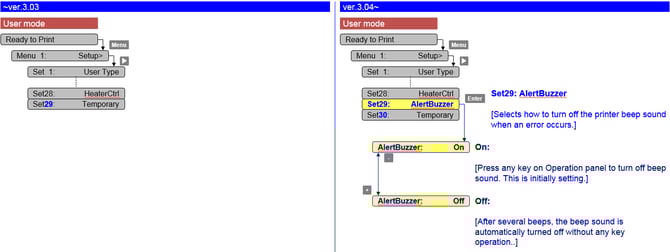
- Added an alert buzzer menu in User Mode
-
Persistent lifetime alert messages can now be in deleted with the "cancel" key (User Mode).
7 days after pressing the "cancel" key, the message will reappear and you just have to hit the "cancel" button again.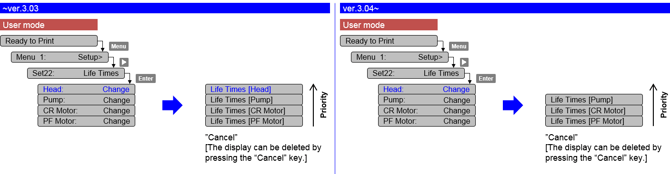
-
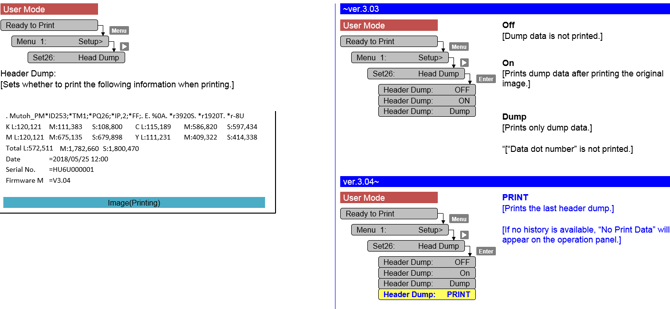
Added "PRINT" menu in the Header Dump menu. This "PRINT" menu enables you to print the last header dump.
-
Corrected the F/W bug that the parameter in MSA cannot be sent to a printer.
If the communication between MSA and the main board is cut off, MSA will automatically retry to send the parameter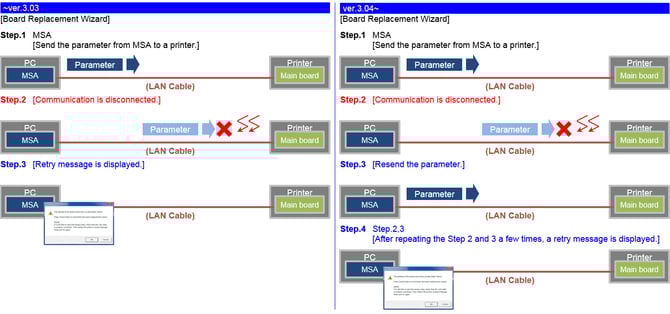
-
440 ml ink cartridges will no longer be accepted by our VJ-1324(X) series model
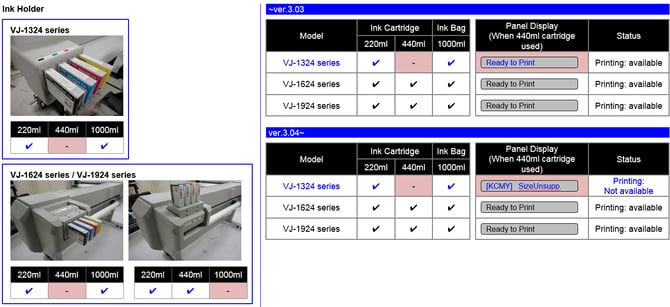
Changed items
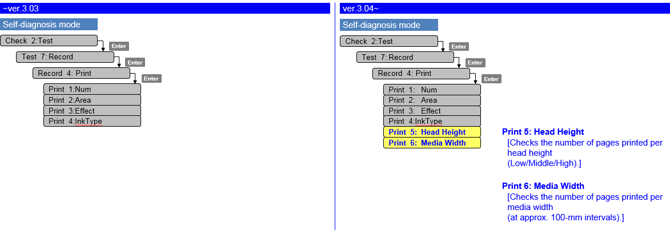
- Nozzle check pattern: add printer information: print time, serial number, firmware version

Bug fixes
- Parameter update after initial ink-charge
Previously the printer needed a reboot after ink-charge, in order to properly store the charge-flag in the parameters. When an error occurred, the charge-flag was reset and inks needed to be recharged again. From this version, parameters are now properly stored after initial charge without the necessity to reboot.
Diagnostic Mode
- Added extra counter information
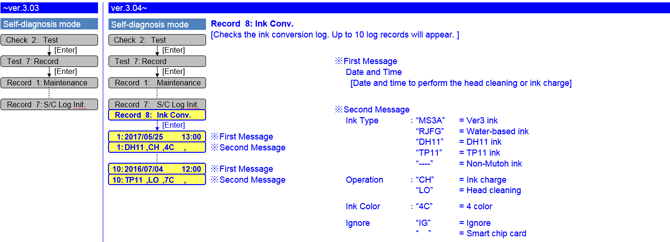
- New ink conversion (ink type / ink color) log menu
Release date: 20 june 2017
3.03
Changed items
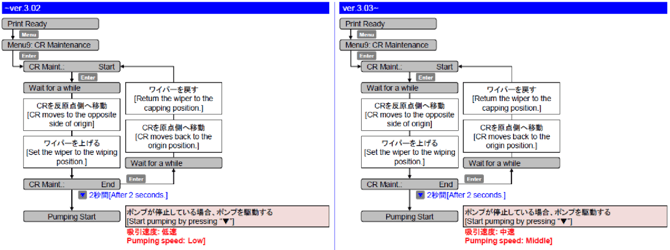
- Modified the pump operation during CR maintenance: changed the pumping speed from low to middle
Release date: 29 november 2016
3.02
Changed items
- Countermeasure to prevent ink leakage during standby mode
- When the waste fluid tank becomes full, close the 2-way valve solenoid.
- When the subtank sensor detects no remaining ink in the subtank, suction the ink on the cap
Release date: 7 july 2016
3.01
Changed items
- When “ink end” occurs, the carriage caps immediately (there was a 20 seconds waiting time)
Diagnostics mode
- Maintenance menu: added average jetting number of print head + total average jetting number
- Parameter/update/head replace menu: head unit life counter automatically reset after entering head rank
- Total printed area for all print modes added
Release date: 7 july 2016
2.08
Changed items
- Tube flush added during “CR” maintenance cycle
Important
- This feature is specifically relevant for printers loaded with UMS ink, see also TIB 2014/576 for VJ-1638
- During media initial: time-out period changed from 10 seconds to 30 seconds
- Changed maximum roll media length from 99m to 200m
Diagnostics mode
- Diagnostic mode: accumulated lifetime menu added, these values cannot be initialized
- Diagnostic mode: if 460cps is not possible because of ink type selection, the uni/bi 460 is not mentioned in adjustment menu
- Diagnostic mode: carriage speediness menu added (normal/low)
Release date: 26 september 2013
2.06
Changed items
- Prevention of nozzle dropout:
- During cleaning cycle: slow down wiping speed
- Before printing, the number of flushing shots is increased
- Diagnostic mode: in longstore sequence, no more keystroke interventions (press “enter”) needed from user
Note
|
| Attachments |
| VJ1624W_V305.jfl 1.77 MB |