
Necessary tools
In order to be able to install firmware, the following tools are required:
- Personal computer with MS Windows
- Network cable to connect the Valuejet wit the pc
- The latest MSA-tool (Mutoh Service Assistance) or MSM-tool (Mutoh Status Monitor)
- Make sure the latest heater firmware is up-to-date and installed first, before installing the mainboard-firmware
Detailed instructions how to install the firmware, are described in the maintenance manual.
The latest current firmware can be downloaded below this article.
Release date: 23 february 2021
Current version - 3.09
Bug Fixes
- While "[*] Check Clr. -> E"is displayed on the panel and the cartridge is removed and reinserted, none of the following didn't work:
- Media feed
- Nozzle check print
- Print head cleaning
This is issue has been fixed.
- When the network transfer was interrupted due to cable issues or bad contacts, the printer needed to be restarted in order to resolve the connectivity issue. When disconnections now occur, the printer will automatically retry to recover the connection within a time-span of 5 minutes before a timeout occurs.
- Ink consumption was not counted during "Sub Tank Refill". This has been fixed.
Version history
Release date: 18 june 2020
3.08
Bug Fixes
- Fixed: The ink cartridges with 440ml and 1000ml shows "Ink near end" when the remaining ink has a certain level. However in some cases the printer display sometimes gave "Broken Chip" instead of "Ink near end" after:
- ... the cartridge is removed and inserted
- ... when the power has been cycled
- Two indications of "S/C Recog. Err." and "Ready to Print" came up alternating every 0.5 seconds. This error can occur when the following 3 conditions are met simultanuously:
- Remain Ink Menu is set to ON
- When a S/C Recognition error occurs (S/C Recog. Err.)
- Ink near end is detected with one color
- This issue has been fixed and now only "S/C Recog. Err." is displayed instead
Release date: 09 april 2020
3.07
User Mode
- Implementation of a new feature to handle smart-chip related issues, with the new S/C Recovery procedure.
For more information check the following article: TIB818 - Smart Chip Recovery - The "Ink End" detection, software-handling and ink-consumption have been improved.
- Media feed, media cut and cancel printing can now be done with the remote panel of the latest version of MSM (Mutoh Status Monitor) tool.
Diagnostics
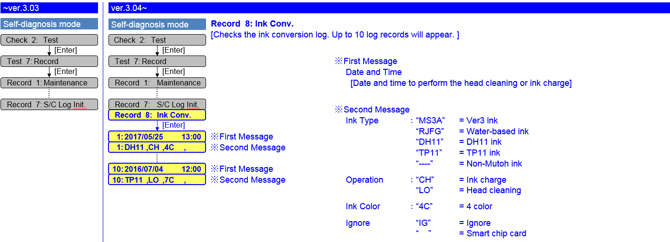
- Longstore history has been added in the Ink Conversion Log
Release date: 03 january 2019
3.05
Bug correction
- Fixed a bug that where it took a lot of time, to complete a print job if using Mac OS High Sierra.
Release date: 13 june 2018
3.04
User Mode
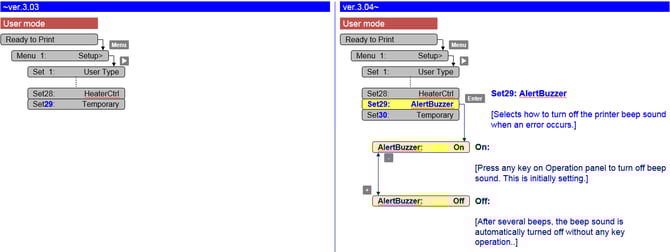
- Added an alert buzzer menu in User Mode
-
Persistent lifetime alert messages can now be in deleted with the "cancel" key (User Mode).
7 days after pressing the "cancel" key, the message will reappear and you just have to hit the "cancel" button again.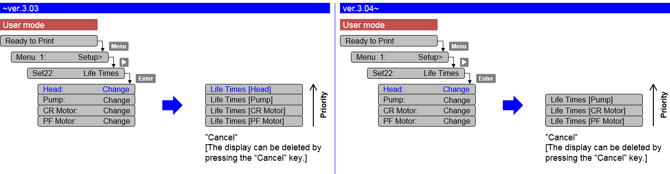
-
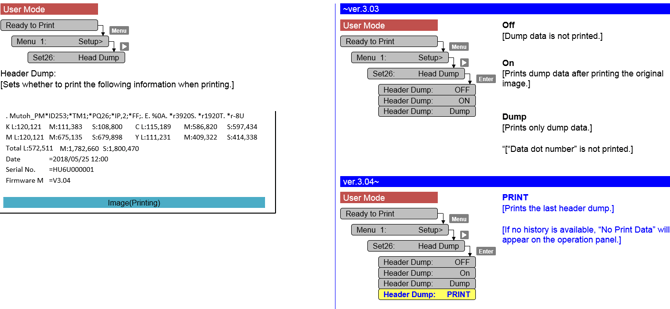
Added "PRINT" menu in the Header Dump menu. This "PRINT" menu enables you to print the last header dump.
-
Corrected the F/W bug that the parameter in MSA cannot be sent to a printer.
If the communication between MSA and the main board is cut off, MSA will automatically retry to send the parameter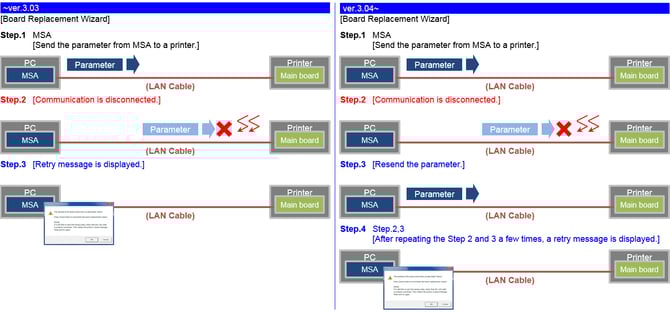
-
440 ml ink cartridges will no longer be accepted by our VJ-1324(X) series model
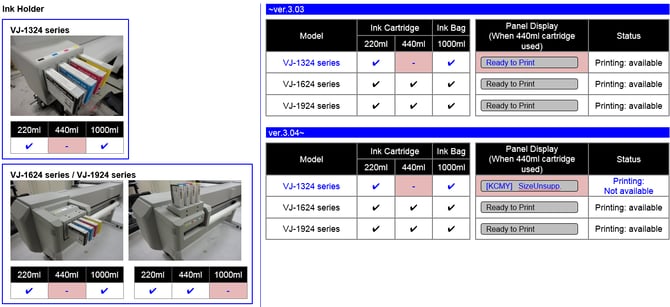
Changed items
- Nozzle check pattern: add printer information: print time, serial number, firmware version

Bug fixes
- Parameter update after initial ink-charge
Previously the printer needed a reboot after ink-charge, in order to properly store the charge-flag in the parameters. When an error occurred, the charge-flag was reset and inks needed to be recharged again. From this version, parameters are now properly stored after initial charge without the necessity to reboot.
Diagnostic Mode
- Added extra counter information
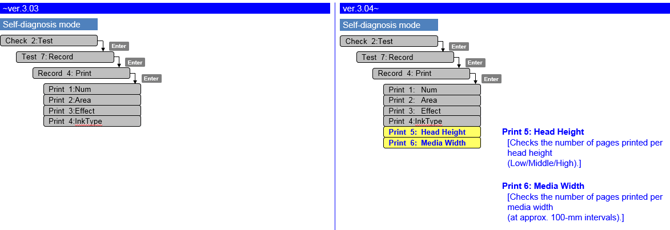
- New ink conversion (ink type / ink color) log menu
Release date: 20 june 2017
3.03
Changed items
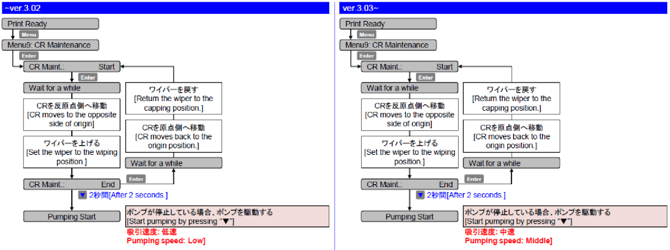
- Modified the pump operation during CR maintenance: changed the pumping speed from low to middle
Release date: 29 november 2016
3.02
Changed items
- Countermeasure to prevent ink leakage during standby mode
- When the waste fluid tank becomes full, close the 2-way valve solenoid.
- When the subtank sensor detects no remaining ink in the subtank, suction the ink on the cap
Diagnostics
- Added the menu to show the number of pages printed for each ink type
Release date: 7 july 2016
3.01
Changed items
- When “ink end” occurs, the carriage caps immediately (there was a 20 seconds waiting time)
Diagnostics mode
- Maintenance menu: added average jetting number of print head + total average jetting number
- Parameter/update/head replace menu: head unit life counter automatically reset after entering head rank
- Total printed area for all print modes added
| Attachments |
| VJ1624X_V309.jfl 1.79 MB |