
Necessary tools
In order to be able to install firmware, the following tools are required:
- Personal computer with MS Windows
- Network cable to connect the Valuejet wit the pc
- The latest MSA-tool (Mutoh Service Assistance)
- Make sure the latest heater firmware is up-to-date and installed first, before installing the mainboard-firmware
Detailed instructions how to install the firmware, are described in the maintenance manual.
The latest current firmware can be downloaded below this article.
Release date: 2 september 2020
Current version - 3.05
New items
- Implementation of a new feature to handle smart-chip related issues, with the new S/C Recovery procedure.
For more information check the following article: TIB818 - Smart Chip Recovery - The "Ink End" detection, software-handling and ink-consumption have been improved.
- The 2-way valve is opened even when an error to ink cartridge occurred. This has been fixed, when an ink-cartridge error occurs, the 2-p valve is now closed
- The cleaning cartridge was not recognized in "Longstore 2" mode. This has been fixed.
Version history
Release date: 21 january 2020
3.04
New items
Prevent ink leakage during standby mode
- When the waste ink bottle is full, the 2-way solenoid valve closes
- When the subtank sensor detects there is no ink inside the subtank, it will refill it through the ink pump, sucking ink
.png?width=670&height=300&name=S80-eLB_SXqTUqx0qHqnXtKYl5_QLsBiHw%20(1).png)
Prints additional printer information on each nozzle check pattern (user mode):
.png?width=670&height=74&name=aEFAHrZwPS10A5-Je3ehHL-S7n0VS8sC2Q%20(1).png)
Added Alert Buzzer menu. If the Alert Buzzer is set to "Off", the beep sound will turn off automatically after several beeps
.png?width=670&height=387&name=Pkk7G5ANkNi4a37Ufb1paPAhUOxzNSd_tw%20(1).png)
Bugfixes
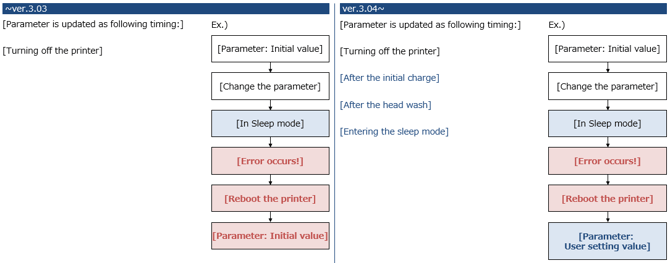
Parameters were not saved immediately after change (and not power cthe printer). When the printer goes to sleep mode (and in case an error occurs) the changed setting was lost. This has now been fixed in the following circumstances: Parameter is always saved immediately:
- After initial charge
- After a head wash
- When entering sleep mode
Release date: 3 august 2016
3.03
New items
- Drop master implementation : added the “thickness” menu to “setup” menu. The printer now also accepts a Media Thickness command (*PK), making it possible to assign a media thickness value from the RIP per substrate type. Doing so will make sure that the bidirectional dot firing will be adjusted to the drop throw distance between the nozzle plate and the media surface. The result: prevention of print artefacts such as image fuzziness or image grain. The print quality will be easily reproducible, on condition that each media thickness is properly defined. It is advised to perform the uni/bi adjustment corresponding to the media thickness parameter set in diagnostics mode.
- Added the “Start Feed” menu : when Start Feed is set, before printing, the printer rewinds or feeds the media the amount specified by the set value
- Added the “Page Gap” menu to “Take-up” menu, in the Page Gap menu, you can change the margin setting between images
- Page gap = normal --> gap is approx. 60 mm
- Page gap = narrow --> gap is 10 mm
-
Added the notification menu about the remaining roll media status
-
Added “fine&fog1” and “fine&fog2” to "effect" menu
-
Added "header dump" menu to "setup" menu
Diagnostic mode
- Updated the maintenance menu structure
- Integrated the average jetting number menu
- Added the menu to check the ink consumption amount
- Added the head replacement menu: automatically initializing the counter after head rank input
| Attachments |
| VJ1604X_V305.jfl 1.59 MB |