
A Mutoh valve damper is being shipped with a specific cleaning fluid inside. This liquid may not be compatible with the ink in use and therefore it is necessary before installing a new damper, to pre-rinse the damper with dedicated cleaning liquid.
Since MS41 cleaning liquid is not available in bottles, the liquid needs to be pulled from the bags (MS41-CL300E). In order to do so Mutoh has a specific tool available (DG-49300).
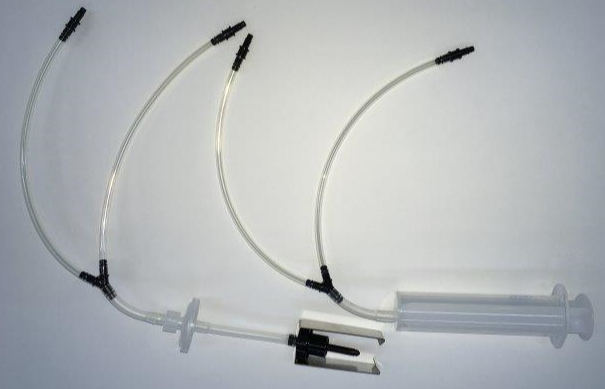
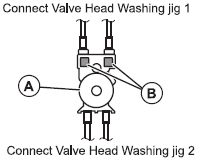
Step 1: connect the 2 tubes which are attached to the black plastic needle to the side of the damper with the filters (B in image below). Valve head washing jig 1.
Step 2: connect the 2 tubes which are attached to the syringe to the side of the damper opposite to the side with the filters. Valve head washing jig 2.
Step 3: attach the MS41 cleaning bag to the needle.
Step 4: pull via the syringe about 3cc of cleaning liquid through the damper.
Step 5: turn the damper upside down to allow the cleaning to settle in the damper
Step 6: remove the cleaning bag from the needle.
Step 7: remove the cleaning out of the damper by pulling the syringe.
Step 8: remove the tubes from the damper.
Caution:
When removing the tubes, make sure to cover the outlet with a polyknit wiper to avoid spilling of cleaning liquid from the tubing.
IMPORTANT NOTES:
- When replacing a print head on an XPertJet loaded with MS41 ink, there is no need to pre-rinse the head with cleaning liquid.
- The head DG-49580 is specially treated in the factory to be installed with MS41 ink.