
Under certain circumstances it is needed to send the MPI file from the machine to MUTOH for further analysis or to create a new ULK file for the machine. This document describes how these files can be downloaded from and uploaded to the
VJ-628(MP).
|
How to retrieve a MPI file and upload an ULK file on a VJ-628(MP) |
- Make sure the printer is powered on and connected via the network to the MSA tool (service software tool that all Certified Mutoh engineers have).
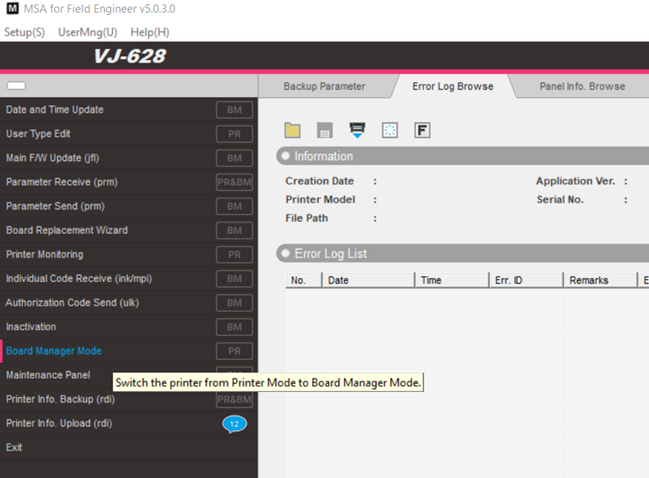
- Switch the printer to “Board manager mode” with the MSA tool (see blue marked menu in below screen shot)
-
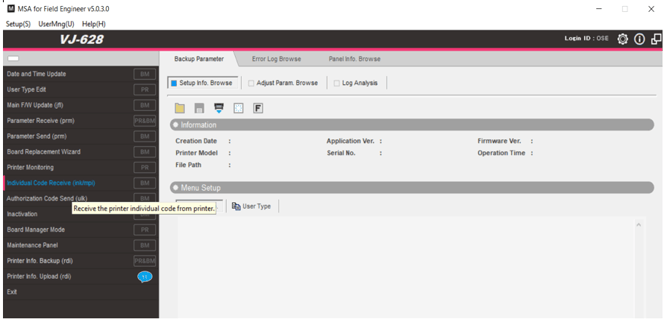
When the confirmation has been sent that the printer is in “Board Manager Mode”, retrieve the MPI file from the printer: See “individual code receive”.
-
Send this file to MUTOH Europe.
-
MUTOH Europe will generate a ULK file.
-
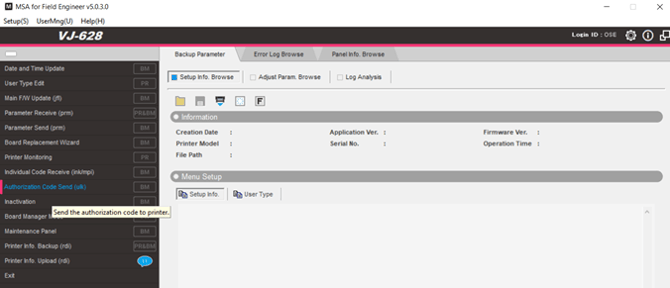
Upload this file via “authorization code sent” ==> wait while the data is sent until you receive the confirmation that the printer is ready
-
To return to normal user mode instead of Board manager mode: Power off the printer and power on again by just pushing the power button.