
We have recently introduced a new MS41 ink color: Orange. As a consequence, the XpertJet XPJ-1682SR can from now on, be loaded in the following possible color-configurations:
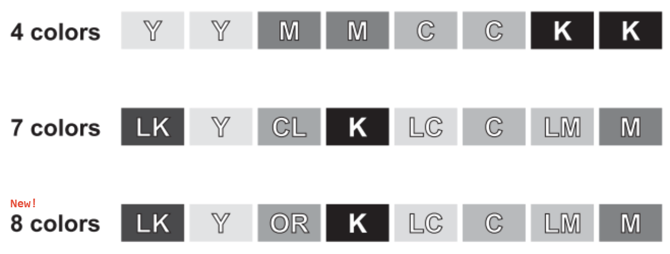
As a basic rule the following applies for all installed-base machines which already have been loaded in a 4-color or 7-color ink-configuration:
| Mutoh does not officially support color configuration changes from 4 or 7 colors to 8-colors (including orange) in installed-base machines which are already loaded with inks. Only new machines (out-of-the-box) which have not had any inks inside, are fully supported when charged with 8-colors from since installation. |
Apart from the above statement from a technical point of view, the printer however can be converted into a MS41 8 color configuration containing the orange inks. This procedure below is only applicable for (already installed) field-units, pre loaded with MS41 ink in the following ink configurations:
- 2 x 4 colors: YYMMCCKK
- 1 x 7 colors: LkYClKLcCLmM
| NOTE This procedure that describes how to convert machines from a 4-color or 7-color configuration to 8 colors is at your own risk. When there are any defects on the ink-system (or print head) due to the configuration change, any part-replacement due to this change will not be covered in warranty. |
How to convert a 2 x 4 color or 1 x 7 color configuration to 8 colors
Necessary items:
- 8 new MS41 Cleaning bags
- 8 new MS41 Ink bags (LK-Y-OR-K-LC-C-LM-M)
Make sure that the maintenance-station is in good shape. If the printer hasn't been maintained more than 1 year ago, proceed with the yearly maintenance first.
- Start the printer in diagnostics.
- Make a nozzle-check to verify the print head.
- Empty the waste-bottle
- Proceed with long store
- When the long store procedure is completed, insert the 8 new Ink bags
- Proceed with a normal ink charge
- Make a nozzle check to verify the print head in the new color configuration
- Conversion completed!