
In some cases it might appear that there is a discrepancy between the white print position and the colour (CMYKVa) print position.
Printing conditions under which this phenomenon might occur are:
- White and colour are printed in separate layers
- Stacked printing (Braille)
Models involved: XPJ-461UF, XPJ-661UF.
Cause:
In multi-layer printing, the firing waveforms of white and colour printing are different. So even if the firing is performed at the same timing, a discrepancy in the landing position might occur.
Especially in the case of stacked printing, such as Braille, this difference in placement becomes more visible.
Countermeasure:
The following adjustment functions and settings were added in FW1.05: "Adjust Layer Printing".
Following serial numbers have FW1.05 already pre-installed at the factory:
- XPJ-461UF: JI3U000379 and higher
- XPJ-661UF: JM2U001003 and higher
Remarks: This function only appears in a 6-colour set-up and the rotary mode is not supported.
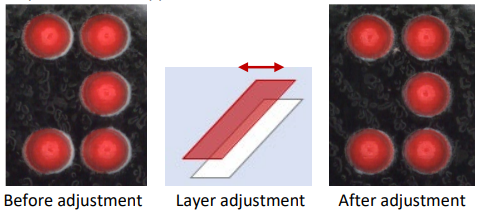
How to perform the extra adjustment:
Please update the FW to 1.05 or later and perform each adjustment when the following printing artefacts occur:
- The "Adj. Layer Prn. 1" through "Adj. Layer Prn. 5" are used for white layer alignment to correct white layer shifting in "single-layer" or "multi-layer" printing.
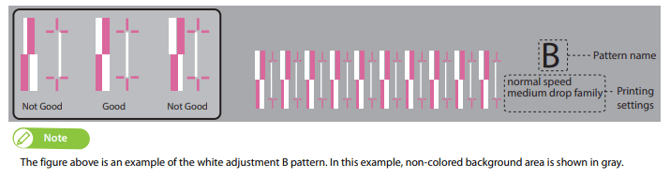
- If layer shifting still occurs in multi-layer printing after performing white layer alignment, perform layer alignment using the menus "Adj. Layer Prn.6" through "Adj. Layer Prn.12". This will correct misalignment between layers in multi-layer printing.
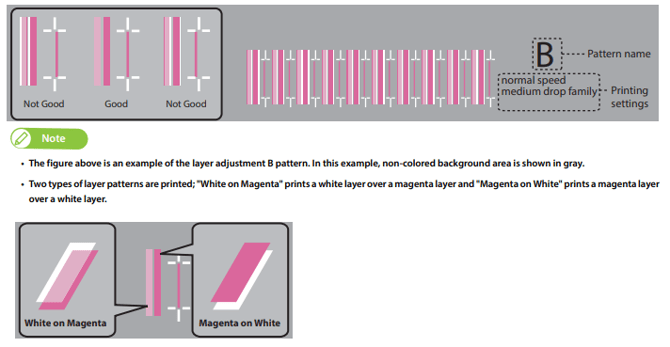
All info on how to perform the alignments can be found in the Operation manuals of XPJ-461UF and XPJ-661UF as of version5.