
This is the procedure how to Clean the print head when the Varnish(US61) channels of the print head are blocked.
Start the printer in diagnostic mode.
Perform a Ink discharge on head2 only
after the ink discharge go tofor the menu Cap IN/OUT select cap out, the carriage will be loose from the maintenance station.
power off the printer.
Remove the carriage cover.
Remove the Print head cover.
Disconnected the ink tubes from the dampers on Print head2.
Remove all the dampers --> Check if there is still Varnish in the dampers.
if yes than Install a tube on the nipples from the Varnish channels inside the Print head.
position of the ink channels on the print head, keep in mind that the dampers are crossed inside the print head.
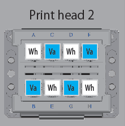
Start the printer in diagnostic mode.
Used the function cap in and cap out.
- cap out --> to put cleaning fluid on the cap assy( I used ULVA cleaning).
- Cap in --> to cap the print head again on the cleaning fluid and suck with the syringe.
Suck with a syringe in a gentle way until the cleaning fluid is coming into the syringe, repeated this 3 times on the same channel, just to be sure.
Repeated this procedure for the other 3 Varnish channels.
Shut down the printer.
Flushed new dampers with UV cleaning(UH22) and let some cleaning inside the dampers.
Install new dampers and reinstall the Print head cover.
Clean the ink tube of Varnish with syringe with the help of UH22 cleaning cartridge, repeated this until the liquid in the syringe is clear.
Reconnected the ink tubes of Print head2.
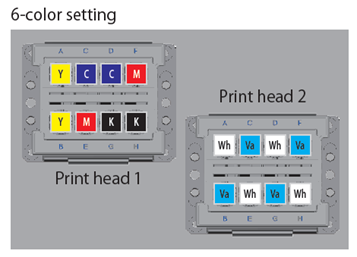
Replace the Varnish bag by a other Varnish bag(different batch).
Start up the printer in diagnostic mode and perform a normal Ink load.
Perform a Nozzle check and check if all nozzles are present.
| Attachments (1) |