
Phenomenon
When replacing the MAIN board on certain models, the panel may automatically power on upon inserting the AC cable after the maintenance board is installed.
In this state:
-
All panel buttons become unresponsive.
-
The printer cannot enter Board Manager mode.
-
Firmware installation is not possible.
Target Parts and Models
| Parts No. | Name | Model |
|---|---|---|
| DH-41737 | MAIN Board | XPJ-1462UF |
| DH-42216 | MAIN Board | XPJ-1682UR |
Market Action / Solution
To address this issue during MAIN board replacement:
-
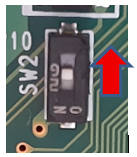
Temporarily turn OFF the DIP switch on the panel before powering on the device.
-
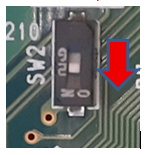
Once firmware installation is complete, turn the DIP switch back ON.
⚠️ This behavior only occurs if the replacement MAIN board does not have the product firmware pre-installed.
After firmware installation, future firmware updates do not require DIP switch changes.
Board Replacement Procedure
-
Connect the MSA and start the Board Replacement Wizard.
-
Use the wizard to back up the prm file from the defective board.
-
Power off the printer as instructed by the wizard.
-
Set the DIP switch on the panel to OFF.
-
Replace the MAIN board with the new maintenance board.
-
Start the printer in Board Manager mode:
-
Press the power button.
-
Within 2 seconds, press the left key on the panel to switch to Board Manager mode (before auto power-off).
-
-
Follow the wizard to install the firmware and restore the prm file.
-
Power off the printer.
-
Set the DIP switch back to ON.
⚠️ Important Notes if DIP Switch is Not Returned to ON:
Automatic power recovery during a power outage will not function.
The printer may malfunction due to ink settling.
On first power-up, the panel may flash, and the printer will not start.
Normal startup will only occur after pressing the power button a second time.
-
Perform adjustments and calibrations as needed in self-diagnosis and user mode.
Reference: Models with DIP Switch ON Configuration
| Model |
|---|
| XPJ-461UF |
| XPJ-661UF |
| XPJ-1462UF |
| XPJ-1682UR |