Some customers prefer to print a certain amount of jobs before removing the roll from the printer and start contour cutting. Since VerteLith at the moment is only able to add a barcode under a job, the customer has to rewind his printed roll.
This article describes how to add a barcode to the top of the image instead of the bottom of the image:
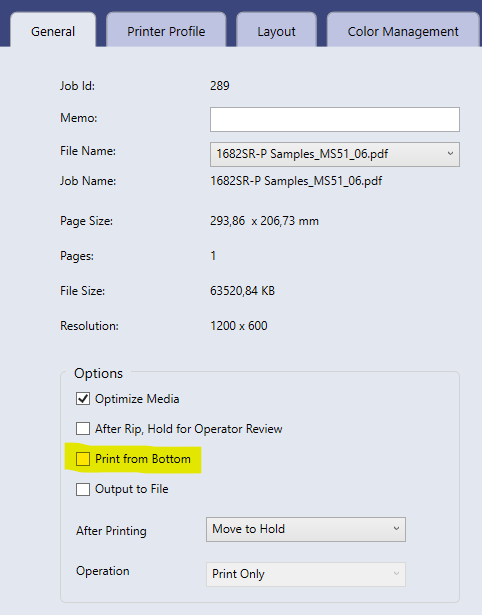
DISABLE Print from Bottom in the general settings tab of a job. That way the printer will start printing the job on top of the preview screen instead of the bottom of the preview screen.
Tips:
- Best practice is to adjust the corresponding Print Environment so that future jobs will have this setting disabled by default.
- Additionally one could rotate the job by 180° to start cutting at the bottom side of the original image.
Was this article helpful?
That’s Great!
Thank you for your feedback
Sorry! We couldn't be helpful
Thank you for your feedback
Feedback sent
We appreciate your effort and will try to fix the article