
No recent searches
Popular Articles

Sorry! nothing found for
VJ-1324 v3.09
Modified on Wed, 24 Mar, 2021 at 3:17 PM
The latest current firmware for the VJ-1324 can be downloaded at the bottom of this article. A complete overview about all the past improvements & changes is listed here as well.
Necessary tools
In order to be able to install firmware, the following tools are required:
- Personal computer with MS Windows
- Network cable to connect the Valuejet wit the pc
- The latest MSA-tool (Mutoh Service Assistance) or MSM-tool (Mutoh Status Monitor)
- Make sure the latest heater firmware is up-to-date and installed first, before installing the mainboard-firmware
Detailed instructions how to install the firmware, are described in the maintenance manual.
Release date: 23 march 2021
Current version - 3.09
User Mode
- Implementation of a new feature to handle smart-chip related issues with the new S/C Recovery procedure.
For more information check the following article: TIB818 - Smart Chip Recovery
The "Ink End" detection, software-handling and ink-consumption have been improved.
- Media feed, media cut and cancel printing has been added in the MSM. This can now be done with the remote panel of MSM.
Bug correction
While "[*] Check Clr. -> E"is displayed on the panel and the cartridge is removed and reinserted, none of the following didn't work:
Media feed
Nozzle check print
Print head cleaning
This is issue has been fixed.
- If the network cable is disconnected during data transfer using the FTP protocol, the connection cannot be established even if the cable is reconnected. The signal reception timeout of FTP protocol is now set to 5 minutes.
- The "Ink End" detection, software-handling and ink-consumption have been improved.
- Fixed an issue which caused to take time to complete a print job if using Mac Os High Sierra
- Two indications of "S/C Recog. Err." and "Ready to Print" came up alternating every 0.5 seconds. This error can occur when the following 3 conditions are met simultaneously:
- Remain Ink Menu is set to ON
- When a S/C Recognition error occurs (S/C Recog. Err.)
- Ink near end is detected with one color
- This issue has been fixed and now only "S/C Recog. Err." is displayed instead
- Fixed: The ink cartridges with 440ml and 1000ml shows "Ink near end" when the remaining ink has a certain level. However in some cases the printer display sometimes gave "Broken Chip" instead of "Ink near end" after:
- ... the cartridge is removed and inserted
- ... when the power has been cycled
Version history
3.05
Release date: 03 january 2019
Bugfix
- Fixed a bug that caused that more time was taken to complete a print job if using Mac OS High Sierra.
3.04
Release date: 13 june 2018
User Mode
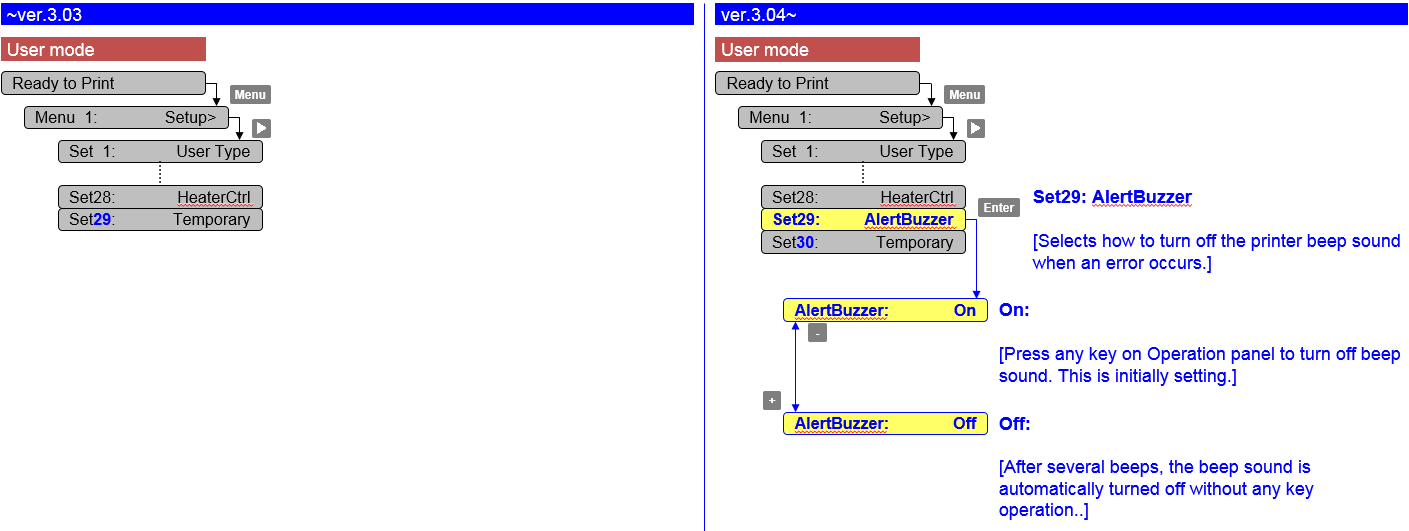
- Added an alert buzzer menu in User Mode
Persistent lifetime alert messages can now be in deleted with the "cancel" key (User Mode).
7 days after pressing the "cancel" key, the message will reappear and you just have to hit the "cancel" button again.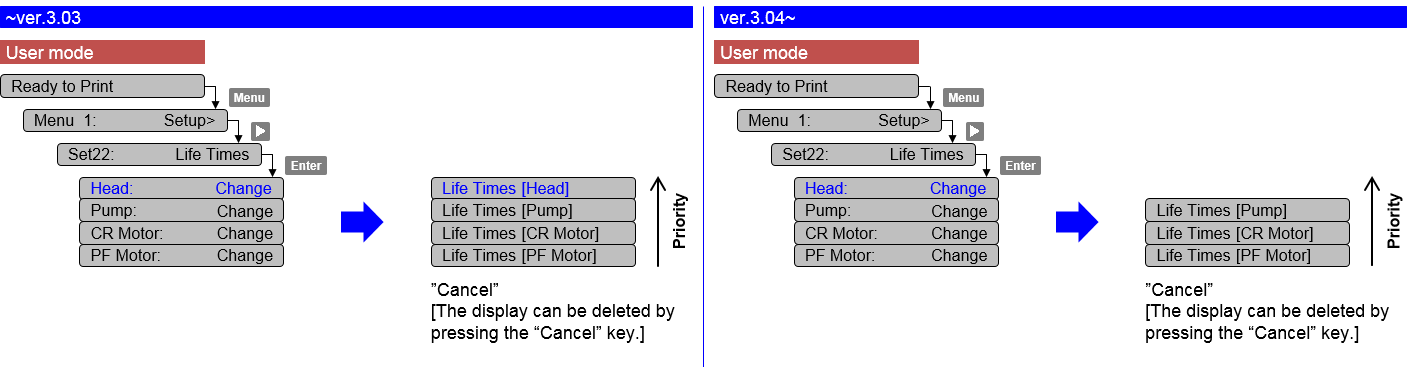
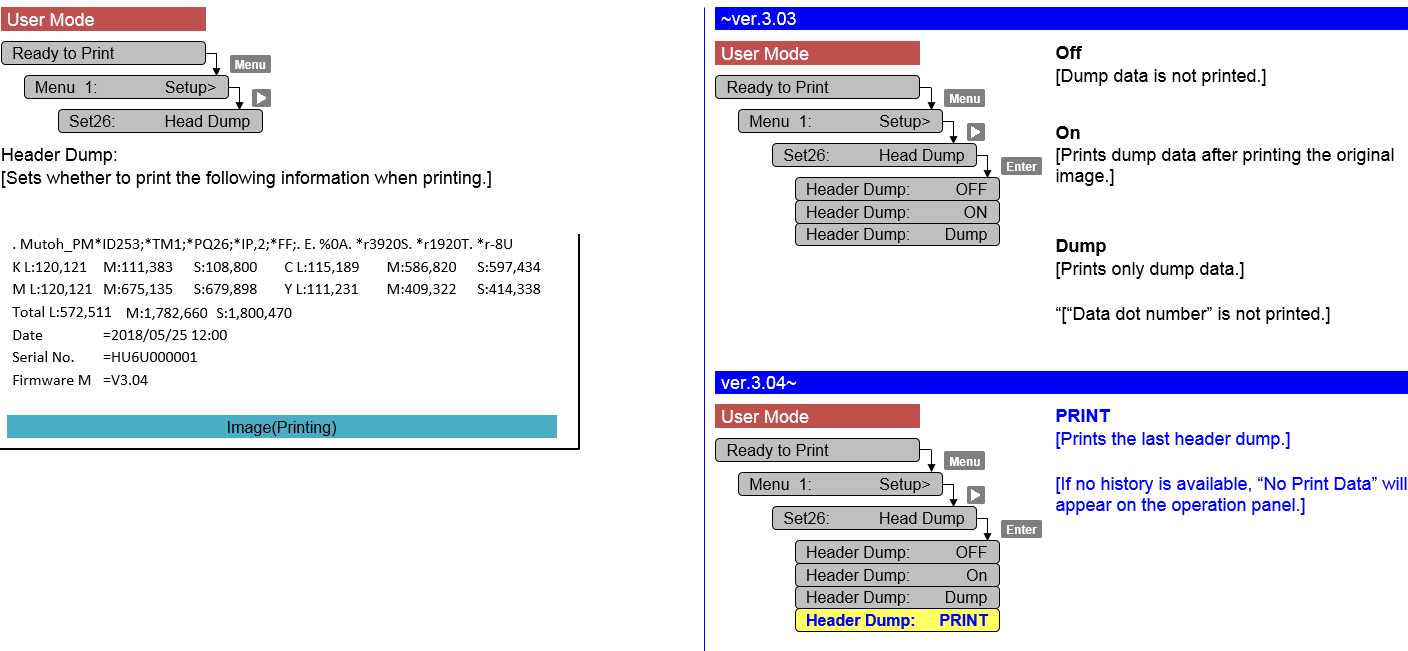
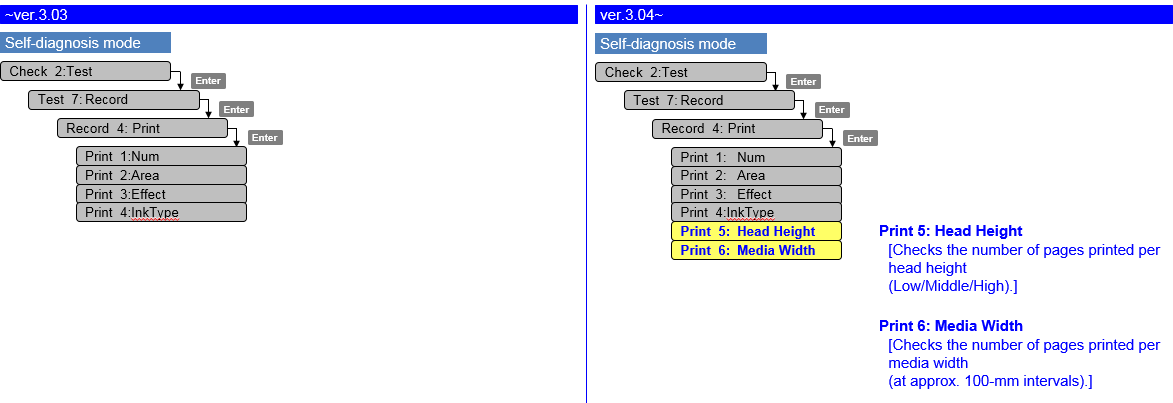
Added "PRINT" menu in the Header Dump menu. This "PRINT" menu enables you to print the last header dump.
Corrected the F/W bug that the parameter in MSA cannot be sent to a printer.
If the communication between MSA and the main board is cut off, MSA will automatically retry to send the parameter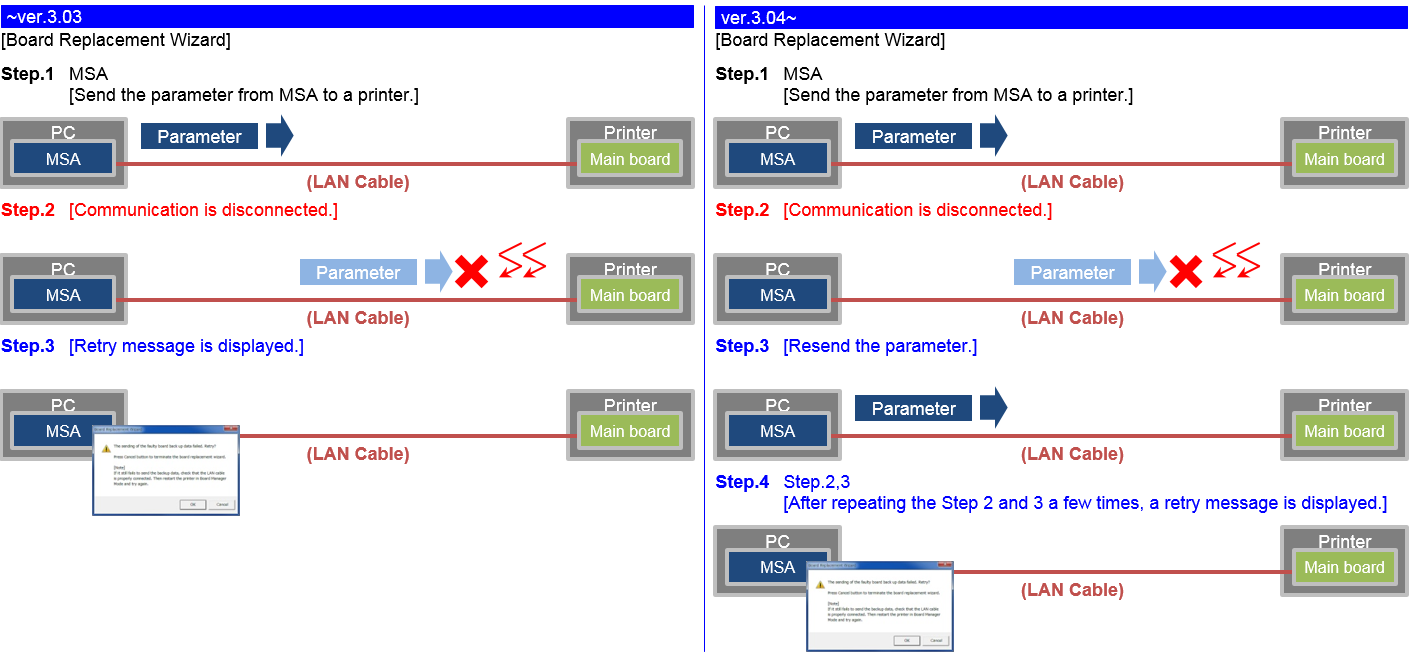
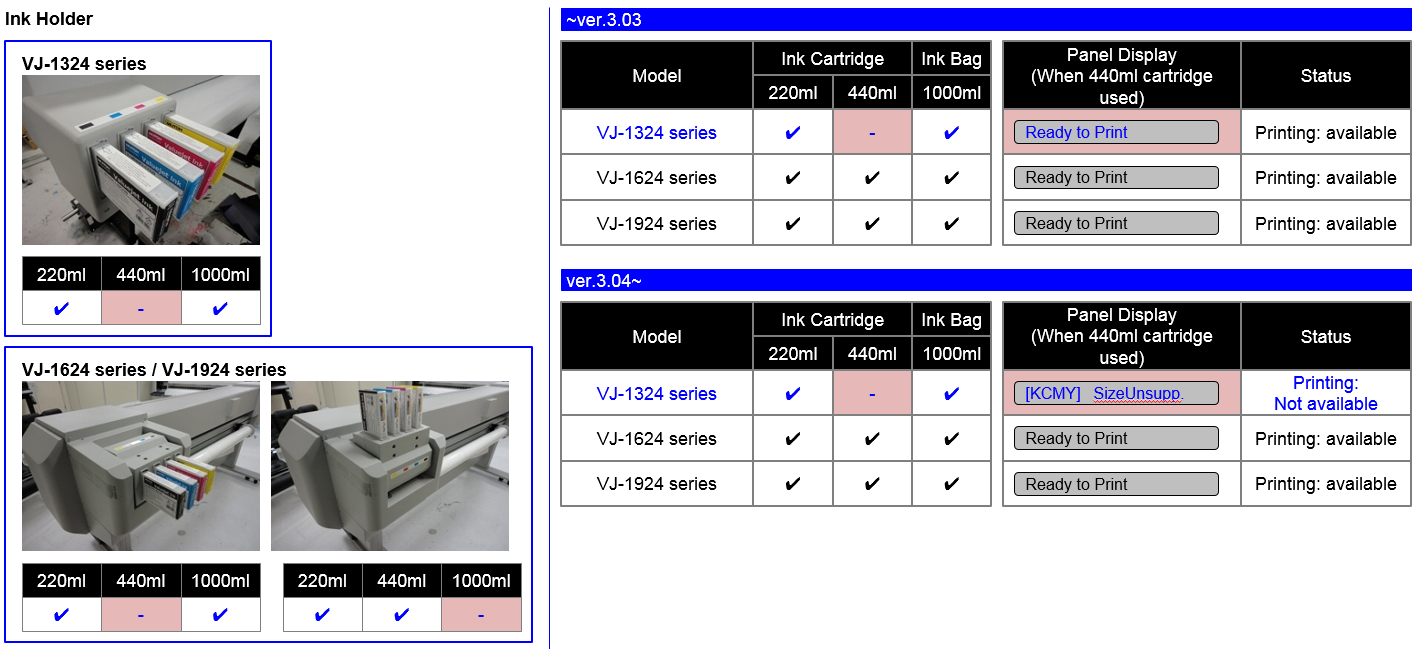
440 ml ink cartridges will no longer be accepted by our VJ-1324(X) series model
Bug fixes
- Parameter update after initial ink-charge
Previously the printer needed a reboot after ink-charge, in order to properly store the charge-flag in the parameters. When an error occurred, the charge-flag was reset and inks needed to be recharged again. From this version, parameters are now properly stored after initial charge without the necessity to reboot.
Changed items
- Nozzle check pattern: add printer information: print time, serial number, firmware version

Diagnostic Mode
- Added extra counter information
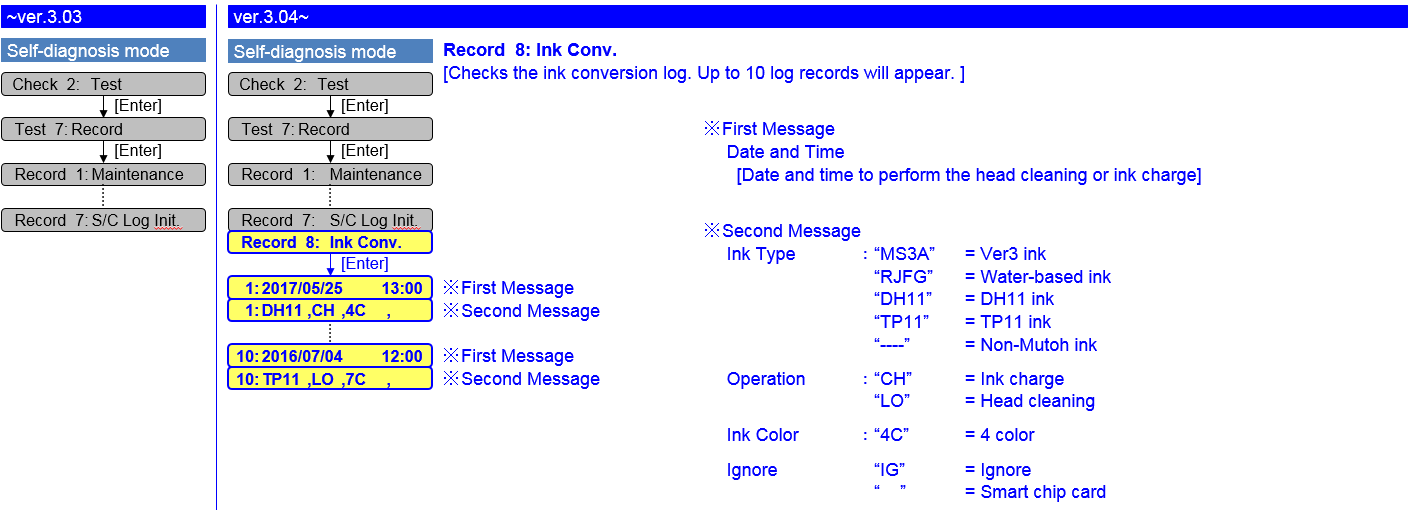
- New ink conversion (ink type / ink color) log menu
Release date: 20 june 2017
3.03
Changed items
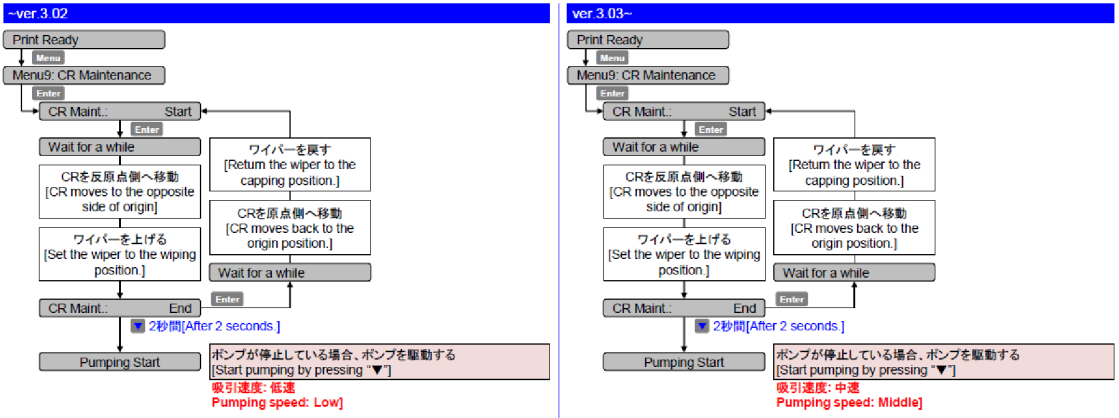
Modified the pump operation during CR maintenance: changed the pumping speed from low to middle
Release date: 29 november 2016
3.02
Changed items
- Added the menu to show the number of pages printed for each ink type
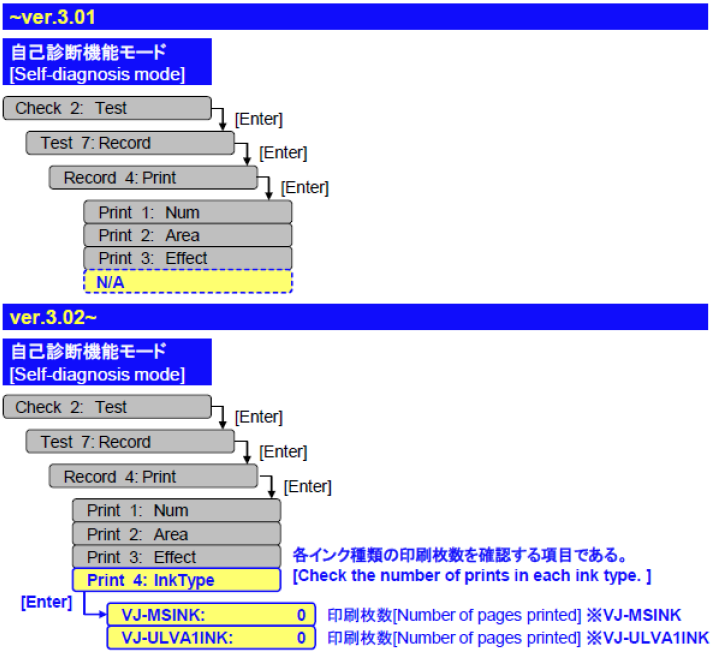
Release date: 7 july 2016
3.01
Changed Items
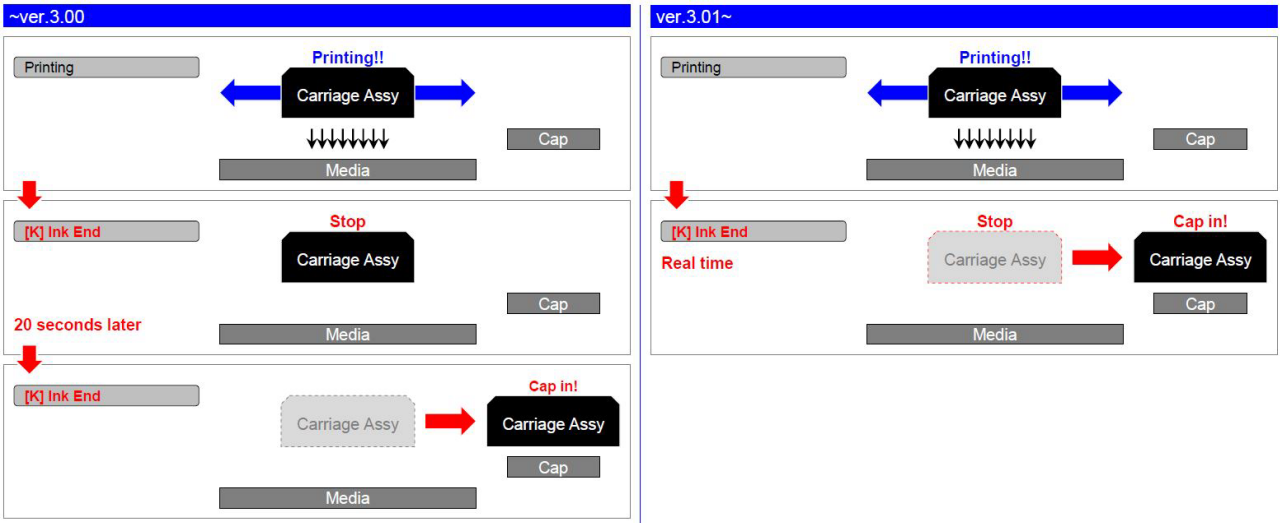
- When "ink end" occurs, the carriage caps immediately (there was a 20 seconds waiting time)
Diagnostics mode
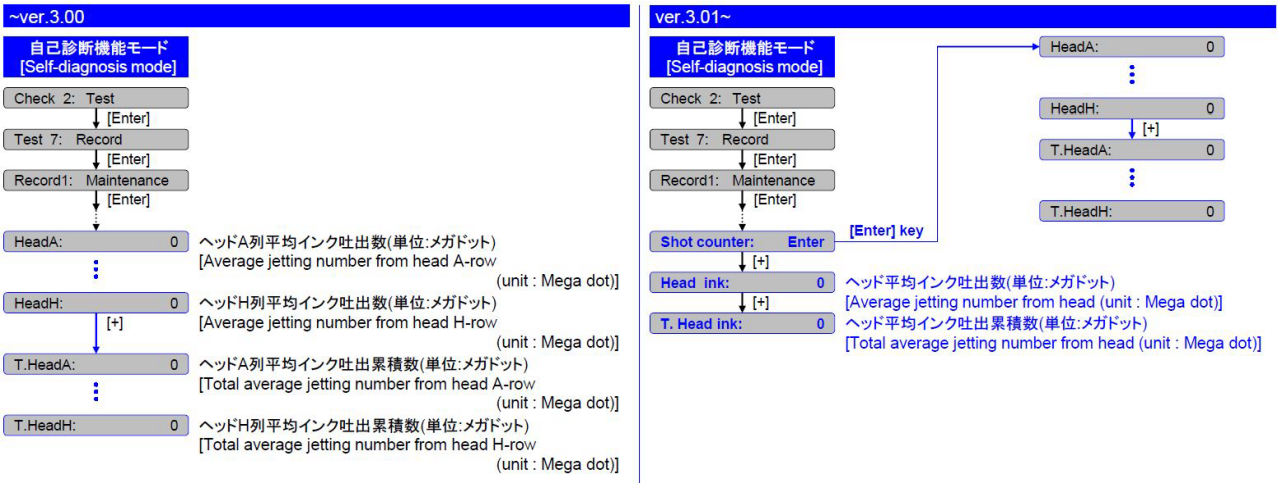
- Maintenance menu: added average jetting number of print head + total average jetting number
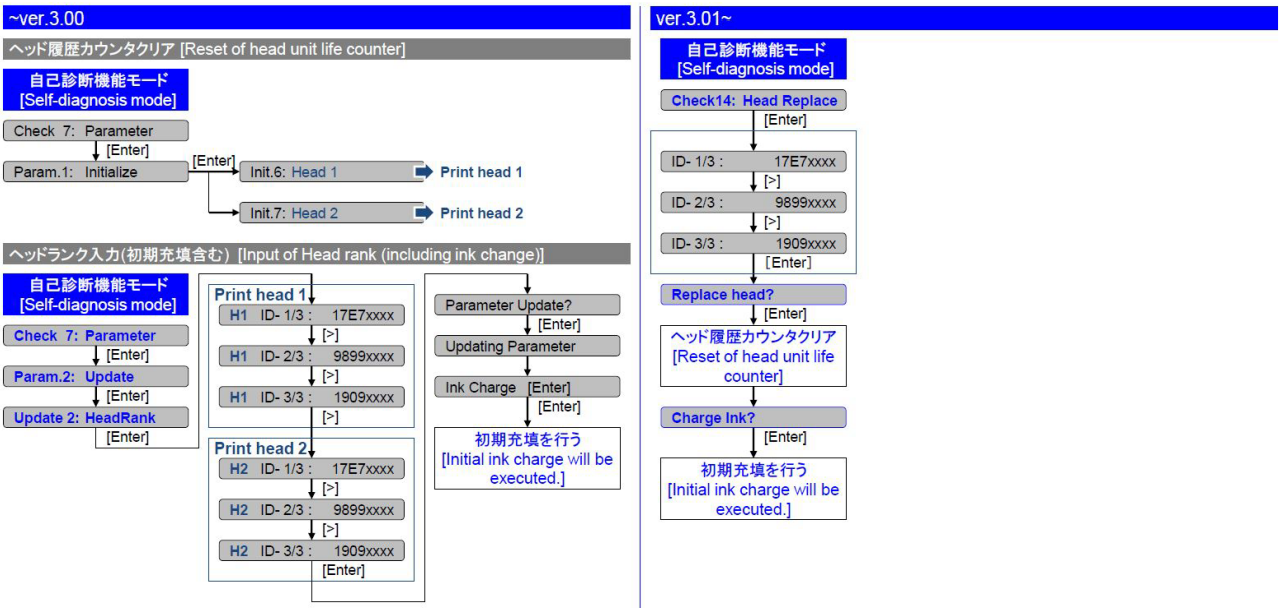
- Parameter/update/head replace menu: head unit life counter automatically reset after entering head rank
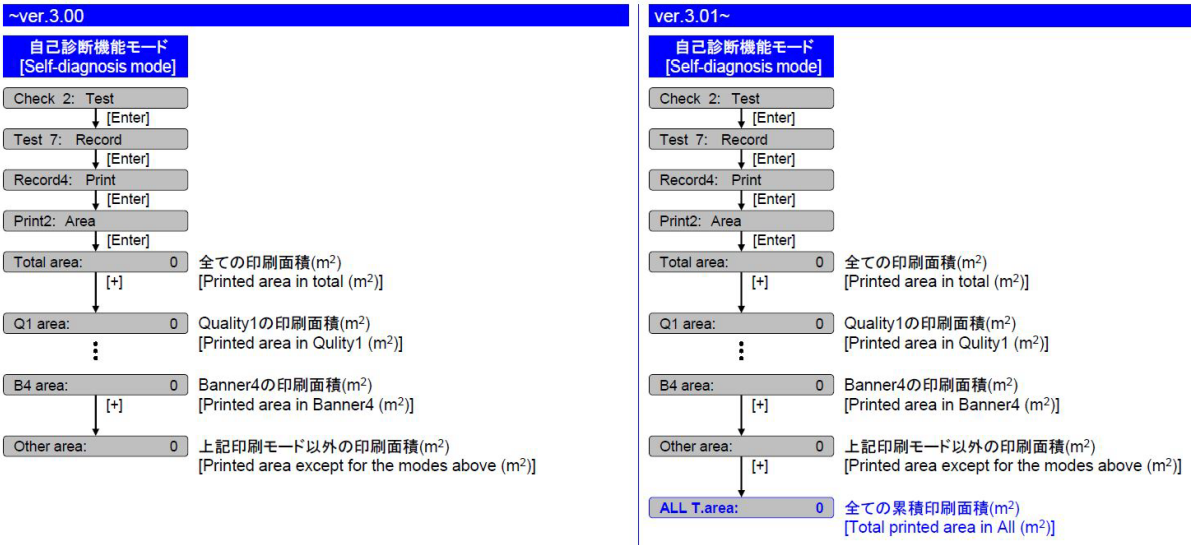
- Total printed area for all print modes added
Release date: 11 january 2016
3.00
New items
- New resolution added: 360x1080 dpi, 3 pass bidirectional 460 cps (*pq235)
Changed items
- User mode: modified the adjustment pattern of the “AdjustPrint” menu:
- Added the block pattern
- Rough pattern menu extended
- Add print information to adjustment pattern
- Added dot size menu used for uni/bi adjustment pattern
remark: choice of dot size setting influences uni/bi adjustment pattern - Menu PF adjust/micro print: modified adjustment pattern
- Added the “Start Feed” menu in user mode: when Start Feed is set, before printing, the printer rewinds or feeds the media the amount specified by the set value
- Added menu media thickness to the user type menu
- Added menu user copy to the user type menu
- Added the “Page Gap” menu to “Take-up” menu, in the Page Gap menu, you can change the margin setting between images
- page gap = normal --> gap is approx. 60 mm
- page gap = narrow --> gap is 10 mm
- Menu roll length: added info about remaining amount of roll media
Diagnostics mode
- Menu pattern/update: added type A / type B (= with block pattern)
Release date: 16 september 2014
2.08
New items
- Tube flush added during “CR” maintenance cycle
Tables can't be imported directly. Please insert an image of your table which can be found here.
This feature is specifically relevant for printers loaded with UMS ink, see also TIB 2014/576 for VJ-1638
Changed items
- During media initial: time-out period changed from 10 seconds to 30 seconds
- Changed maximum roll media length from 99m to 200m
Release date: 28 february 2014
2.07A
Changed items
- Added the accumulation life menu. (However it cannot be initialized.)
- Added the carriage speed selection menu in Self diagnosis mode.
* (Low: 240cps/320cps) (Normal: 320cps/460cps) - Added the warning message cartridge re-insert when displayed as “Broken Chip”.
- Improved Robustness of the Smart Chip Management
Some customers have reported miswriting problems of smart chips. Problems typically occurred in combination with a bulk ink system.
In this firmware all smart-chip “write” and “read” routines have been revised, and are made more robust.
We are confident that this firmware will help solving the reported miswriting issues.
Release date: 26 september 2013
2.06
Changed items
- Prevention of nozzle dropout, during cleaning cycle : slow down wiping speed
Tables can't be imported directly. Please insert an image of your table which can be found here.
Release date: 7 may 2013
2.05
Changed items
- Improved media cut operation in case of “double cut - 3 steps” in combination with opening cover
Bug fixes
- A shrill sound might occur while cutting media, this is now fixed
- Modified the data communication control to a smart chip: when ink pump is operating, data writing to s/c could be corrupt
- Carriage solenoid can be turned on and off for a moment during initial printer operation after power on with open cover, this is now fixed remark: this does not happen if cover is closed
- Interval time in print count command (*PC) could exceptionally be set to more than 5 seconds, this is now fixed
- IP address menu: a cursor is misaligned for one character if UP/DOWN key is pressed for a long time, this is now fixed
- If “media end” happens while printing, a printer might not work properly even if a next media is set, this is now fixed
- Backward feeding should not occur if take-up unit is used, this is now fixed
Release date: 18 february 2013
2.04
New items
- New print mode (with new resolution) : *PQ185 720x540dpi
- Media cut modification : added menu for cut pressure (low/high); high is default value
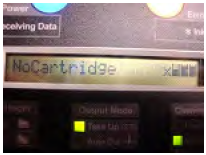
- New functionality : next to the standard ink status information in user menu, the remaining ink can also be graphically visualised during "normal" panel display (ready to print, warming up, printing)
Tables can't be imported directly. Please insert an image of your table which can be found here.
Tables can't be imported directly. Please insert an image of your table which can be found here.
Enabling remain ink indicator : menu 7 display / display 4 remain ink / remain ink : ON
The status of ink cartridge and ink is shown on panel display under following conditions :Tables can't be imported directly. Please insert an image of your table which can be found here.


 Printer statusPanel display 4 cart.Panel display 8 cart.




Release date: 19 november 2012
2.03
Changed items
Job status function added in user mode
1) Case 1: status printer idle ("ready to print")
- Press “menu” to enter the job status menu
- Job status: completed / cancelled = status of last sent job
- Press the “-” key to see additional info
- todolength: x.x meter
- done: x.x meter
- remain: x.x meter
2) Case 2: during printing, job status can be monitored
- Press “menu” to enter the job status menu
- Press the “-” key to see additional info
- todolength: x.x meter
- done: x.x meter
- remain: x.x meter
- remain time: x minutes
Release date: 2 july 2012
2.01
Changed items
- New revision of main board, part number mainboard will remain the same, will be used from Q4 2012 because of flash memory component end-of-life, more info to follow.
- Modified the network time out interval
If data traffic on the network is intermittent or broken, 300 seconds (used to be 60 seconds) is allowed by the printer to recover. The value is fixed internally, it cannot be modified.
If recovery is not possible, the print job is interrupted. - Added header dump menu in user mode
Release date: 13 april 2012
2.00
New features
- Adding "Ink Type" menu
“Ink Type" menu is added in self-diagnosis mode.
Changed features
Changed Error Messages
Tables can't be imported directly. Please insert an image of your table which can be found here.
Old messageNew messageBug fixes
- After activation, some menu settings on panel cannot be changed (“Side margin”, “Method of cut”), this is now fixed.
- Printout of setup list (in menu “test print”) is disturbed if “Wait time” in “set: auto cleaning” is set to a 4 digit number (example 1440 min), this is now fixed.
- Fix functionality of ink drying time. The ink drying time which was set on the panel is not available if print mode is changed.
- Fix Failure of counter in cutter aging test (Self-Diagnosis Mode).
Release date: 3 january 2012
1.08
Bug fixes
- Head cable error
If the print head temperature drops below 14°C, a Head cable error occurred. To avoid this problem, please upgrade to the latest firmware version.
Release date: 15 november 2011
1.06
Changed features
- Head thermistor value smoothing
Currently the head thermistor signal is easily influenced by noise. Now the head thermistor value is smoothed, less influence from the noise - VSD1 wave form changed in order to improve VSD1 alignment.
- Diagnostic mode Bi-D default changed
Bug fixes
- Wrong calculation of the ink volume from dot count => fixed
- When no media is loaded and perform “PF motor aging”, it reaches PF motor life time much faster => fixed
- After setting the origin and lift up and down the lever, the margin information for measuring is not updated => fixed
Attachments (1)
VJ1324_V309.jfl
1.79 MB
Was this article helpful?
That’s Great!
Thank you for your feedback
Sorry! We couldn't be helpful
Thank you for your feedback
Let us know how can we improve this article!
Feedback sent
We appreciate your effort and will try to fix the article
X