Necessary tools
In order to be able to install firmware, the following tools are required:
- Personal computer with MS Windows
- Network cable to connect the Valuejet wit the pc
- The latest MSA-tool (Mutoh Service Assistance) or MSM-tool (Mutoh Status Monitor)
Detailed instructions how to install the firmware, are described in the maintenance manual.
The latest current firmware can be downloaded below this article.
Release date: 17 may 2021
Current version - 1.11
User Mode - Changed items
- Implementation of a new feature to handle smart-chip related issues with the new S/C Recovery procedure.
For more information check the following article: TIB818 - Smart Chip Recovery
The "Ink End" detection, software-handling and ink-consumption have been improved
- When the network transfer was interrupted due to cable issues or bad contacts, the printer needed to be restarted in order to resolve the connectivity issue. When disconnections now occur, the printer will automatically retry to recover the connection within a time-span of 5 minutes before a timeout occurs
- The header dump was not printed when multiple online data were continuously transmitted with the "header dump" setting enabled
- The life expectancy of the circulation pump has been changed from 300 hours to 11.1 hours
Bugfix
"Checking the ink expiration date" message can now be cancelled by pressing the ENTER key
Version history
Release date: 20 September 2018
1.09F
User Mode - Changed items
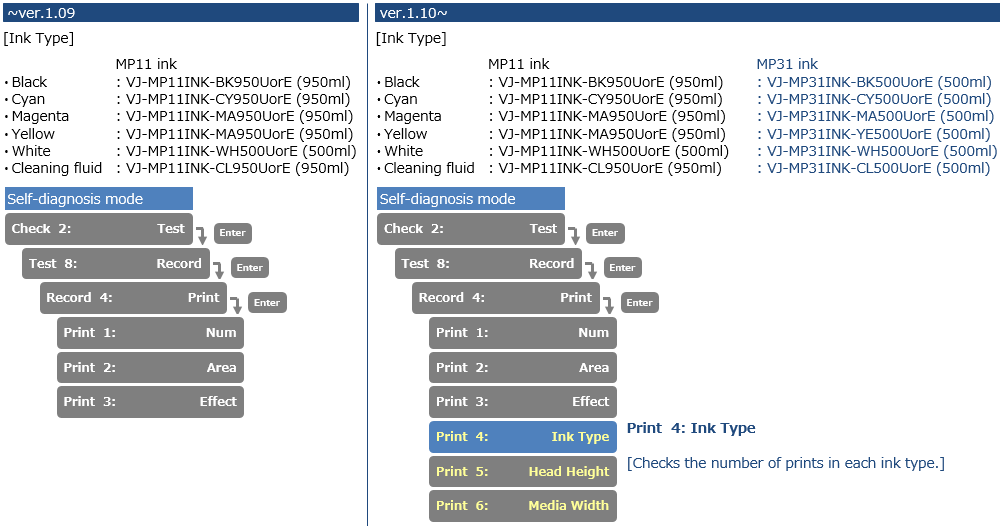
- Added native support for reading MP31 ink chips
- Changed the Head Maintenance Menu (in combination with using MP31 inks).
The Daily Maintenance menu has been added.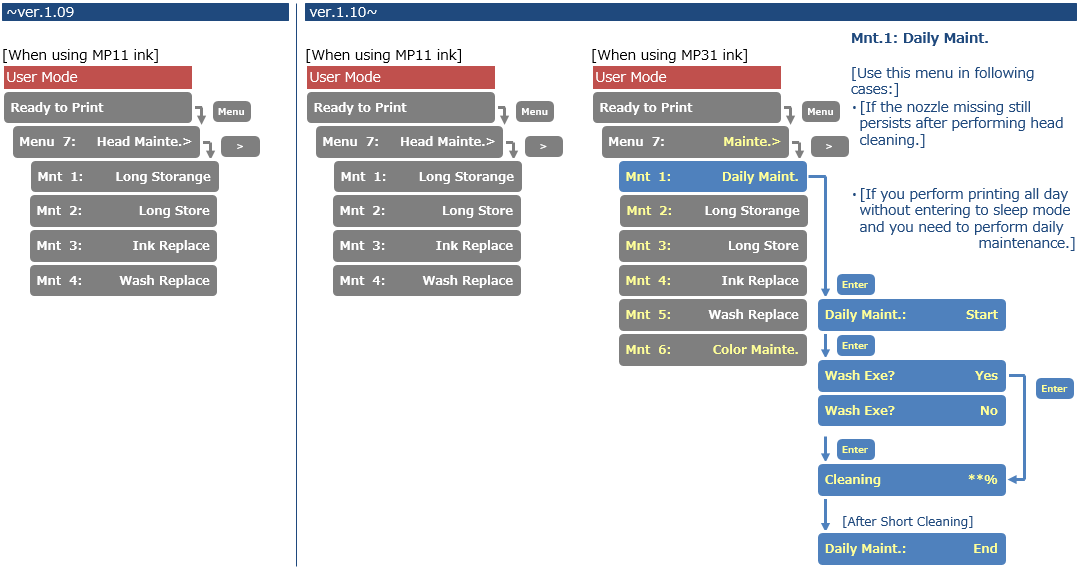
- Changed the printer behavior during the CR maintenance (Only when using MP31 inks)
The carriage moves to the middle of the printer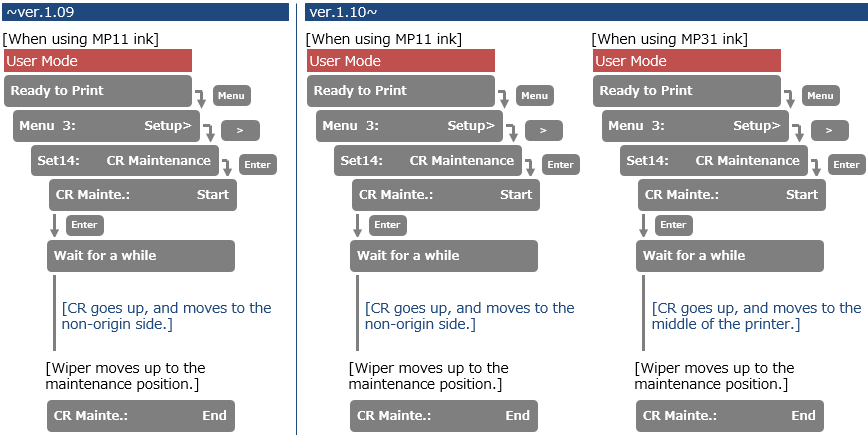
- Added Sleep Mode menu in User mode. Sleep mode is only active when using MP31 ink.
The cleaning timer is set to Off and the cleaning type cannot be set.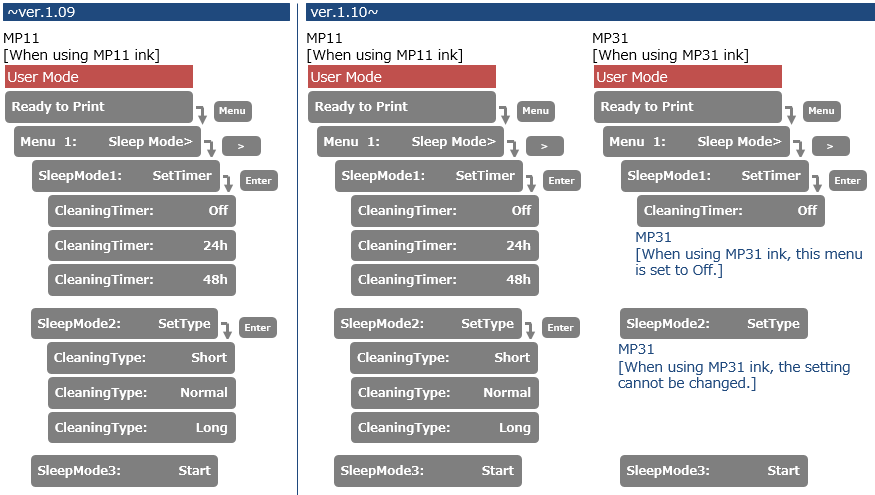
- Changed the frequency of lifetime alert message (User Mode)
If 7 days have passed after pressing the cancel key, the lifetime will reappear when you print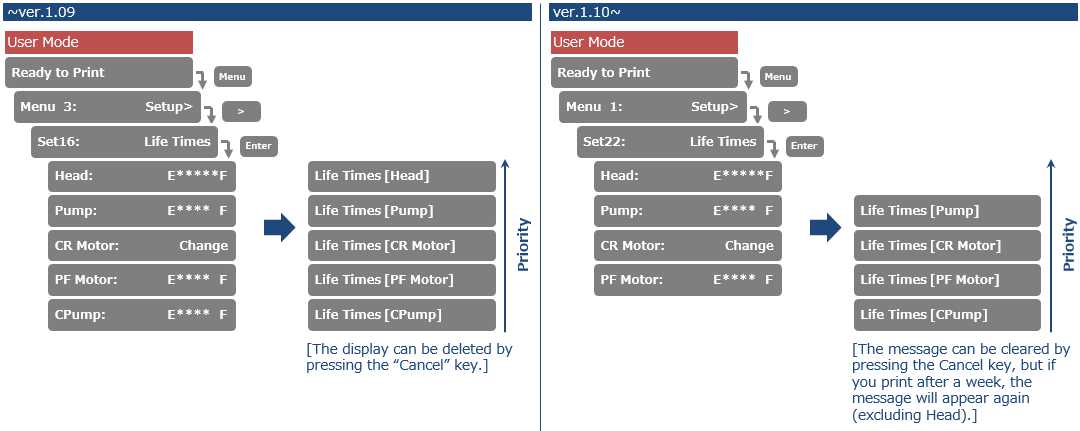
- Added user-notification to check the expiration date (in User mode: only functional when using MP31 inks)
This message "ink not expired" will automatically appear every 3 months, requesting the user to verify the expiry dates of the cartridges / bags.
- Added a message to prompt a user to perform daily maintenance (User mode: only when using MP31 ink)
This message will appear 24 hours after powering-on the printer.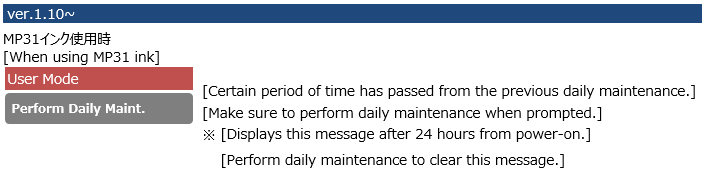
- Added the message to prompt a user to perform a nozzle check. (User mode: only when using MP31 ink)
This message appears if the printer has been in sleep mode for a week.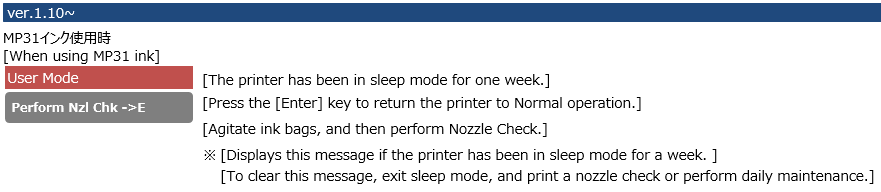
- Changed conditions to enter sleep mode. Even if the lever is up, the printer can now go into sleep mode
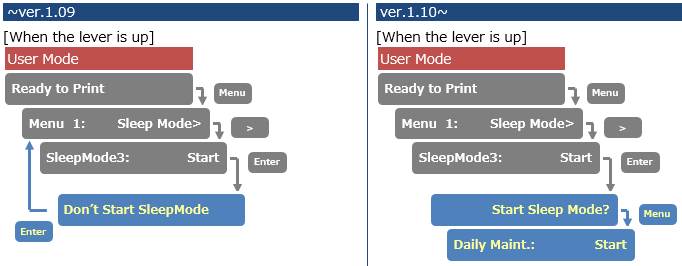
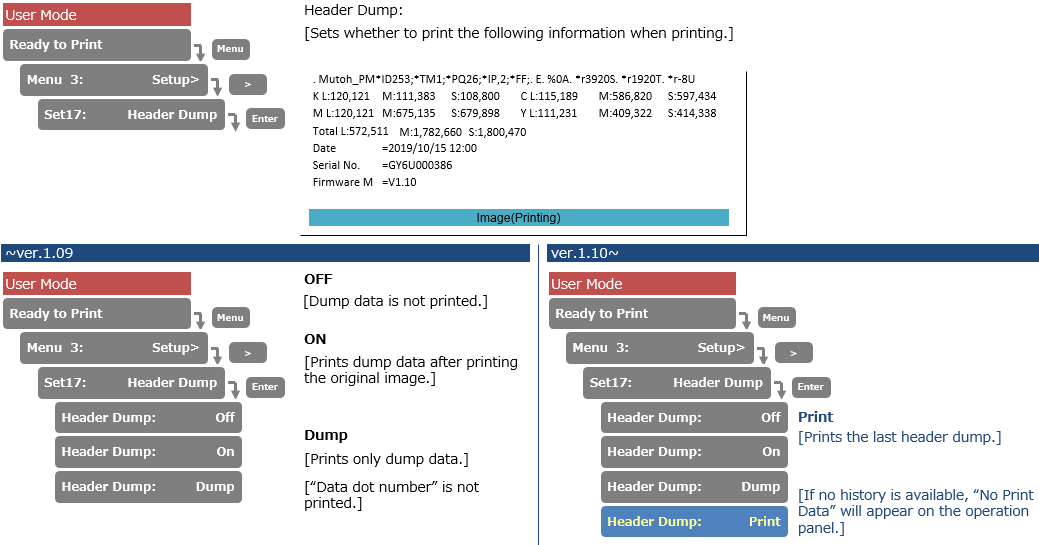
- Added "PRINT" menu in Header dump menu (User mode). The "PRINT" menu prints the last header dump
- Changed autocleaning menu during stand-by (User mode: Only when using MP31 ink)
Setting to disable the autocleaning = OFF as been added.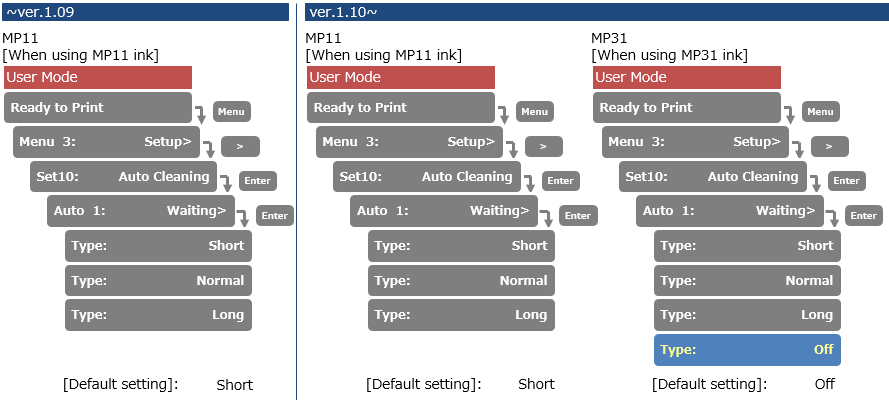
- Added an extra "Nozzle check B" (User Mode)
A white background has been added under the printer information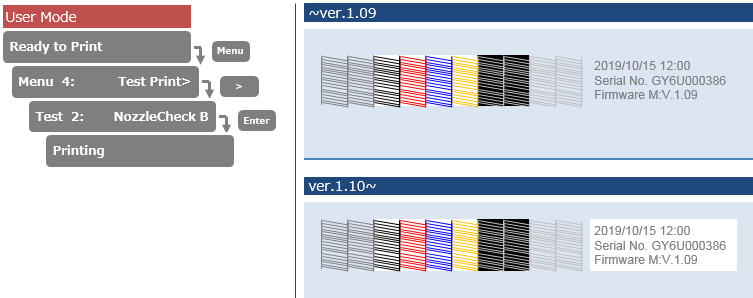
- The Color Maintenance has been added (User mode, only when using MP31 inks)
The printer performs the color ink maintenance when waking up from sleep mode during 24 hours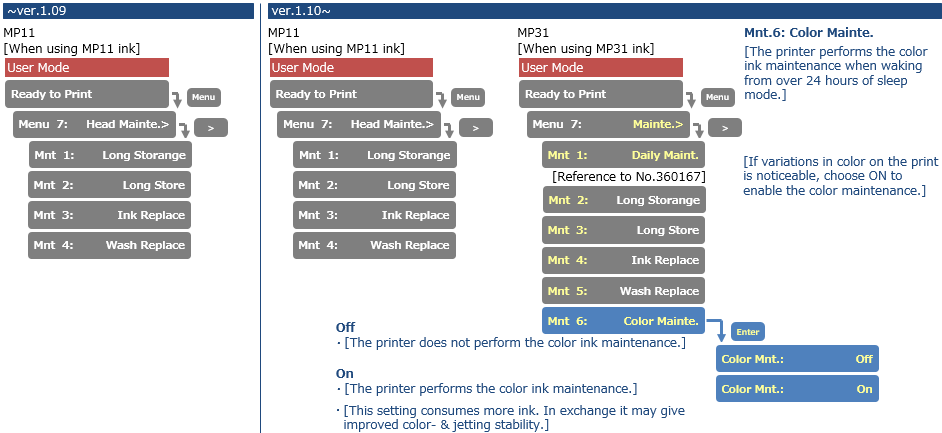
Diagnostics mode
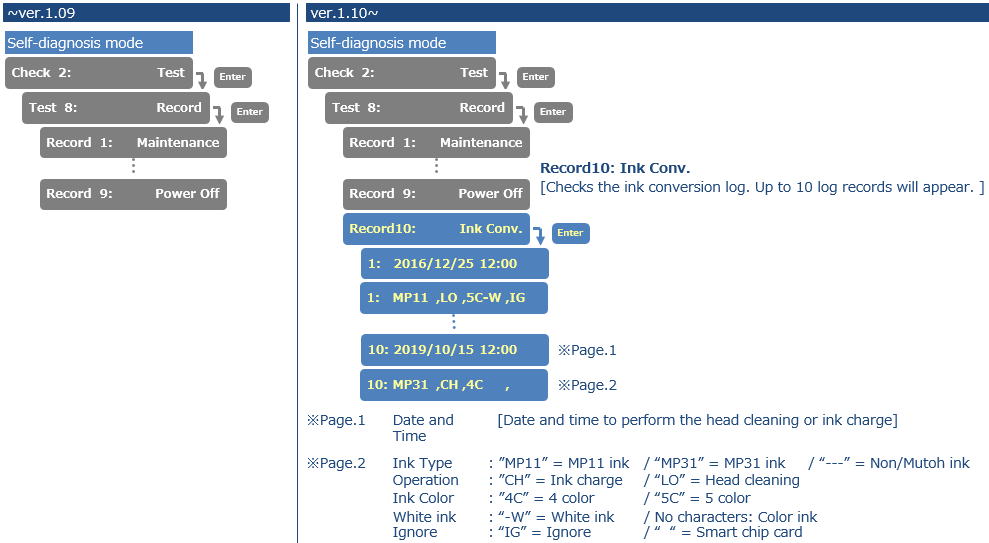
Added an ink-conversion log menu in diagnostics. The ink conversion log records when ink conversions have occurred
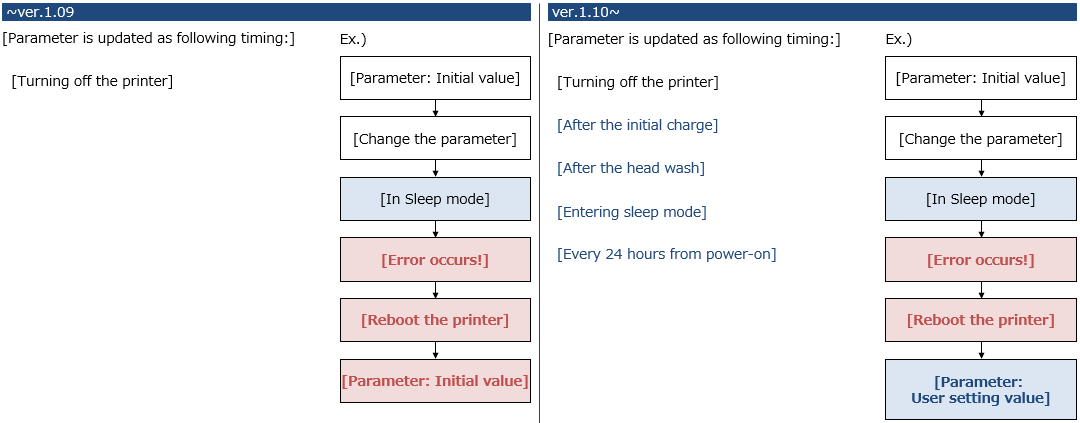
- Parameter changes are now stored immediately after a change (where parameters were changed or an ink-charge was done a power failure occurred while the printer was put in sleep mode without any power-cycling, these changes were not properly stored into the internal parameters). This has now been fixed.
- Added a menu item in Test > Record > Print menu (Diagnostic menu)
Head Height & Media Width are added to the menu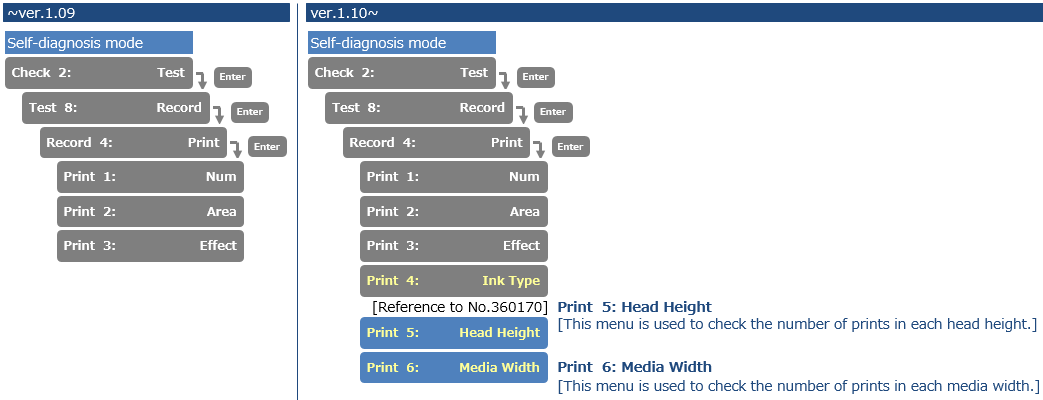
- Added an extra menu to set the UNI-D/Bi-D adjustment pattern (Diagnostics)
"Type A" = Line pattern, "Type B" = Block pattern + line pattern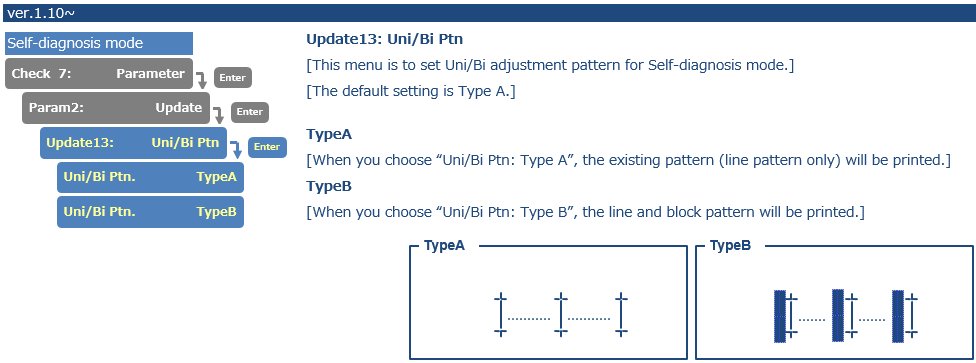
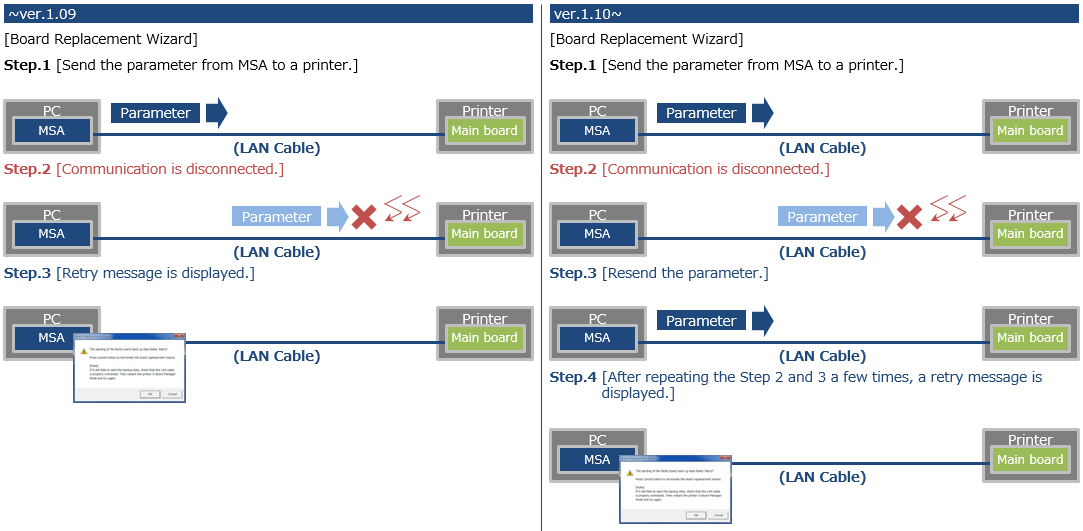
Corrected a bug that the parameters in the MSA cannot be sent to the printer. If the communication between MSA and mainboard is interrupted, the MSA will automatically retry to reconnect to send the parameters.
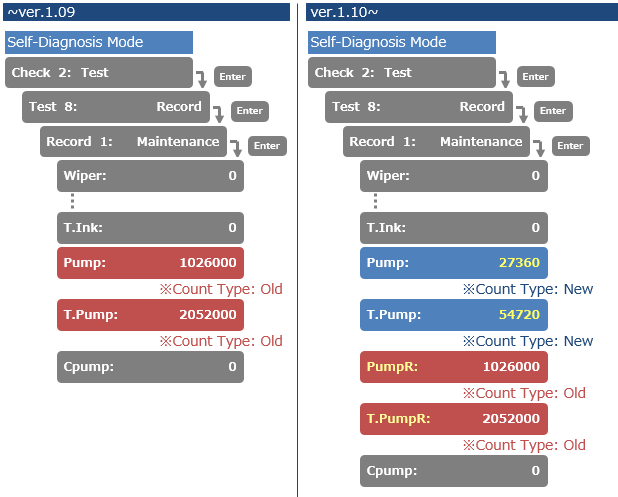
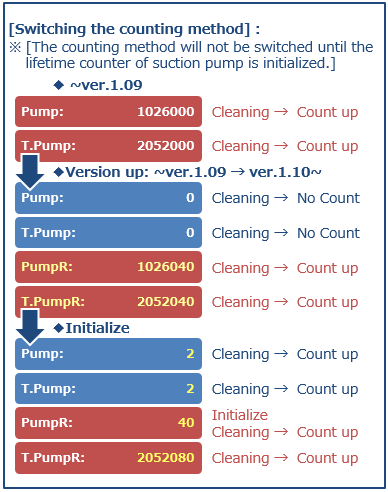
Changed the lifetime counting method for the suction pump. The lifetime of the suction pump has changed in units from 285 hours, to 28800 counts
Release date: 23 january 2020
1.09F
This firmware version allows the usage of MP31 chips. If a previous firmware version is utilized, the VJ-1617H printer will not accept MP31 chips.
Release date: 1 september 2017
New items
- Added the alert buzzer menu
If alert buzzer is set to “off”, the beep sound will turn off automatically after several beeps - Print additional information next to nozzle check pattern printer info: print time, serial number, firmware version


Diagnostics mode
- Added shot counter menu in maintenance menu record
Shot counter menu shows: fire A -> H and T.Fire A -> H (T = accumulated total) Added the head replacement menu: the head lifetime counter will be automatically reset after updating the head rank
Added the accumulated total printed area into history menu


Release date: 5 june 2014
1.07
Bug fixes
- When “ink end” occurred during power-on cleaning, the operation stopped without showing “ink end” on panel, this is now fixed
- If a user type is initialized, the height of carriage becomes an initial value of 1.3mm, when a print is started this could result in a media collision. this is now fixed: media height (re-)adjustment is performed automatically after user type initialization
Release date: 17 april 2014
1.06
Changed items
- Initialization of user type can be done individually ("per type")
- Sleep mode : type of cleaning cycle (short/normal/long) can be selected
- Time-out time before start of media detection changed from 10 secs to 30 secs
Release date: 10 july 2013
1.05
Changed items
- Added the version check menu of the blower heater to the diagnostic menu ► Check2:test“► “Test2:Version” ► “Ver:Heater Firm 1.05"
- Modified the operation of the origin point setup: when the panel key is pressed for a long time, the carriage moves smoothly.
- Modified the Uni/Bi menu in diagnostics
240cps-VSD2/240cps-VSD3/320cps-VSD2/320cps-VSD3 - After cancelling a printjob, the header dump info corresponds with the printed part with earlier FW, the dot count was zero with cancelled jobs.
- Bi-D adjustment pattern: reference nozzle row should be “E”
- Changed bottom margin.
- Improved LED control on the panel.
- Servo parameter changed to avoid CR2 over-current.
- Diagnostic menu: next to the existing life count values, accumulated values are added.
- Improved head exchange procedure, ink discharge menu added.
- New waveform vsd4 added.
- Improved take-up setting and no back-feeding possibility.
- Improved media initial operation (top&width if “rigid” is selected).
- Improved rear/edge calibration in Diagnostics


Bug fixes
- Diagnostic menu: if “ink end” became active during cleaning, wrong color info was displayed, this is now solved.
- With cover open the power supply did not shut off, this is now solved.
- Diagnostic menu: if “ink error” occurs during cleaning, no message was displayed, this is now
solved. - The choice of ink set-up during initial ink fill was not saved, this is now solved.

Versions 1.02, 1.03 and 1.04 were never released
Was this article helpful?
That’s Great!
Thank you for your feedback
Sorry! We couldn't be helpful
Thank you for your feedback
Feedback sent
We appreciate your effort and will try to fix the article