The latest Mutoh Service Assistant versions (as of version 5) support the older Mutoh models as well as the latest generation XpertJet printers. The old Mutoh Service Assistant (up to version 4) is obsolete and not longer supported.
Necessary tools:
In order to be able to use the MSA tool, the following are required:
- Personal computer with MS Windows
- Make sure any firewall is disabled, or the file MSA tool/application is added to the firewall exceptions
- This document describes all the new features and how to install latest version.
Detailed instructions how to install, configure and use the software are described in the maintenance manual which can be downloaded in the link on the bottom of this article.
The latest MSA software can be downloaded form the following URL: https://mutoh-club.com/mutoh/user/
IMPORTANT NOTE 1: Access to MSA Tool & Latest DownloadsTo access the latest version of the MSA tool and other downloads, please ensure you meet the following requirements: 1. Personal User Account RequiredYou must have an active personal user account on the "MUTOH Club for Dealers" platform.
2. Activation via Email InvitationOnce your account is created, you will receive a personal email invitation. 3. No Access Without CredentialsIf you are unable to log in using your personal credentials, you will not be able to download or use MSA version 5.
|
The MSA tool can no longer be downloaded from the link below this KB-article. All new MSA versions can only be downloaded from the "MUTOH Club for Dealers" from the following URL: https://club.mutoh.co.jp/mutoh/user
IMPORTANT NOTE 2: Access Credentials for MSA Version 5 and Higher1. Old Login Credentials Are No Longer ValidThe login and password previously used for MSA version 4 are no longer supported.
2. Use Your Personal MUTOH Club LoginTo access MSA version 5 and above, you must log in using your personal "MUTOH Club for Dealers" account credentials. 3. First-Time Login Requires Internet ConnectionWhen launching MSA 5 (or higher) for the first time, ensure that:
|
Another important change in this version, is that the "hidden" technician section is now always visible as soon as the MSA software is connected to a printer and the technician is logged-in into the application. All other functionalities like board replacement-wizard, parameter backup, printer monitoring and diagnostics, etc. are now also easily accessible.
MSA Manual:
The complete MSA 5.0.x technical documentation with al the functions, how to use and changes can now be downloaded from this link: MSA documentation.
Release date: 17 October 2025
6.0.6
New:
- XPJ-1641SR-P2 is supported.
- Support for I3200-U1 when registering head rank.
- New ink type related information (US81).
- The "Setup Info. Browse" tab displays the lifespan of each circulation pump individually.
Target Models: VJ1628MH / 628MP / 628D2 / 1638UH(2) / 1638UR(2) / XPJ1462UF / 1682UR / 1682D / XPD-924D. - Ink expiration date log to Log Analysis.
Supported Models : XPJ-461UF, XPJ-661UF, XPJ-1462UF, XPJ-1682UR, HA-1642 - Compatible with XPJ-1462UF firmware 1.10:
- Add the following to Adjust Param. Browse: Adjust Param -> Adjust CR.
- Add the following to Setup Info. Browse:
Setup Info. Browse -> Setup Info. -> Printer Status -> Ink Smart Chip
Setup Info. Browse -> Setup Info. -> Maintenance -> Soak Cleaning
Setup Info. Browse -> Setup Info. -> Ink Agitation -> Perform / Next Time
- Compatible with HA-1642 firmware 1.02:
- Add the following to Setup Info. Browse
Setup Info. Browse -> Setup Info. -> Setup -> Output Mode (Added : Pull Back)
Setup Info. Browse -> Setup Info. -> Life Times -> Take up
- Add the following to Setup Info. Browse
- Compatible with VJ-1638UHx(1.16)/URx(1.09) series:
- Add the following to Setup Info. Browse
Setup Info. Browse -> Setup Info. -> Setup -> Nozzle Select(Only when using 4-color)
Setup Info. Browse -> Setup Info. -> Setup -> Color Maint.(Only when using US11/UA31)
Setup Info. Browse -> Setup Info. -> Setup -> Extra Curing
- Add the following to Setup Info. Browse
- Compatible with XPJ-1641SR-P firmware 1.05 and XPJ-1341SR-P firmware 1.06:
- Add the following parameter to Setup Info. Browse
Setup Info. Browse -> Setup -> Auto Cleaning (Added : Spitting)
- Add the following parameter to Setup Info. Browse
- Compatible with VJ-628MP firmware 1.16:
- Add the following to Setup Info. Browse
Setup Info. Browse -> Setp Info. -> Setup -> AllowPrn LowT
Setup Info. Browse -> Setp Info. -> Ink agitation -> AllowPrint
- Add the following to Setup Info. Browse
Fixes:
- Log information cannot be output to a file using the log analysis function.
- Although the Daily Maintenance Status log in the Printer Use Status log should have been performed multiple times on the same day, the execution times were not arranged in chronological order, and as a result, it was displayed as the log for the previous year.
- The threshold value for the circulation pump life in the setup information reference function of XPD-724 was incorrect.
Release date: 15 April 2025
6.0.5
New:
- "Long Storage (User Mode)" is displayed in the Ink conversion of the Log Analysis.
VJ-1628MH: Ver1.10~
- The display of items in Self-diagnosis - Parameter - Update - Head voltage has been corrected to match the HA-1642 FW correction. HA-1642:Ver1.01~
- The measurement temperature range has been expanded when logging UV LED temperature for the XPJ-1682UR.
XPJ-1682UR: Ver1.03~ - "Waste Ink Tank Full" has been added to the log list in Log Analysis.
XPJ-1682UR:Ver1.02~ - "Type C" has been added to Ink Circulation in Self-Diagnosis - Parameter - Update.
XPJ-1462UF: Ver1.08~
XPJ-1682UR: Ver1.01~ - The new effect has been added to the XPJ-C641SR-P firmware, so it can be displayed as a user-type effect in the setup info.
XPJ-C641SR-P:Ver1.00~ - The new effect has been added to the XPD-924D firmware, so it can be displayed as a user-type effect in the setup info.
XPD-924D:Ver1.01~ - The XPJ-1682UR can print even when a agitating message is displayed by changing the panel settings. In Log Analysis, you can see the log of the number of pages printed when agitating is requested.
XPJ-1682UR: Ver1.03~ - "Log Analysis" supports the "Board Replacement Wizard" log. You can check the board replacement date, the firmware versions before and after the replacement, etc.
Changes:
- The menu display has been changed accordingly with the firmware updates of the XPJ-1682UR.
* Ver1.01:Removed Sleep Mode > Auto Cleaning./Removed Setup > Advanced Setting > Auto Cleaning > Standby Mode.
* Ver1.02: Added Ink agitation > Perform./Added nk agitation > Next time
*Ver1.03: Added Ink agitation > Print Stop - "Low1" display for the Head Height parameter in the HA-1642 setup information has been changed to "Low". HA-1642: Ver1.01~
- When opening a file in Log Analysis, unnecessary messages were displayed in the message box notifying of abnormalities in the analysis results. The only messages that should be displayed are "Missing Data", "Data Error", and "Data Init."
Fixes:
- When viewing the parameters of the VJ-628MP main F/W v1.04 or later with the MSA language set to English, the [1]-[1]-[5]-[5] menu in "Setup Info" is displayed in Japanese. This has been fixed to "Media End".
- When opening data with an invalid occurrence date in Error Log Browse, an error message box on the OS stating "The value could not be converted to a date" appears and processing is interrupted. MSA cannot be operated even if the message box is closed.
- In Log Analysis, if a file with missing data, invalid data, or no history is referenced in the Waste Ink Tank Full data, the file will be erroneously displayed as the analysis result of the soaking cleaning log in the message box notifying the analysis result.
- When displaying the Printer Use Status log in Log Analysis, if the daily maintenance execution log has no history and the print count log has history, the number of daily maintenance statuses displayed above the list is incorrect.
- On the VJ-1938TX, when a subtank error occurs, the name of the color slot was displayed, but now it is displayed using the slot number.
Release date: 17 October 2024
6.0.4
New:
- XPJ-C641SR-P is supported.
- The soak cleaning log is displayed in the "Backup Parameters - Log Analysis" tab.
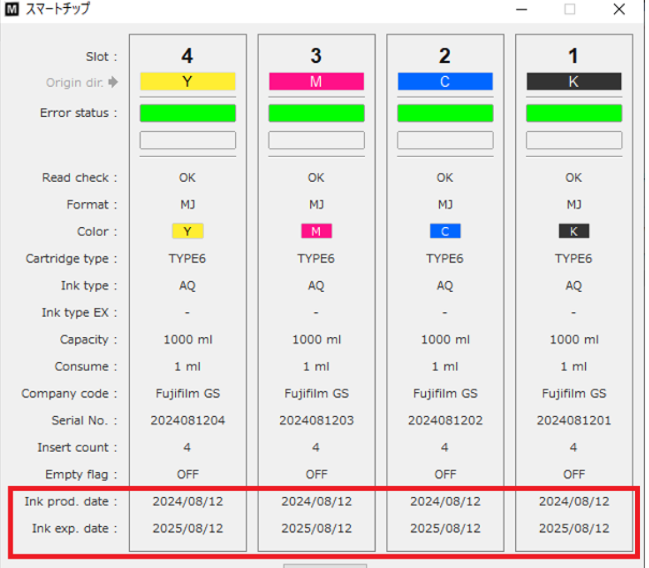
It will be displayed depending on the printer model and firmware that supports soak cleaning. - Smart chip information monitoring now additionally displays ink production date and ink expiration date.
This is limited to models that support ink S/C cards, which have the ink production date and ink expiration date registered: This is currently being implemented on XPJ-1682UR + US61 inks and HA-1642 with Aquafuze inks- XPJ-1682UR + US61 inks will not be inhibited to print even after the shelf life has expired. It is a warning.
- HA-1642 + Aquafuze inks can continue to be used up to 2 months after the expiry date. After this period the printer will not continue with these inks.
Screen shot of the SC information screen:
Release date: 14 August 2024
6.0.3
New:
- HA-1642 is supported.
- XPJ-1682UR is supported.
- XPJ-662D is supported.
- Support for I3200-A1 when registering head rank.
- Support for a new ink type (AQUAFUZE).
- Ink set: Type:B 7 colors 2 (K/C/Lk/Lm/Lc/CL/Y/M) for VJ-628MP.
VJ-628MP supports this ink configration from Ver1.14
Bugfix:
- Incorrect display of ink switching log under certain conditions.
- When with 10 counts or more ink conversions.
- When InkConf. Type is set to TypeB on the VJ-628MP. - The slot color may not be displayed on the Smart Chip Information Monitoring and Ink System Monitoring screens of the Printer Monitoring function.
Release date: 26 October 2023
6.0.2
New
- The "Board Replacement Wizard" can now overwrite the firmware of other models that use the same main board.
Previously, when a firmware was installed, it was not possible to install firmware for a different model that uses the same main board. It is now possible to overwrite firmware for a different model that uses the same board without resetting the board. However, this only applies to main boards that have been removed using the "Board Replacement Wizard". FW cannot be overwritten for main boards that have a registered serial number. - The function to take execution logs of "Board Replacement Wizard".
Note: The following models are not supported:
1324/1604X/1604WX/1624/1624W/1924W/1608H/1608HS/1628TD/2628TD - XPJ-1462UF Error Support
E215 : UV SafeCtrl1
E216 : UV SafeCtrl2
E217 : UV SafeCtrl3
E218 : UV SafeCtrl4
E219 : UV SafeCtrl5 - Support for upgrading the XPJ-1462UF main unit firmware.
(v1.04)
- Printer status/Life Times/Dust cover1-4
(V1.05)
- Settings/User Type/Media settings/Height/Confirm Height
- Maintenance/Ionizer (Only displays item names) - Starting with version 1.05 of the XPJ-1462UF, it is now possible to view a log of when the waste liquid tank is full.
- Sorting function for "Error Log List"
Changes
- Revised English notation in "Log Analysis"
"X day's worth" => "for X days"
"Mente." => "Maint."
"Print Number" => "Number of prints"
"Ink Kind" => "Ink Type" - The number of items displayed in the "Log analysis" tab has increased, making it difficult to see.
Items displayed can now be selected using a combo box.
Bugfix
- When referencing an RDI file obtained from VJ-x628TD, an external exception error message appears and the MSA becomes inoperable.
Release date: 26 October 2023
6.0.1
New
- I-9472 Headrank support for VJ-628MP/VJ-1617H/VJ-1627MH
- The following has been added to the XPJ-1462UF setup information.
・Low speed print settings is displayed.
・Wiping count and cleaning count are displayed for 2 heads. - A maintenance panel function has been added to the VJ-628 series so that it can be used in printer mode.
Bugfix
- In the Printer Monitoring->Smart Chip Info monitoring dialog, the error status background is not displayed in yellow when a recoverable error occurs. It is now fixed.
- The following error details are now displayed on the XPJ-1462UF.
- ID220 Ext NG Inq.
- ID221 Ext IO Fault.
- On VJ-1626UH/1617H/1627MH, the Ink Color/Type displayed on the Information tab was incorrect.
It is now fixed.
Release date: 28 August 2023
6.0.0
New
- XPJ-1462UF support
- Support for the controller FW (*.mlc) on XPJ-1462UF
- The Head replacement tab is added in the Log Analysis
- Extra information is being displayed in the main menu:
- Ink type / Colour
- Total printed area
- Printer model
- Added OGB 7 colour and OGB 8 colour setting support for VJ-628MP and VJ-1628MH
- Added 8 colour setting support for MS41 on XPJ-1682SR-P
- Head rank specification for the Acufine 1600 head (see TIB 855)
- US61 ink support for XPJ-1462UF
Changes:
- Revised user Interface
- The format of the date display has been unified, so that it is displayed in the format according to the region setting of the operating system on the PC
Bugfix
- When TYPE B is selected for the pump count on a XPJ-1641SR or XPJ-1682SR, the pump life count may not be displayed correctly in the menu "Setup Info Browse."
It is now Fixed to be displayed correctly - The date in the log analysis on the SC Recv status was sometimes displayed incorrectly as 01-01-2020
Release date: 16 January 2023
5.1.2
New
- OEM model support
- The head rank can be entered via the MSA for XPJ series printers.
Changes:
- Revised terminology in the "ink conversion" log: "head cleaning" has been reformulated to "long store"
- The C++ Runtime Library 2010 (x86) included in the installer has been changed to Runtime Library 2015-2022 (x86).
If the C++ Runtime Library 2015-2022 (x86) is not installed on the PC, you will be prompted to install it after starting the MSA installer.
Release date: 03 October 2022
5.1.1
New
- An 8-digit delimiter key input user interface has been added to "Head Rank Entry".
- The head rank can be entered from MSA for VJ and RJ series printers.
- Support for display of added ink types: MS51
- New system error "E158 CR lock heavy failure" added.
- The following items are now displayed in the Information area of the various function tab pages in the main window.
MSA Action Tag
FPGA/DIGA Ver.
Application Ver. - URL of MUTOH Club has been changed by cloud computing. The URL to access the site has been changed from "club.mutoh.co.jp" to "mutoh-club.com".
Bugfix
- If there is more than the specified time difference between the system time of the local PC and the system time of the MUTOH Club at the time of MSA user registration, registration will not be possible.
In the past, the error message "No account" was displayed. From now on, the message "Check your PC System time" will be displayed. There was an error in the initialization of wipe counts during head rank entry. It is now fixed.
- Automatically backed up RDI files were not uploaded to MUTOH Club.
It is now fixed.
Release date: 15 April 2022
5.1.0
New
- The head rank can be entered via the MSA for XPJ series printers.
- "Delete" and "Back space" keys have been enabled to use on the "Edit the name of the user type" dialog.
Bugfix
- When the firmware is upgraded, the printer information (rdi) is automatically saved.
It should be the new version's information, but it was the old one by mistake: this is now fixed. - Printer information (rdi) that was automatically backed up before the printer model was selected is missing the serial number from the filename when it is saved: this is now fixed.
- The RDI file could not be downloaded from the printer using the board replacement wizard after replacing the main board: this is now fixed.
5.0.9.0
Release date: 20 january 2021
New
- Menus to support XPJ-1641SR-P are added.
- The SC Recovery Status tab is now added to the log analysis of XPJ-461UF/661UF/VJ-628MP.
- The Ink Conversion tab is now added to the log analysis of XPJ-1642WR.
- "Select Nozzle" is now added to "AutoNozzleCheck - Setup Info Browse" for XPJ-1642WR.
- MSA Ver 5.0.9.0 supports the displaying of the Mutoh DS3 ink in the smart chip information monitoring.
5.0.8.0
Release date: 07 december 2021
New
- Newest models supported : XPJ-1341SR-P
- "Ink kind conversion" has been added to "Log analysis" for the following models:
- VJ-1638UH2 (FW version v1.15 or higher)
- VJ-1638UR (FW version v1.08 or higher)
- XPJ-461UF/XPJ-661UF (FW version v1.02 or higher)
- "SC Recov. Status" has been added to "Log analysis" for the following models:
- XPJ-1641SR/1682SR/1682WR/1642WR (FW version v2.02 or higher)
- XPJ-1642WR (FW version v1.05 or higher)
- In the "Adjust param Browse" sheet, the initial value of the head rank is displayed with "Default" at the end.
- Supported "Front Interlace" and "stand by heat" supported by VJ-628MP v1.07
- The data format was not checked by "Parameter Send (PRM)".
It has been corrected to check it and an error message appears when it is not right. - XPJ-1682SR supported 8 colors including MS41 Orange ink.
Bugfix
- When "001" was entered in the IP address, input was rejected. This issue is fixed.
- H-cont and Browner versions are missing when saving log analysis results in CSV format.
It has been corrected. - In "Setup Info." Of "Setup Info. Browse" of XPJ-1642WR, the life count (calculation) of the head was incorrect. It has been corrected.
- When the setup information was saved in txt format, the operating time was missing. It has been corrected.
5.0.7.0
Release date: 20 april 2021
New
- New models supported: XPJ-1642WR
- When a VerteLith license is registered on MSA, VerteLith can be operated in maintenance mode
- The S/C recovery functionality has been added (see article TIB818 - Smart Chip Recovery for more info)
- Support for new heater firmware (for XPJ-1641SR & XPJ-1682SR). File extension is "*.hfl". For more information please check the following article Heater Control Firmware for XPJ-1641SR and XPJ-1682SR
Changes
- The counting method of the circulation pump has been changed from VJ-1617H v1.11 and higher
The value shown by MSA is switched automatically depending of the firmware used on this model.
5.0.6.0
Release date: 23 march 2021
Bugfix
- When the password on the MUTOH Club is changed the password inside the MSA changes as well, when it has an internet connection. This can trigger the error "Account ID is not right" inside the MSA tool. This has been changed to "Password is not correct".
The print head life count gave incorrect information like "unknown" or "100%" if the printer parameters are downloaded before setting the model. This issue has been corrected.
The UI had a display positioning error on the log analysis function tab, when daily maintenance is performed more than once. This issue has been corrected.
The counting method of the circulation pump has been changed from VJ-1627MH v1.02 and VJ-628MP v1.03. MSA switches now correctly between the old and new counting method by checking which firmware version is used.
New
The latest released printer models are supported2 new functions have been added to XPJ-16xx series (starting form v2.00).
For more information, check the following newsletter
Nozzle Area Select
Media Tracker
5.0.5.0
Release date: 06 january 2021
Changes
- If the printer parameters are downloaded before setting the model in the MSA, incorrect print head numbers are displayed. This has been fixed
- The spelling of "NeaarEnd" has been corrected ("Near End")
- Adjust parameter is displayed with some extra info: ">>> Default" if the rank is the initial value
- "Front interlace" of the menu Setup is now listed with the lastest XPJ-1641 & XPJ-1682 firmwares
- Added support for VJ-1638UH2 and VJ-1638UR
5.0.4.0
Release date: 14 october 2020
Changes
- The UI didn't respond properly when selecting a model name. This has been fixed.
- The log history can now be displayed on MSA on XPJ-1641/1682. The latest firmware versions on these units are required in order for this function to work properly
- Bug for entering serial number has been fixed.
5.0.3.0
Release date: 07 may 2020
Changes
- [Added] - The Smart Chip recovery functionality has been added (Read TIB818 - Smart Chip Recovery carefully in order to obtain more information about the new functionality)
Some extra options have now also been included in the MSA tool (for service diagnostic purposes)- The "Recovery Log" can now be checked in the MSA tool
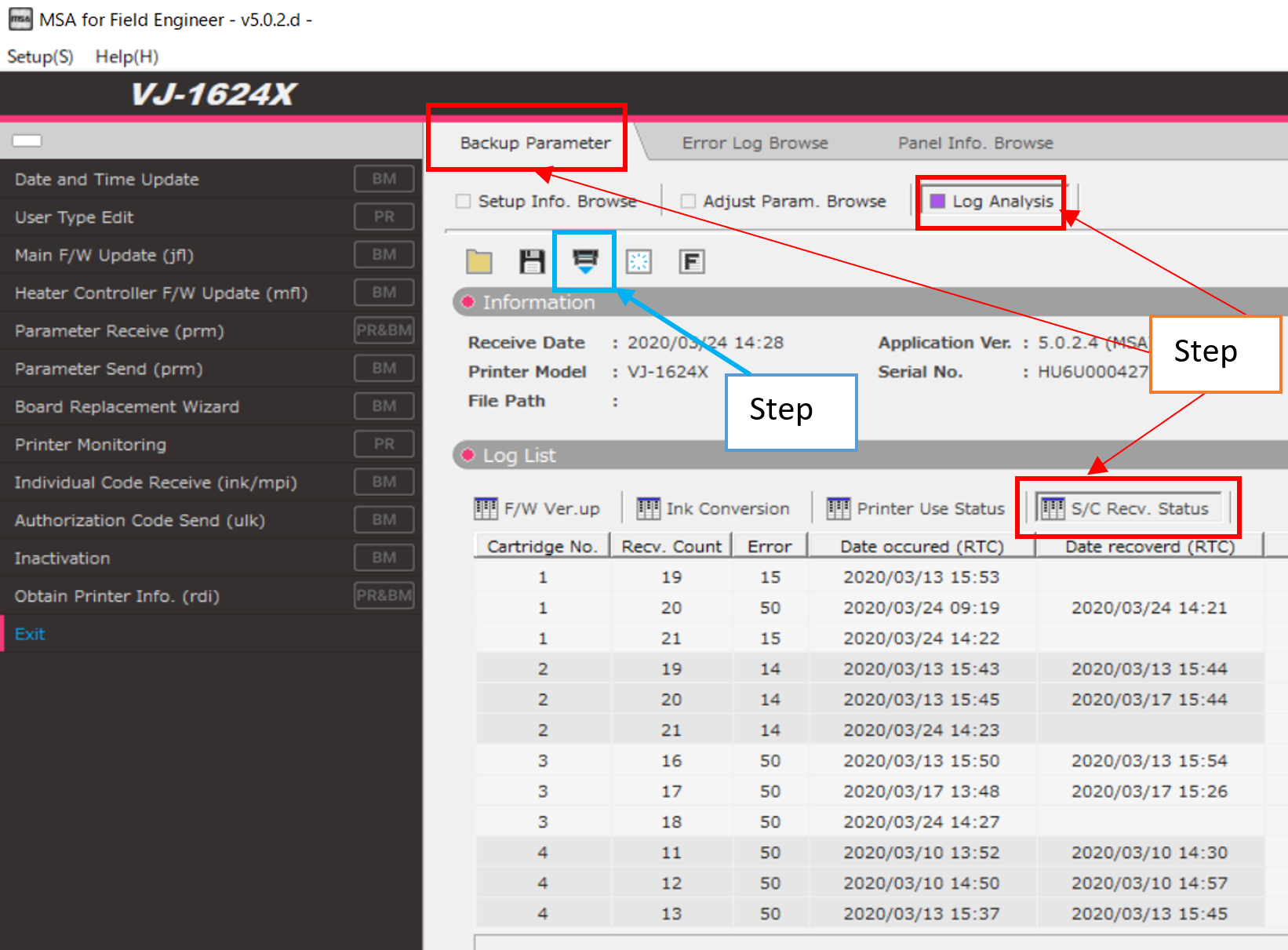 Select "Log Analysis" on the backup parameter tab and select "S/C Recv. Status.Then click the "Acquire" button to retrieve the log
 - The following contents are displayed in the logs
 Error = Detail of the specific S/C errorDate occurred = Date and time that the S/C recovery has been doneDate recovered = Date and time that the S/C chip issue is resolved
Note:- If there is no recovery information, the slot may still be in recovery mode
- If it contains other information, there is a possibility that the chip is replaced, before the recovery is completed and another S/C error occurs
- Example log situation (4 cartridge-machine):
Logs indicate that the cartridges Black and Cyan are already in recovery mode (see slots 1 and 2, the last line have no "Date Recovered" after entering into "Recovery Mode"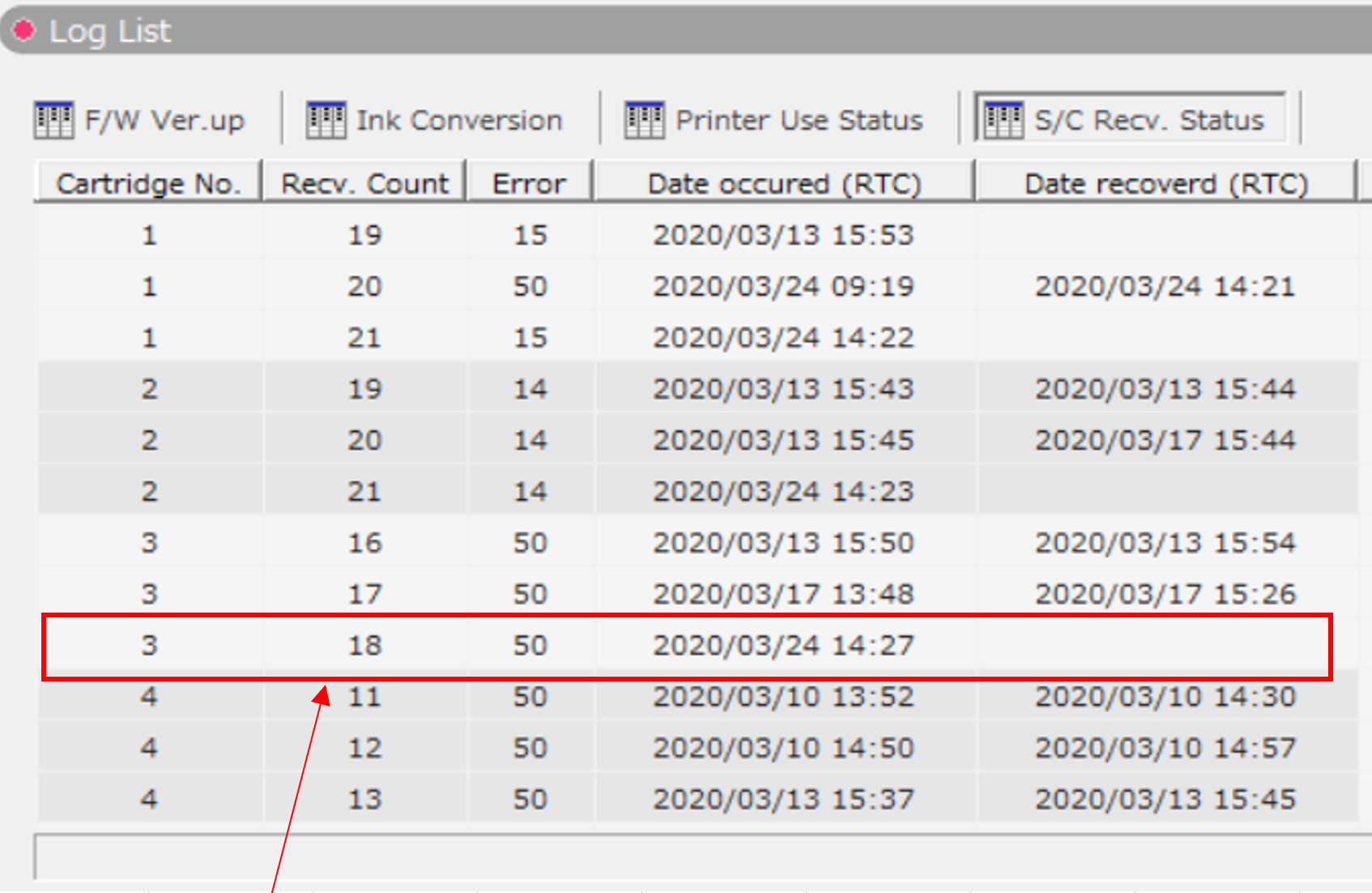 Magenta (slot 3) is inserted. The chip of Magenta fails, so more than half slots (3 out of 4) have displayed "S/C Recog Err" and the printer will not be available in this situation.In that case you have 2 options:
- Or: Replace the magenta cartridge with a working smart chip
- Or: Check the cartridge-slots 1 to 3 by a technician (see article "How to diagnose smart chip related errors") or the cartridges 1 to 2 must be replaced with properly working Smart Chips.
- The "Recovery Log" can now be checked in the MSA tool
- If you chose to replace the magenta cartridge with another one where the smart chip works fine...
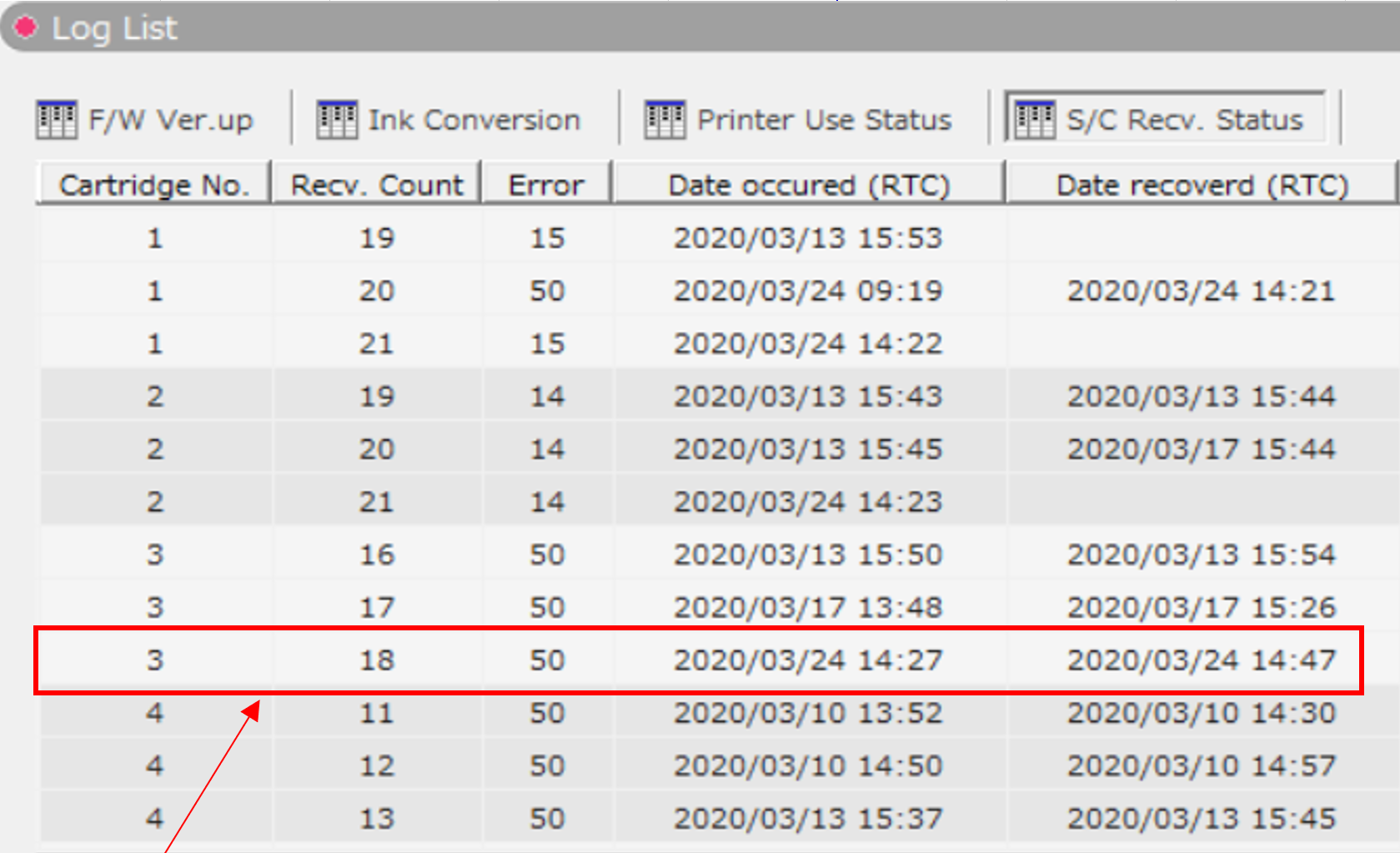 The log list will indicate in column "Date recovered) that slot 3 is working fine again. In this specific situation/example, only 2 of 4 cartridges (Black and Cyan) are still in "Recovery mode" so the printer will be available for working.
 - The Smart Chip Recovery status can also be displayed in the MSA "Smart Chip Info. Monitoring" menu:
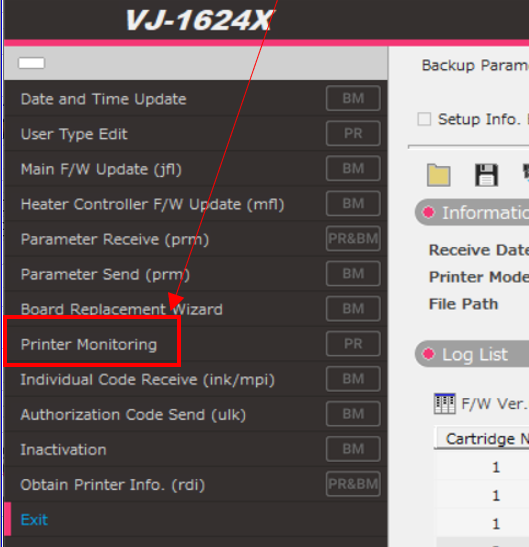
Select "Smart chip info monitoring"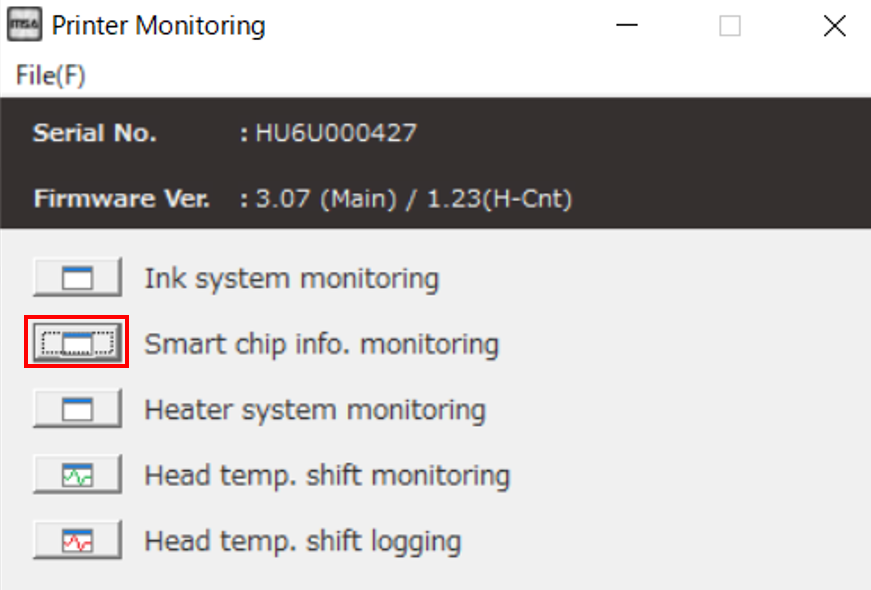
Following the log-example above, the following is displayed for Black and Cyan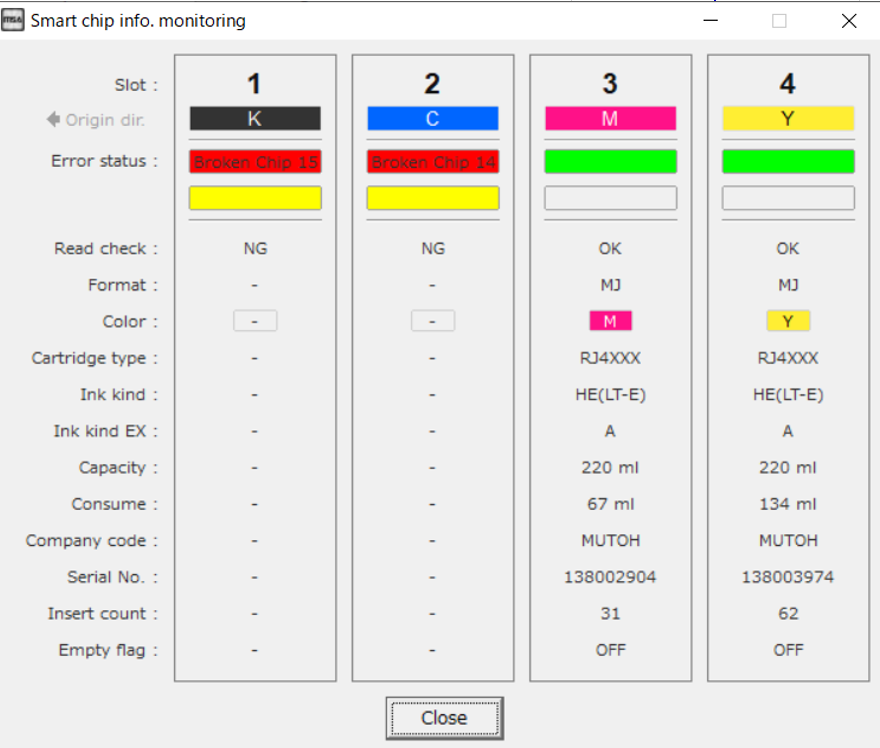
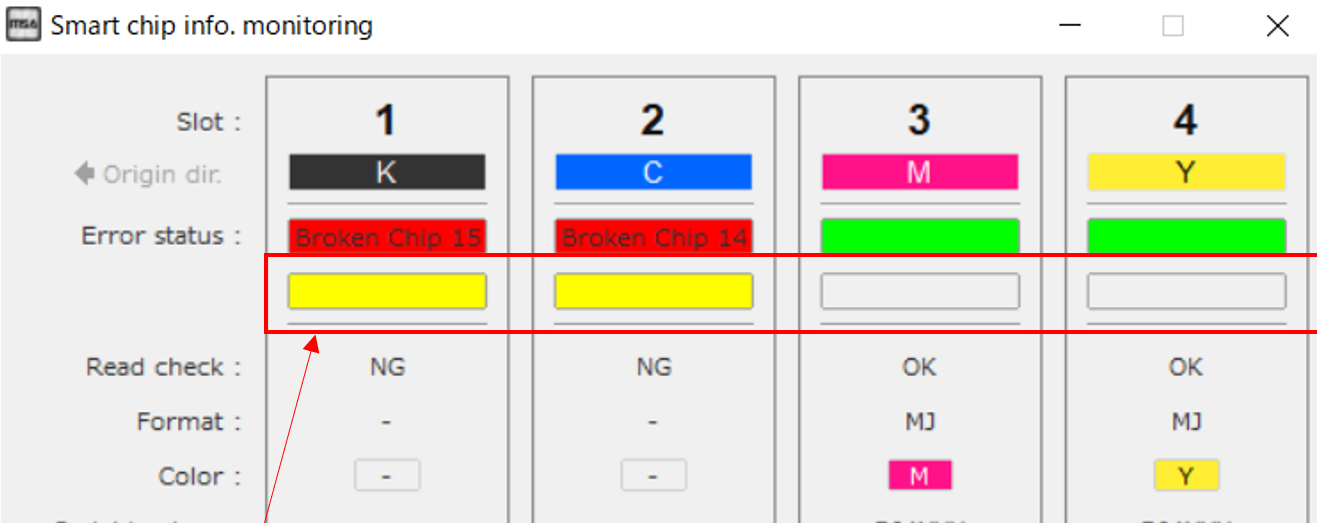
The S/C recovery status is indicated by the following color-codes:Yellow S/C is able to be recovered (or is already being recovered) Red S/C recovery cannot procee since more than half of total slots are not ok Smart-chip read is properly working (you also see more information below)
- Added] - Vacuum setting "High" has been added, to be used with the latest XPJ-16xxSR firmware
- [Changed] - The "Broken Chip" error only gave numbers in the ink monitor. Now it notifies "Broken Chip" goes together with a number for diagnostic purposes.
- [Added] - UV lamp settings in diagnostics can now be seen in the MSA
5.0.2.0
Release date: 28 february 2020
Added support for the following products:
- XpertJet XPJ-661UF
- XpertJet XPJ-461UF
5.0.1.2
Release date: 17 december 2019
This is a major revision enabling support for the following new generation products:
- XpertJet XPJ-1682SR
- XpertJet XPJ-1641SR.
Bugfix
Crash issue during start-up on non-english clients has been fixed.
5.0.1.1
Release date: 12 november 2019
Initial release Version 5
Was this article helpful?
That’s Great!
Thank you for your feedback
Sorry! We couldn't be helpful
Thank you for your feedback
Feedback sent
We appreciate your effort and will try to fix the article