
This article will explain step by step how to switch from Universal Mild Solvent Inks (UMS) to Eco solvent inks for the 2nd generation ValueJet printers.
Important
|
220/440ml Eco ink cassette set-up
When working with a VJ-1324(X)* use 220ml cassettes:
When working with a VJ-1604X, VJ-1624(X), VJ-1638(X), VJ-2638(X) use 220ml or 440 ml cassettes:
1L ink adapter Eco ink set-up
When working with a VJ-1604X, VJ-1324(X), VJ-1624(X), VJ-1638(X) VJ-2638(X):
Managing VOC's
The Solvent selection in our UMS inks was put together with a very responsible mind guarding an optimum balance between performance, the operator health & safety and environmental responsibility.
You have to take into account that also a printer with UMS ink will contribute to the exhaust in the working environment, as it is the case for the other installed equipment.
- Local health & safety regulations on exhaust vary from country to country. For UMS inks, the ventilation requirements are identical to those of Eco inks. In case of doubt, please contact a local consultancy agency.
- The size of the room in which the production equipment is setup has a big impact on the concentration levels of the different exhaust of the customer’s production equipment.
- With any equipment producing exhaust, it is recommended to separate the production environment from the finishing environment.
Terminology used in this document
- Cassette 220ml or 440ml
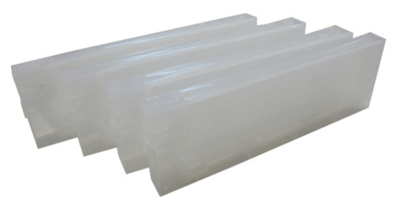
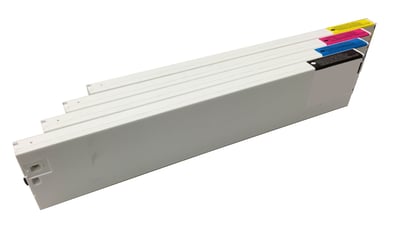
- Working on VJ-1604X, VJ-1324(X)*, VJ-1624(X), VJ-1638(X) or VJ-2638(X)
(*) Note: - The VJ-1324(X) officially does not support 440 ml ink cassettes. If you wish to use Eco inks:
- or use 220ml cartridges
- or use the 1L ink packs.
If the printer is running on very old firmware, upgrade to the latest version. Make sure to update the heater firmware first before installing the main firmware and starting the ink-conversion!
- The VJ-1324(X) officially does not support 440 ml ink cassettes. If you wish to use Eco inks:
- Working on VJ-1604X, VJ-1324(X)*, VJ-1624(X), VJ-1638(X) or VJ-2638(X)
- Ink pack adapters
.png?width=273&height=227&name=0SRWXqCsD5EZSAVjjt_OLxoBZPOYfzVMRQ%20(1).png)
- Working on VJ-1324(X), VJ-1604X or VJ-1624(X) (1 set required)
- Working on VJ-1638(X) or VJ-2638(X) (2 sets required)
Background information - Moving from UMS to Eco
- The present document is intended to explain the conversion process from UMS ink.
- No flushing liquid is required
- Uni- & Bidirectional alignments need to be verified
- UMS and Eco are not 100% chemically compatible. Mixing large quantities of ink is not recommended
- Printers without subtanks VJ-1324(X):
- No "Long Store" required
- Eco can be loaded immediately after UMS
- Printers with subtanks VJ-1604X, VJ-1624(X), VJ-1638(X) and VJ-2638(X):
- Changeover via "long store"
- Next to the physical ink switch however, there is another topic requiring attention:
- The C,M,Y,K colors of Eco are close to but not identical to the colors of UMS.
- Usage of dedicated Eco profiles is strongly recommended to get the maximum performance
- When creating profiles we strongly recommend to use the recommended print modes for UMS printing. For more information, please click the following article: XpertJet 1641SR & 1682SR Printmodes
- Eco inks (220ml, 440ml cassettes and 1L ink packs) are available with Eco type chips. When replacing UMS inks no extra action is needed for the smart chips.
Switching from UMS to Eco cassette set-up
When you want to switch from UMS to Eco ink you need to order the following items:
| Part N° | Description | Qty needed |
| For VJ-1324(X) | ||
| VJ-MSI3A-BK220 | Eco ink cassette Black (220ml) | 1x |
| VJ-MSI3A-YE220 | Eco ink cassette Yellow(220ml) | 1x |
| VJ-MSI3A-MA220 | Eco ink cassette Magenta (220ml) | 1x |
| VJ-MSI3A-CY220 | Eco ink cassette Cyan (220ml) | 1x |
| For VJ-1604X, VJ-1624(X) | ||
| VJ-MSI3A-BK220 or VJ-MSI3A-BK440 |
Eco ink cassette Black (220ml) or Eco ink cassette Black (440ml) |
1x |
| VJ-MSI3A-YE220 or VJ-MSI3A-YE440 |
Eco ink cassette Yellow (220ml) or Eco ink cassette Yellow (440ml) |
1x |
| VJ-MSI3A-MA220 or VJ-MSI3A-MA440 |
Eco ink cassette Magenta (220ml) or Eco ink cassette Magenta (440ml) |
1x |
| VJ-MSI3A-CY220 or VJ-MSI3A-CY440 |
Eco ink cassette Cyan (220ml) or Eco ink cassette Cyan (440ml) |
1x |
| For VJ-1638(X), VJ-2638(X) | ||
| VJ-MSI3A-BK220 or VJ-MSI3A-BK440 |
Eco ink cassette Black (220ml) or Eco ink cassette Black (440ml) |
2x |
| VJ-MSI3A-YE220 or VJ-MSI3A-YE440 |
Eco ink cassette Black (220ml) or Eco ink cassette Black (440ml) |
2x |
| VJ-MSI3A-MA220 or VJ-MSI3A-MA440 |
Eco ink cassette Magenta (220ml) or Eco ink cassette Magenta (440ml) |
2x |
| VJ-MSI3A-CY220 or VJ-MSI3A-CY440 |
Eco ink cassette Magenta (220ml) or Eco ink cassette Magenta (440ml) |
2x |
Furthermore you also need to order a periodical maintenance kit of the corresponding machine.
Please follow the procedure as described below
Note
|
Note
|
Important
|
For VJ-1324(X)
Remove the UMS cassettes |
Insert new 220ml Eco cassettes |
Perform a normal ink charge in diagnostics |
| IMPORTANT After completing the ink-switch, make sure to also do the periodical maintenance on the corresponding machine. |
For VJ-1604X, VJ-1624(X), VJ-1638(X), VJ-2638(X)
Verify if the latest firmware is installed |
Select long store in the setup menu (user mode) |
Remove UMS cassettes when asked |
When asked cleaning cassettes, unplug the power cable |
Plug power cable back in |
Power on the printer |
Insert new Eco cassettes when the printer asks "Insert Ink Cartridges" |
Printer starts an ink charge |
| IMPORTANT After completing the ink-switch, make sure to also do the periodical maintenance on the corresponding machine. |
Switching from UMS set-up to 1L ink adapter Eco set-up
When you want to switch from Universal MS (UMS) ink to Eco ink you need to order the following items:
| Part N° | Description | Qty needed |
| For VJ-1604X, VJ-1324(X), VJ-1624(X) | ||
| VJ-HCIPADPT | Ink adapter set (contains 4 adapters per set) for usage with Eco inks | 1x |
| VJ-MSI3A-BK1000 | 1 Litre Eco ink pack - Black | 1x |
| VJ-MSI3A-YE1000 | 1 Litre Eco ink pack - Yellow | 1x |
| VJ-MSI3A-MA1000 | 1 Litre Eco ink pack - Magenta | 1x |
| VJ-MSI3A-CY1000 | 1 Litre Eco ink pack - Cyan | 1x |
| For VJ-1638(X), VJ-2638(X) | ||
| VJ-HCIPADPT | Ink adapter set (contains 4 adapters per set) for usage with Eco inks | 2x |
| VJ-MSI3A-BK1000 | 1 Litre Eco ink pack - Black | 2x |
| VJ-MSI3A-YE1000 | 1 Litre Eco ink pack - Yellow | 2x |
| VJ-MSI3A-MA1000 | 1 Litre Eco ink pack - Magenta | 2x |
| VJ-MSI3A-CY1000 | 1 Litre Eco ink pack - Cyan | 2x |
Furthermore you also need to order a periodical maintenance kit of the corresponding machine.
Please follow the procedure as described below
Note
|
Note
|
Important
|
For VJ-1324(X)
Remove the UMS cassettes |
Insert new Eco 1L bags with ink adapters |
Perform a normal ink charge in diagnostics |
| IMPORTANT After completing the ink-switch, make sure to also do the periodical maintenance on the corresponding machine. |
For VJ-1604X, VJ-1624(X), VJ-1638(X), VJ-2638(X)
Verify if the latest firmware is installed |
Select long store in the setup menu (user mode) |
Remove UMS cassettes when asked |
When asked cleaning cassettes, unplug the power cable |
Plug power cable back in |
Power on the printer |
Insert new Eco 1L bags with ink adapters when the printer asks "Insert Ink Cartridges" |
Printer starts an ink charge |
| IMPORTANT After completing the ink-switch, make sure to also do the periodical maintenance on the corresponding machine. |
Periodical maintenance
- After completing the ink switch, proceed with a periodical maintenance for the corresponding machine. This kit contains all parts which have to be replaced:
- Capping station
- Wiper assy
- Dampers (if available on the corresponding machine)
- While proceeding with the periodical maintenance, make sure:
- That the drain tubes are empty and free of ink residue
- To remove any dried ink residue and media fibres from the left and right print head protection ramps
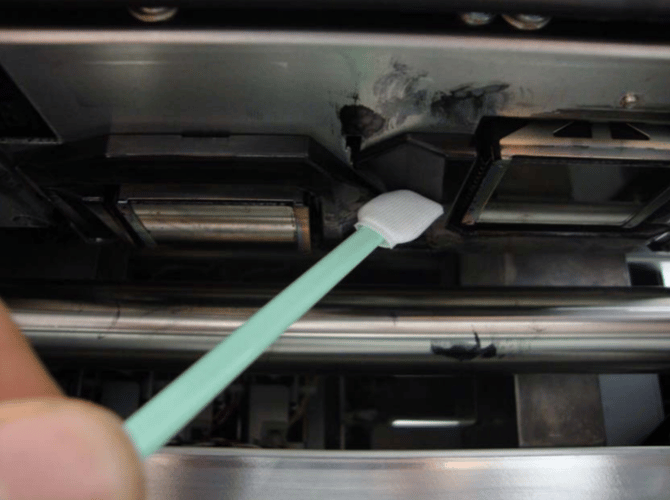
- to clean the Spitting box (+ replace the sponge if needed)
- there are no fibres or dried ink on the sides of the spitting box
- to clean the media retainers
- to clean the optical parts such as the encoder strip, etc. with isopropy alcohol
- to lubricate the mechanical parts (Y-rail, etc)
For detailed information, please refer to the maintenance manual of the corresponding machine.