Necessary tools
In order to be able to install firmware, the following tools are required:
- Personal computer with MS Windows
- Network cable to connect the Valuejet wit the pc
- The latest MSA-tool (Mutoh Service Assistance) or MSM-tool (Mutoh Status Monitor)
- Make sure the latest heater firmware is up-to-date and installed first, before installing the mainboard-firmware
Detailed instructions how to install the firmware, are described in the maintenance manual.
The latest current firmware can be downloaded below this article.
Release date: 23 September 2022
Current version - 1.14
Added
- Print head I9472 is supported.
Installed Ver 1.14 Serial number: VJ-1948WX IK7U00347~
Version history
Release date: 16 March 2022
1.13
Bug Fixes
- Abnormal printing could occur even at the areas with no data.
- When a small print area (of 0.01sqm or less) is printed several times, the various printed area logging was not updated.
- When a communication error, such as a disconnected network cable or a missing data package, occurs during data transmission using FTP protocol, the connection cannot be established even when the cable is reconnected. The printer must be restarted to recover. The signal reception timeout of the FTP protocol is now limited to 5 minutes so that the printer can be automatically recovered.
- The vacuum fan must be stopped immediately after the cancel key is pressed after executing the self-diagnosis mode > Test > Fan, but it did not stop for 3 seconds. With this FW the fan stops immediately.
Release date: 21 april 2020
1.12
Changes
- Several small bug fixes
Release date: 21 january 2020
1.11
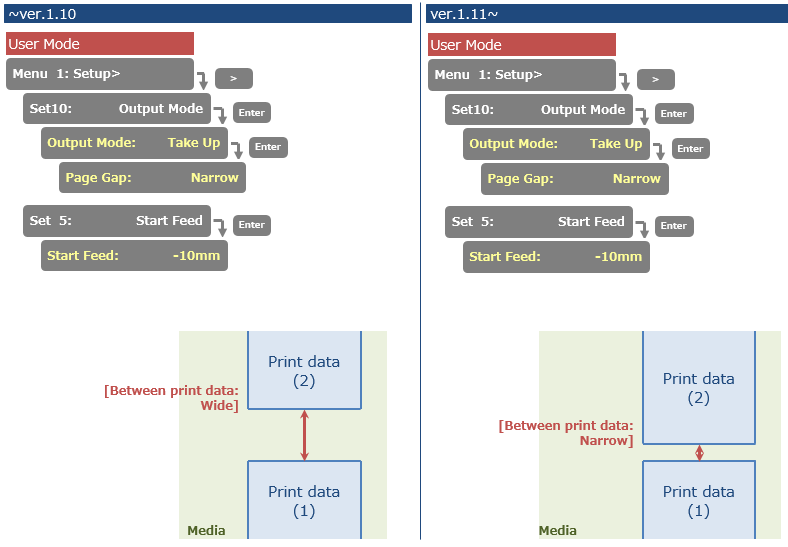
Bug Fix
- Fixed a bug that caused the settings of "Page Gap" and "Start Feed" menu not to work, the when the printer was set to "Take Up"
Release date: 3 january 2019
1.08
User Mode
- Changed the maximum roll media length for Roll Length > Length setting
The maximum length is changed from 200m to 1500m

Diagnostic Mode
- Added the menu item in Test > Record > Print menu
(1)Head Height, (2)Media Width are added to the menu

- Added "Drop Mapping" menu in Parameter > Update
In On setting, a middle dot data is printed with large dots, a small dot data is printed with middle dots

- Changed the Long store menu flow when "Reset Ink Bag" menu is set to On
In On setting, it is possible to move on to the next process by pressing Enter key

Bug Fix
- Corrected the F/W bug that the parameter in MSA cannot be sent to a printer.
If the communication between MSA and the main board is cut off, MSA will automatically retry to sent the parameter.

Release date: 29 march 2018
1.07
New items
- Added “Print” menu in the header dump menu. This “Print” menu prints the last header dump
- Added the alert buzzer menu
A new effect 'i-Weave Ex' has been added to improve the image quality. Since the overlap is larger than Fine & Fog, the throughput decreases about 72% in the case of Graphics 2 (720 x 1080 - 6 Pass). It can be activated with the PM commands *EF 33 ~ 35. To use the new 'i-Weave Ex' effect the RIP should send the data via the VPS (Valuejet Print Server in the VSM). If the Rip sends the data directly to the printer it will be converted to Fine & Fog. Requirements: VPS in VSM v7.00 (VPS v3.12.0)
Added “Reset ink bag” menu in update menu of parameter (Self-diagnostics mode) Select to display or hide the confirmation message of ink bag replacement when “ink End” message appears.


Changed items
- Changed the frequency of lifetime alert message
If 7 days have passed after pressing the cancel key, the alert message appears again when you print

Was this article helpful?
That’s Great!
Thank you for your feedback
Sorry! We couldn't be helpful
Thank you for your feedback
Feedback sent
We appreciate your effort and will try to fix the article