Necessary tools
In order to be able to install firmware, the following tools are required:
- Personal computer with MS Windows
- Network cable to connect the Valuejet wit the pc
- The latest MSA-tool (Mutoh Service Assistance) and/or MSM-tool (Mutoh Status Monitor)
Detailed instructions how to install the firmware, are described in the maintenance manual.
The latest current firmware can be downloaded below this article.
Release date: 22 October 2025
1.16
* When you update to F/W Main Ver1.16, please you make sure to use MSA tool Ver.6.0.6 or higher
1:[Added] If the machine is used in an environment lower than the machine's guaranteed operating temperature, the "E235 warm-up error" will frequently occur. Since the printer cannot be used under these conditions, a print permission setting has been added. Enabling this setting will allow printing even in low-temperature environments. However, image quality cannot be guaranteed when the setting is enabled.
2:[Added] The ink agitation message is displayed after 12 hours for white ink and 48 hours for color ink, and if the agitation message is displayed, printing will not proceed. For users who want to operate at night, there is a high possibility that continuous printing will be halted if ink agitation is requested at night. A setting to allow printing has been added, and by enabling this setting, it will be possible to skip agitation and continue printing. However, if the inks, including color inks, have not been agitated for 48 hours or more, printing will not be possible.
3:[Changed] Measures to reduce "Ink Low" caused by incorrect operation. When the printer is in standby mode and ink is not being consumed, if an ink pack is removed, "[**]Check Ink" will be displayed, prompting the operator to check the cartridge status.
4:[Added] Using the printer in a temperature environment outside the guaranteed operating range may cause mechanical problems or physical problems (the ink may change quality or not curing). To prevent and suppress such problems, a warning will be displayed on the main panel and on VerteLith and MSM if the printer temperature (temperature information for head 1) falls below 18C or exceeds 50C. If the printer temperature falls within the guaranteed operating range, these warnings will automatically disappear.
5:[Fixed] When printing data created with Fiery's RIP, missing dots and misaligned printing of specific colors occur.
6:[Fixed] When printing data with the "*LY" command specified is sent repeatedly, printing and cutting operations from the second time onwards will behave unexpectedly.
Installed Ver1.16 Serial Number:
VJ-628MP : IO1U000793~
Release date: 13 February 2025
1.15
* When you update to F/W Main Ver1.15, please you make sure to use MSA tool Ver.6.0.4 or higher
1:[Fixed] When processing data that contains several layers before the internal pattern printing is completed, each layer is printed out of alignment.
2:[Fixed] When the start button on the MSM is pressed to switch to sleep mode and then an operation key on the printer is pressed, the printer may not be able to switch to sleep mode.
3:[Fixed] An "E076 preheater error" may occur during warm-up.
4:[Fixed] In low temperature environments, an "E235 warm-up error" may occur.
5:[Added] There are many cases of devices not being able to switch to sleep mode or errors related to heaters on the market.
The following information will now be recorded in the log:
- Record the start and end status of daily maintenance before switching to sleep mode, and detect abnormal termination of daily maintenance.
- Record the initial temperature when warm-up begins.
- Record whether the pre-heater error is a problem with the temperature rise rate or a problem with the temperature discrepancy between the pre-H thermistor and the platen H thermistor. (This can be confirmed in Log Analysis on the MSA.)
Installed Ver1.15 Serial Number:
VJ-628MP : IO1U000705~
Release date: 24 July 2024
1.14
* When you update F/W Main Ver1.14, please you make sure to use MSA tool Ver.6.0.2 higher
1:[Added] Ink set: Type:B 7 colors 2 (K/C/Lk/Lm/Lc/CL/Y/M).
MSM supports this feature from Ver 8.2.2.
2:[Added] There have been reports of nozzle instability when using Bk ink. A soak cleaning menu has been added to the user menu as a preventative measure.
When it is executed, the print head is removed from the capping station and the user fills the cap with cleaning solution using a dropper.
The printer will wait when the wait time is entered from the panel.
After waiting, powerful cleaning will be performed and the process will end.
MSM supports this feature from Ver8.2.2.
Soak cleaning is recorded in the log. (Logs will be available for confirmation after MSA is supported)
3:[Changed] When using a high capacity ink pack adapter, if the machine shakes while printing, the adapter will also shake, causing a writing error to the smart chip and printing to stop.
The amount of ink used is not written to the smart chip while printing is in progress. This has been changed so that it is written when printing is completed.
4:[Changed] Previously, once "Longstore" was executed, it was not possible to cancel it while it was in progress.
It can be canceled up until the cleaning cartridge is inserted.
5:[Fixed] A CPU error occurs when connecting to a PC with antivirus software (AVG AntiVirus) installed.
Installed Ver1.14 Serial Number:
VJ-628MP : IO1U000601~
Release date: 18 June 2024
1.13
Bugfix
- E073 errors occurred occasionally because the PF2 overcurrent threshold was set too low compared to the specifications. Fixed to the correct threshold.
- After inserting the cleaning cartridge to perform a head cleaning or an initial cleaning, sometimes the message "Full WasteInkTank" wrongly appeared on the display. This has now been fixed.
Installed Ver1.13 Serial Number:
VJ-628MP : IO1U000581~
Release date: 23 May 2023
1.12
Changes
- New ink colors OR/GR/BL supported.
-Color configuration-
OGB 7Color:K/C/Cl/Or/Bl/Gr/Y/M
OGB 8Color:K/C/Wh/Or/Bl/Gr/Y/M
Bugfix
- When the smart chip terminal short circuit occurs due to the misalignment of the smart chip card attachment position on the ink cartridge, the chip recovery may not function and an I/C error may occur. Fixed chip recovery to work even in such cases.
- If an "ink end" occurs during spitting during the cleaning sequence, the carriage remains stopped on the spitting position. Fixed to cap in when "ink end" occurs.
- When pressing Sleep mode on the MSM and closing the screen during the processing of this action, the printer did not shift to Sleep mode. Fixed.
Installed Ver1.12 Serial Number:
VJ-628MP : IO1U000500~
Release date: 23 September 2022
1.11
Changes
- The calculation of the ink consumption on the smart chips has been improved to be more accurate.
- A new cleaning type has been added to: "Self diagnosis - Parameter -Update" menu:
- type A : for solvent ink (CGS ink included)
- type B: for waterbased ink (other applications)
- Messages (signals) on the printer can now be cancelled by the MSM tool.
- Adjustment of rear and edge sensor can now be adjusted from MSM.
Bugfix
- The cartridge agitation message appears on the MSM, but it did not always disappear after the cartridges have been agitated: this is now fixed.
- MSM screen instructions and printer status during daily maintenance were different: this is now solved.
- If the carriage cannot be locked due to a damage to the latch mechanism the carriage keeps on moving around the home position. This movement would not stop. The software is now changed and a new error is displayed when the head lock cannot be completed after 2 times: "E158 CR lock error".
Release date: 28 April 2022
1.10
Changes
- The "color maintenance" function has been revised for improved stability.
- The calculation to detect that the waste tank is full has been optimised.
- Full waste tank: from 500ml to 650ml
- Near full waste ink tank: from 475ml to 625ml
- Following error occurred in the 7 colour-set-up as of FW 1.08 or later: The Lk ink consumption was incorrectly counted during the Cl flow rate. As a result the displayed consume was higher than the actual consume. This is now solved.
Release date: 15 december 2021
1.09
Changes
- Bug fix: Previously the "color maintenance" setting was disactivated when the "power-on cleaning" setting was set to "off". This has now been fixed and the "color maintenance" function can now be enabled regardless of the "power-on cleaning" setting.
New
- The Smart card recovery procedure has been added in this model.
This feature was already present in other Mutoh printers, but now it is also included in the VJ-628MP.
The TIB explaining the feature can be found on our Knowledgebase via this link: https://mutoheu.freshdesk.com/a/solutions/articles/14000112240
Different data can be printed on each front and back sides, with the ink combination of 7 or 8 colors including white.
The PM command * WL53; is now valid for this new feature.
Release date: 01 september 2021
1.08
Changes
- Changed the minimum media thickness input from 80 µm to 10 µm.
New
- Added a new combination of 8 colors. W & Lk ink support have been added
- Added an ink discharge menu in maintenance mode. This discharge function can be used when replacing a print head.
Release date: 03 august 2021
1.07
Changes
- The maximum time that can be set for the standby-heat becomes longer from 1h to 8h
- The color maintenance process has been improved for Lm ink
- The interval between ink cartridge agitations is shortened from 3 days to 3 days (except WH ink)
New
- Color maintenance to prevent color unevenness can now be performed directly from the MSM (latest version required)
- The "front interlace" setting is now changed to a selectable type: "Auto or Off" in order to decrease noticeable unevenness
Release date: 03 june 2021
1.06
Bugfix
- When color maintenance is running (set to ON), the pump did not work in previous versions causing the flushed ink to overflow from this cap. This issue has been fixed.
New
- When the printer is not used for a longer period, the magenta color might have slight a variation. The color maintenance feature now includes light magenta and is now flushed as well, together with magenta and cyan.
Release date: 08 march 2021
1.05
User mode
- A new color configuration with 7 colors (including Lk) has been added
Open Issues
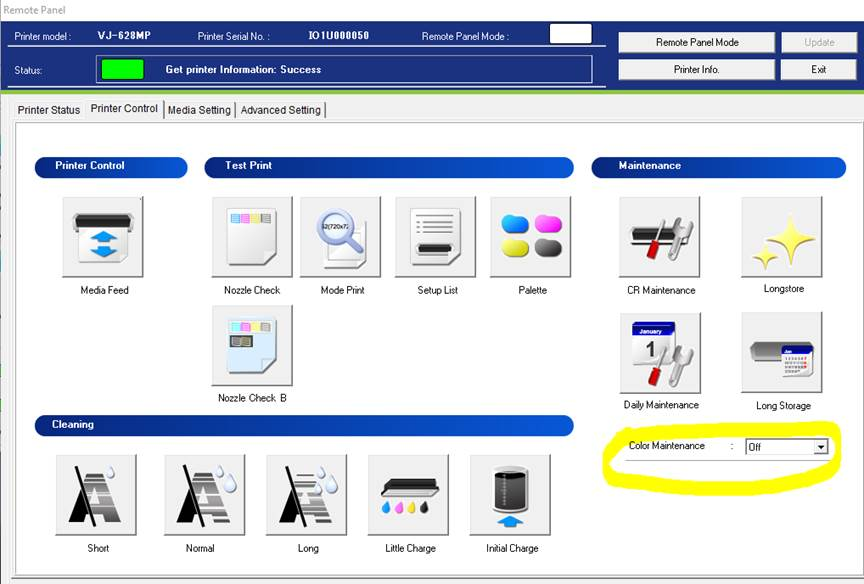
- The Color Maintenance setting must be set to OFF. If this is feature set ON, ink inside the cap of the printer will accumulate over time and will not be drained by the pump. As a consequence it may overflow from the cap into the printer, when the cap is full. This issue may both occur when the printer is waking up from sleep mode, as well when the printer is rebooted. It will be fixed in the following FW release 1.06
Release date: 20 january 2021
1.04
Initial version
Was this article helpful?
That’s Great!
Thank you for your feedback
Sorry! We couldn't be helpful
Thank you for your feedback
Feedback sent
We appreciate your effort and will try to fix the article