Necessary tools
In order to be able to install firmware, the following tools are required:
- Personal computer with MS Windows
- Network cable to connect the Valuejet wit the pc
- The latest MSA-tool (Mutoh Service Assistance) or MSM-tool (Mutoh Status Monitor)
Detailed instructions how to install the firmware, are described in the maintenance manual.
The latest current firmware can be downloaded below this article.
Release date: 15 January 2026
Current version - 1.20
* When you update to F/W Main Ver1.20, please you make sure to use MSA tool Ver.6.0.60 or higher
Bugfix:
1/ When printing only white (*WL10) and then printing layers twice, the print position of the second layer and above is shifted in the second layer print.
2/ When printing data created with Fiery's RIP, missing dots and misaligned printing of specific colors occur.
3/ When printing continuously with the VerteLith with the media cut enabled, printing may stop midway after printing a few sheets.
4/ During media detection, user type selection, or media thickness correction input, the screen times out and the printer proceeds to the next operation (paper width detection).
Added:
1/ Add soak cleaning menu to user mode.
2/ Using the printer in a temperature environment outside the guaranteed operating range may cause mechanical problems or physical problems (the ink may change quality or not curing).
To prevent and suppress such problems, a warning will be displayed on the main panel and on VerteLith and MSM if the printer temperature (temperature information for head 1) falls below 18C or exceeds 50C. If the printer temperature falls within the guaranteed operating range, these warnings will automatically disappear.
3/ "Custom Mode" menu to Self-Diagnosis > Parameters > Update.
*This is for internal testing purposes and will not be used in the field.
Update to 1.20 Serial number:
VJ-1638UH : End of production
Version history
Release date: 11 June 2025
1.19
* When you update to F/W Main Ver1.19, please you make sure to use MSA tool Ver.6.0.5.0 or higher
Bugfix:
1/ A CPU error occurs when connecting to a PC with antivirus software (AVG AntiVirus) installed.
2/ When the smart chip terminal short circuit occurs due to the misalignment of the smart chip card attachment position on the ink cartridge, the chip recovery may not function and an I/C error may occur.
Fixed: chip recovery to work even in such cases.
3/ If printing is canceled during layer printing, the printing position of the second layer may be shifted when printing the next layer print data.
Changed items:
1/ The threshold value was changed because "Check Ink" errors occur frequently when using a high capacity ink pack adapter.
2/ If the ink bag is removed without removing the high capacity ink pack adapter while stirring the ink, the ink end detection flag will react and the ink is out flag will be set.
Only when the printer is in standby mode and not consuming ink, if the ink pack is removed, "Check ink" will be displayed to prompt the user to check the cartridge status.
3/ The amount of ink consumed recorded in the S/C was less than the actual amount of ink consumed, so when the cartridge end detection flag was detected, there was a discrepancy between the actual amount of ink consumed and the amount written in the S/C, so the message "[**] Check Ink" was displayed.
The calculation of ink consumption has been revised so that it is closer to the actual amount of ink consumed.
Update to 1.19 Serial number:
VJ-1638UH : End of production
Release date: 22 January 2025
1.18
* When you update to F/W Main Ver1.18, please you make sure to use MSA tool Ver.6.0.4.0 higher
Bugfix:
When a printer with 6 colors setting is upgraded to Ver.1.17, the first print after the power on will be printed in the wrong colors.
Update to 1.18 Serial number: VJ-1638UH : End of production
Release date: 23 December 2024
1.17
Changed items
1/ [Added] "Longstore" and "Ink Discharge" logs are now recorded.
The logs can be checked in self-diagnosis mode and with MSA 6.0.5 (to be released) or later.
-User mode:
Ink charge: "UC" on the panel, "Ink charge (User mode)" on the MSA Log list.
Longstore:"UW" on the panel, "Longstore (User mode)" on the MSA Log list
- Self-diagnosis mode:
Ink charge:"CH" on the panel, "Ink charge (Diagnosis)" on the MSA Log list
Longstore/Discharge:"LO" on the panel, "Longstore (Diagnosis)" on the MSA Log list
2/[Fixed] After upgrading the firmware, an "[ALL] S/C ink error" occurs at startup and the printer cannot start.
Conditions for occurrence:
UH21 ink is used.
The self-diagnosis parameter was changed from "unfilled" to "filled" in Ver.1.14 or earlier, and then the printer was upgraded to Ver.1.15 or Ver1.16.
NOTE: If an error occurs due to this issue, the error will not be recovered even if you upgrade the firmware. It is recommended that you upgrade the firmware before an error occurs whenever possible.
If an error occurs, please obtain the rdi file and contact MJ.
3/ [Fixed] If initial filling is performed while chip recovery is in operation, the slot where chip recovery was in operation will switch to a different ink type. After that, an S/C ink error will occur.
NOTE: If an error occurs due to this issue, the error will not be recovered even if you upgrade the firmware. It is recommended that you upgrade the firmware before an error occurs whenever possible.
If an error occurs, please obtain the rdi file and contact MJ.
4/[Fixed] In machines that are charged with six colors of ink, the message "S/C Col. Err" may be displayed even if the correct color S/C card is inserted.
5/[Fixed] When chip trouble is set in ACG, the ink charge progress (%) display is not updated periodically. The display will be updated every second.
6/[Fixed] If printing is canceled while the printer is receiving print data, the machine will down.
7/[Fixed] During chip recovery, "Cleaning -> Ink charge" can be executed even when there is no ink.
Update to 1.17 Serial number: VJ-1638UH : End of production
Release date: 15 November 2021
1.16
Changed items
- Addition of menu: “Extra curing”. This feature will allow a post-curing after printing. The value entered represents the number of times the carriage will pass over the print to post-cure.
Release date: 27 may 2021
1.15
Changed items
- Supports new company code S/C cards.
Release date: 03 February 2021
1.14
Bugfix
- While "[*] Check Clr. -> E"is displayed on the panel and the cartridge is removed and reinserted, none of the following didn't work:
- Media feed
- Nozzle check print
- Print head cleaning
This is issue has been fixed.
Release date: 29 october 2020
1.12
Changed items
- Implementation of a new feature to handle smart-chip related issues, with the new S/C Recovery procedure.
For more information check the following article: TIB818 - Smart Chip Recovery - The "Ink End" detection, software-handling and ink-consumption have been improved.
- The 2-way valve is opened even when an error to ink cartridge occurred. This has been fixed, when an ink-cartridge error occurs, the 2-p valve is now closed
- The cleaning cartridge was not recognized in "Longstore 2" mode. This has been fixed.
Release date: 9 december 2019
1.11
Changed items
- Color maintenance menu has been added in user mode (only when using US11 ink)
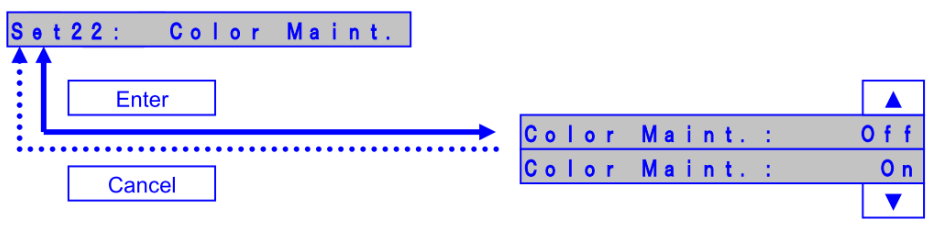
Color Maint. : On
The printer performs color ink maintenance when waking up after 72 hours of sleep mode to ensure smooth startup after longer sleep times.
Color Maint. : Off
The printer does not perform the color ink maintenance - Added support for UH21 ink cartridges
Release date: 25 october 2019
1.09
Diagnostics
- Added "UV lamp type" in the parameter menu. Technical Bulletin TIB804 introduced a new kind and part number of UV lamp for the VJ-1638UH
As a consequence, the firmware has been adapted to be able to select the correct "UV Lamp type" depending of the kind of lamp installed. Read the above mentioned bulletin carefully to ensure that the correct lamp type parameter is selected by default: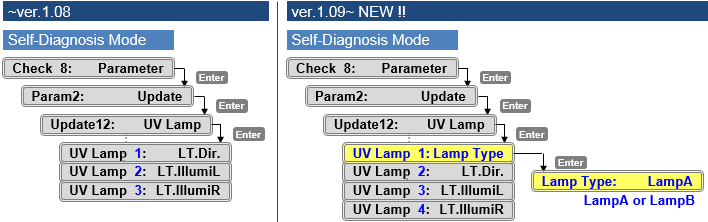
- LampA
When set to Lamp A, the UV lamp emits the UV light with 100% duty cycle of the specified light intensity - LampB
When set to Lamp B, the UV lamp emits the light with 87% duty cycle of the specified light intensity
- LampA
Release date: 11 december 2018
1.08
User Mode
Added the Auto Cleaning menu in the Setup menu
=> Configure a timer value to perform an auto cleaning action

Bug correction
Fix the bug that it takes time to complete a print job if using Mac OS High Sierra.
Remark
When you install this F/W, please use MSA ver.4.1.2.0 or higher
Release date: 22 august 2018
1.06
Bug correction
Printer could not start printing if the life counter reached a level of 95%.
This bug has been corrected in case of displaying the circulation pump lifetime message.

Release date: 12 june 2018
1.05
User Mode
- Added an extra PRINT menu option in the Header Dump menu. The PRINT option enables you to print the last header-dump, AFTER a print has been made.
- Improved nozzle-check for better readability when using non-white substrates (user mode)


Bug fixes
- Parameter update after initial ink-charge
Previously the printer always needed a reboot after ink-charge, in order to properly store the charge-flag in the parameters. When an error occurred after sleep mode, the charge-flag was reset and inks needed to be recharged again if the printer was not properly restarted. From this version, parameters are now properly stored after initial charge without the necessity to reboot.
New items
- The daily maintenance log, firmware log and ink conversion logs can now be retrieved
The history logs can now be checked with the latest MSA tool (4.1.7.0 or later). In order to be able to read out the log data, the downloaded PRM file can be loaded in the MSA tool:
The contents of the logs may vary, depending on which ValueJet model is being monitored.

The Log List contains 3 different tabs:
- F/W Ver.up
Shows the firmware-update history - Ink Conversion
Shows the ink-conversion history - Printer Use Status
Shows the operational history and the daily maintenance history
After loading the maintenance log history, the information can be exported into a readable TXT file


Diagnostics
- Changed the error message when the waste tank is full from "No Waste Ink Tank" => "Full Waste Ink Tank"
Added extra counter information


Release date: 15 november 2017
1.04
Changed items
- Nozzle check shows additional info : date, serial number, firmware version
Added alert buzzer menu
Added daily maintenance function: when entering the sleep mode or powering off the printer, the menu automatically shifts to the daily maintenance menu
Display the message to prompt users to perform the daily maintenance: when the total printing time reaches 12 hours, the message appears to prompt users to perform the daily maintenance
Changed the frequency of lifetime alert message: after pressing the cancel key, the message will re-appear after 7 days printing
Added “data edge” setting in “head travel” menu: print head follows image borders


Release date: 20 june 2017
1.03
Changed items
User Menu
- Modified *ip command: added the new dot parameters to specify the different dot size for k/c/m/y and white/varnish

Diagnostic menu
- Modified the “fill pattern” menu: described the nozzle row (a-h) for each colour, instead of describing odd/even

Release date: 28 february 2017
1.02
Changed items
- Added the UV illuminance setting during printing for UV flex ink

Diagnostics mode
- Added the ink type confirmation menu: added UV flex ink (US11)
- Changed the dot size for the head slant check pattern print: VSD3 large dot changed to VSD3 small dot
- Changed the head slant micro adjustment pattern for front/back slant check


Was this article helpful?
That’s Great!
Thank you for your feedback
Sorry! We couldn't be helpful
Thank you for your feedback
Feedback sent
We appreciate your effort and will try to fix the article