Some units in the field may have a PG (paper gap) stepper-motor applying unnecessary high torque during the carriage up/down movement. In some isolated cases it may result in a particular situation which we call 'tooth-skipping' in the vertical up/down movement. This phenomenon may cause the carriage to 'skip' 1 or more teeth too high or too low, requiring a mechanical repair. This may result in 2 possible issues:
- Error E124 PG ORIGIN: During initialization, the carriage is unable to properly initialize the homing to the PG origin sensor
- Incorrect media-thickness detection during media-initialisation
This particular situation may especially be triggered in the following circumstances:
- Insufficient lubrication of the worm-gear transmission for the Paper Gap (PG). This causes more friction and a wrong amount of "stepping" of the PG stepper motor during the carriage up/down movement.
- Incorrect mechanical calibration of the Paper Gap worm-gear transmission. To properly adjust the Paper Gap motion, use the DG-44241 jig and follow the instructions in the chapter "Replacing PG motor" in order to properly align the worm-gear transmission, described the VJ-1638UH maintenance-manual. It may also be required to verify the head-height (with the jigs DG-46922 and DG-46923) software-calibration.
- Head crashes on the media during initialization and particularly during printing.
In order to avoid these kinds of occurrences, we strongly recommend to do some additional preventive actions in the field.
First step:
Download and install the the latest VJ-1638UH firmware on the printer. Before proceeding to the next steps below:
- Make sure the mechanical adjustment of the Paper Gap gear assy is properly set (with jig DG-44241)
- Ensure that the Paper Gap (transmission) assy (worm gear) is properly lubricated with white grease (KY-80050)
Second step:
The latest firmware contains a few additional options in the 'Maintenance menu' in the parameter-section:
- Check 7: Parameter > Param2: Update > Update11: PG Motor > PG Motor 1: Param
- Check 7: Parameter > Param2: Update > Update11: PG Motor > PG Motor 2: Vref
These 2 parameters helps to better control the the PG stepper motor torque force.
The following procedure describes how to properly set the PG motor torque:

The PG Motor 1 setting should be set to "TypeB".
The next step is to find the correct Vref voltage setting for the PG motor.
Goal of this adjustment:
In order ensure the PG torque is properly set, you need to find set the optimal VRef value that controls the stepper motor power and torque The PF stepper motor assy should not make any stalling noise, when the 'carriage up/down' of the carriage is moving freely.
| IMPORTANT REMARK Please read the complete documentation carefully first before proceeding with these steps below. |
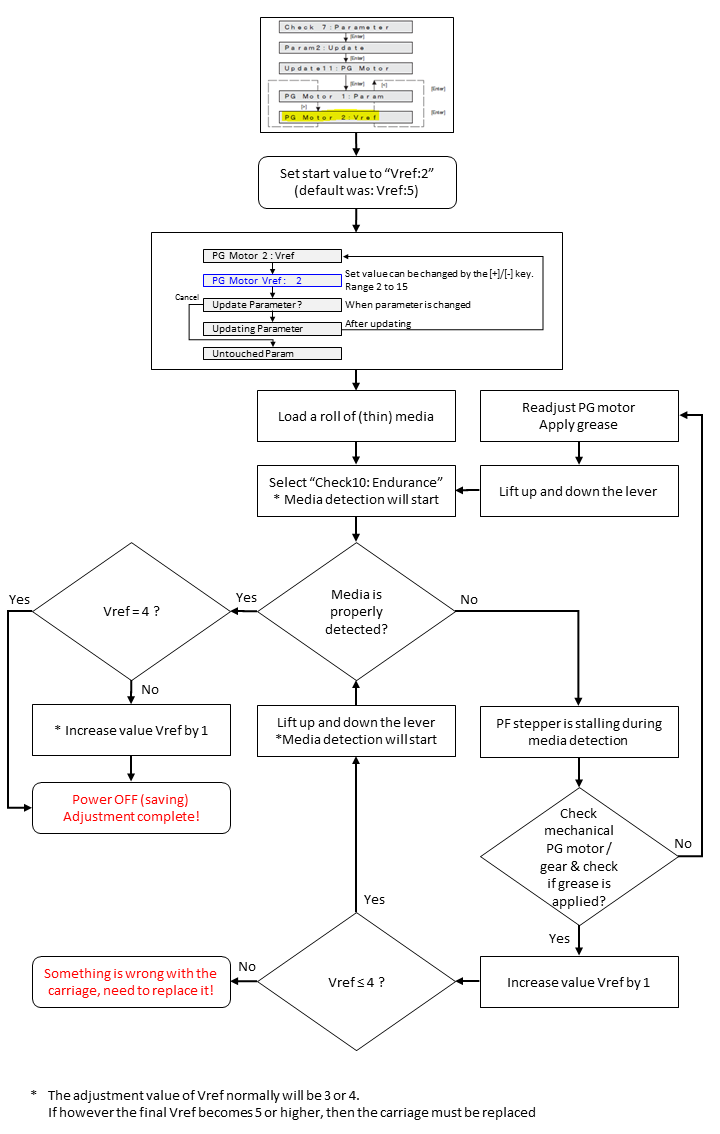
Please note that the normal default 'Factory setting' of Vref is 5. If after completion of this adjustment you end up with a final Vref value more than 4, then there is a suspicion that the Paper Gap stepper motor needs to 'abnormally hard' make the up/down vertical carriage-movement. In that case, there is something wrong with the carriage itself. In this case it is recommended to replace the complete carriage assembly with a new VJ-1638UH spare part carriage.
Article changes
Revision 1.0 : 4 september 2018 - Initial release
Revision 2.0 : 8 january 2019 - Linked bulletin "TIB801 - VJ-1638UH Carriage - Part number modification" to this article
Was this article helpful?
That’s Great!
Thank you for your feedback
Sorry! We couldn't be helpful
Thank you for your feedback
Feedback sent
We appreciate your effort and will try to fix the article