Necessary tools
In order to be able to install firmware, the following tools are required:
- Personal computer with MS Windows
- Network cable to connect the XpertJet with the pc
- The latest MSA-tool (Mutoh Service Assistance) or MSM-tool (Mutoh Status Monitor)
Detailed instructions how to install the firmware, are described in the maintenance manual.
The latest current firmware can be downloaded below this article.
Current version 1.11
** Make sure when updating to F/W Main Ver1.11 or higher to use MSA tool Ver.6.0.4 higher.
Bug fix:
- A CPU error occurs when connecting to a PC with antivirus software (AVG AntiVirus) installed.
- When "Check Color" is displayed when the power is turned on, "Ink End" will not be displayed even if the ink end sensor is detected.
- Cleaning can sometimes not be performed from the remote panel.
- When an ink-related error occurs, the "soak cleaning" process starts, and the panel becomes inoperable during the process.
- When printing with "User Type > Adjust Print", if the following error message appears, the Cancel key does not clear the message.
- [**]S/C Recog. E"
Changes:
- Previously, once "Longstore" was executed, it was not possible to cancel it while it was in progress. Now it can be canceled up until the cleaning cartridge is inserted.
- When using a high capacity ink pack adapter, if the machine shakes while printing, the adapter will also shake, causing a writing error to the smart chip and printing to stop.
The amount of ink used is not written to the smart chip while printing is in progress. This has been changed so that it is written when printing is completed. - Change the status display on MSM during soak cleaning from "Cleaning" to "Soak cleaning".
- When using the high capacity ink pack adapter, the "Check Ink" message appears even if there is sufficient ink remaining in the ink pack.
The threshold at which the "Check Ink" message appears has been changed to an appropriate value. - If the ink bag is removed without removing the large-capacity pack adapter while stirring the ink, the ink end detection flag will react and the ink is out flag will be set.
Only when the printer is in standby mode and not consuming ink, if the ink pack is removed, "Check ink" will be displayed to prompt the user to check the cartridge status.
New:
- The ink switching log now records not only when ink is switched, but also when the user mode, self-diagnosis long-term storage, and ink filling are recorded.
Self-diagnosis: History: How to display in the ink switching log.
User mode: Initial charge "UC", Longstore "UW"
Self-diagnosis mode: Initial charge "CH", Longstore/Ink discharge "LO"
Installed Ver 1.11 Serial number:
XPJ-1341WR-P : KI5U000215~
Version 1.10
** Make sure when updating to F/W Main Ver1.10 or higher to use MSA tool Ver.6.0.4 higher.
Bug fix:
- When performing Bi-D printing with "CR Print Shifting Width" set to "Media", the CR may not scan to the edge of the media and may wrap around at the edge of the printing data.
Changes:
- When the media detection setting is "OFF", media cutting is not possible, so when cutting is performed (long press of ENTER), "Media detection OFF" is displayed.
- The words on the panel in the soak cleaning menu were slightly different from other models, so they were changed to be the same as the other models.
Installed Ver 1.10 Serial number:
XPJ-1341WR-P : KI5U000205~
Version 1.09
Bug fix:
There was a problem with the "head soak" cleaning cycle that was added in the previous version.
- When performing the soak cleaning process while a media error (e.g. no media) is displayed, the carriage moves to the left and then immediately returns to the cap-in position.
- When pressing Enter with the cleaning solution filled into the cap, the soak time is entered after cap-in, but the process of sucking up the cleaning solution occurs when the cap is in. This means that the cleaning solution inside the cap is drained and the print head is not soaked.
- When entering the soak time, if the set time is not confirmed, the process does not move to the next step. At this time the cap is in a soaking state, but because the soaking time is not being counted, it is not recorded in the log.
XPJ-1341WR-P : KI5U000190~
Release date: 04 June 2024
Version 1.08
** Updating to F/W Main Ver1.08 or higher requires using MSA tool Ver.5.1.2.0 (or higher)
Changes
1. When "color check" is displayed the error LED will now be lit.
2. Added a "head soak" procedure in user mode (Menu 12: Soak clenaing)
This procedure can be used to soak the head in the cap when nozzles remain misfiring or missed.
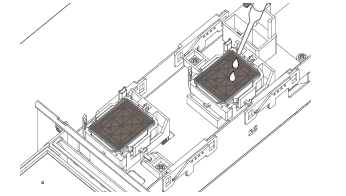
3. When DS3 ink is being selected the CR maintenance log is active.
Bug fixes
1. Internal patterns were printed using the overwrite count and overwrite weight settings.
Change the internal pattern to be printed without overwriting.
Installed Ver 1.08 Serial number:
XPJ-1341WR-P : KI5U000185~
Version 1.07
** Updating to F/W Main Ver1.07 or higher requires using MSA tool Ver.5.1.2.0 (or higher)
Changes
1. Acceleration of the paper feed during printing can be changed
This is a useful feature if slippery media is used.
New setting (Self-diagnosis mode>Parameter>Update>PF Acc.)
"Normal": Default
"Low": Low acceleration
*Note the impact on throughput.
2. Added patterns for head slant adjustment.
These patterns may improve the accuracy of head tilt adjustment and improve the print quality.
New patterns (Self-diagnosis mode>Adjustment>Head Slant)
* Slant V-1
* Slant V-2
A high magnification loupe(x200~x400 e.g. Digital loupe) is required for adjustments with these patterns.
Bug fixes
1. When performing "Adjustment print" using the remote panel function of the MUTOH Status Monitor(MSM), the value displayed in the Rough Pattern adjustment value input menu was the center value of "11" and the maximum value of "21".
Fixed the change so that the center value is "6" and the maximum value is "11", just like the machine.
2. When the chip terminal short circuit occurs due to the misalignment of the card attachment position, the chip recovery may not function and an I/C error may occur.
Fixed chip recovery to work even in such cases.
3. When printing with Caldera Rip, the CR speed is sometimes slow (about 240 cps), and sometimes abnormal printing occurs. This was caused by an out-of-specification parameter used in the PM command.
Fixed to replace with the parameters within the specification and process it when the parameter out of the specification is received.
Installed Ver 1.07 Serial number:
XPJ-1341WR-P : KI5U000155~
Version 1.06
Change
1. "Automatic print settings" has been added to the remaining roll paper management menu in order to streamline operations up to barcode printing for remaining roll paper management.
If "Auto Print Settings" is set to ON, "Do you want to print the remaining amount?" is displayed after cutting the media.
If "Yes" is selected, the barcode is printed after media cutting.
Bug fixes
1. Head rank input method selection menu (Auto/Manual) is not displayed in Self diagnosis>Head replace menu: This is now fixed.
2. When the *IP4 command is output in bi-directional printing in 600x900dpi mode, the image shifts and appears double. This is now fixed.
3. The print area calculation was incorrect. It occurs under the following conditions:
- 600x1200, 450x900, 300x600 print modes.
- The length information (ESC)*r#t|T. is not added to the print data.
- Printing via Port9100
This is now fixed.
Installed Ver 1.05 Serial number:
XPJ-1341WR-P : KI5U000135~
Version 1.05
Bug fixes
1. When the mini latch of the carriage lock is damaged and the carriage cannot be locked during the initial operation after power-on then the carriage continued to move left and right in the HOME position.
This is now fixed so that "E158 CR Lock Error" will be displayed after 2 attempts.
2. When "Page gap" is set to "Narrow" and "Output" is switched from "Take-up" to another setting then a "front interlace" will be executed when printing. This is now fixed.
3. When performing a head wash and the waste ink tank got full at a time when no cartridge was in the printer then the message "no cartridge" was incorrectly displayed. This is now fixed and will display "ink discharge" or "washing head".
Installed Ver 1.05 Serial number:
XPJ-1341WR-P : KI5U000090~
Version 1.04
First released version
Installed Ver 1.04 Serial number:
XPJ-1341WR-P : KI5U000003~
Was this article helpful?
That’s Great!
Thank you for your feedback
Sorry! We couldn't be helpful
Thank you for your feedback
Feedback sent
We appreciate your effort and will try to fix the article