The MSM (as of version 8.1.1) allows to automatically export the Print History of the printer(s), which are being monitored.
How?
- Select "print History":
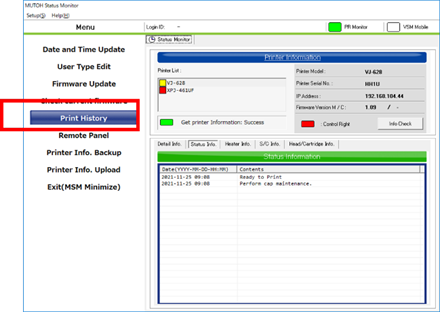
- Select "Export":

- Select the appropriate "Delimiter" and "Decimal point" settings for your "Windows regional settings"
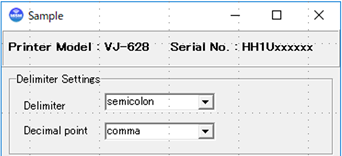
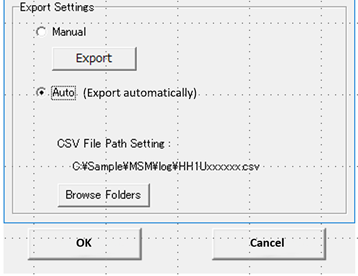
Complete the settings by choosing:
- One-time ‘Manual Export’.
- Automatic Export – ‘Auto’, which will automatically create a “*.CSV”-Type file including the full print history of the printer.
- The file is generated in the folder of your choice, which you can set via the ‘Browse Folders’ button.
- The file is updated every time the printer has received new print data.
- New settings to be confirmed with ‘OK’ or aborted via ‘Cancel’.
Was this article helpful?
That’s Great!
Thank you for your feedback
Sorry! We couldn't be helpful
Thank you for your feedback
Feedback sent
We appreciate your effort and will try to fix the article