Necessary tools
In order to be able to install firmware, the following tools are required:
- Personal computer with MS Windows
- Network cable to connect the XpertJet with the pc
- The latest MSA-tool (Mutoh Service Assistance)
- Make sure the latest heater firmware is up-to-date and installed first, before installing the mainboard-firmware
Detailed instructions how to install the firmware, are described in the maintenance manual.
The latest current firmware can be downloaded below this article.
Release date: 03 December 2022
Current version - 2.04
Bugfix
- If the Cancel key is pressed just before the printhead is capping in, all keys become disabled except the main switch. This is now fixed.
- When performing a "Longstore" in Self-Diagnostics mode and the waste ink tank got full at a time when no cartridge was in the printer then the message "no pack" was incorrectly displayed. This is now fixed and will display "ink discharge" or "head cleaning".
- When "Page gap" is set to "Narrow" and "Output" is switched from "Take-up" to another setting then a "front interlace" will be executed when printing. This is now fixed.
- When a scan of the barcode is executed from the panel's "roll length manage" menu it incorrectly detects the front edge of the media and displays a read failure. This is now fixed.
Changes
- Revised nozzle check sequence: when printing the Nozzle check via the short key on the panel the nozzle check F will always be printed.
- After the ink pack has been replaced the message "replace SC card" will be displayed. The printer will not work until the card has been replaced.
Version history
Release date: 14 September 2021
2.03
Bugfix
- Fixed an issue where the printed area log was not updated when printing 0,01m² or less
- Fixed an issue where the amount of ink counted in the smart chip during subtank filling was not exactly the same as that of the actual amount consumed.
- Fixed an issue when the "alert buzzer" setting is changed by the MSM that only took effect after rebooting.
- Fixed an issue with the "alert buzzer" which could not be stopped, when the "alert buzzer" is switched off
- When the user type is changed, the effect settings are not properly switched. This issue has been fixed.
- Fixed an issue where the display is saying "warming up" even though the heater temperature is set to the same temperature during the standby heat
- Fixe an issue where there was an incorrect display when requesting the activation code on the panel
Changes
- Implementation of a new feature to handle smart-chip related issues, with the new S/C Recovery procedure.
For more information check the following article: TIB818 - Smart Chip Recovery - The "Ink End" detection, software-handling and ink-consumption have been improved.
Release date: 01 September 2021
2.02
Bugfix
- Fixed a panel message display issue in the following situations:
- Version display after turning power on
- When the system displays error messages
Release date: 31 march 2021
2.01
Bugfix
- In some cases the media feeding doesn't stop when operated by the control panel. This has been fixed.
Changes
- "Pump type" has been added in the Diagnostics / Parameter menu ("Type A" or "Type B).
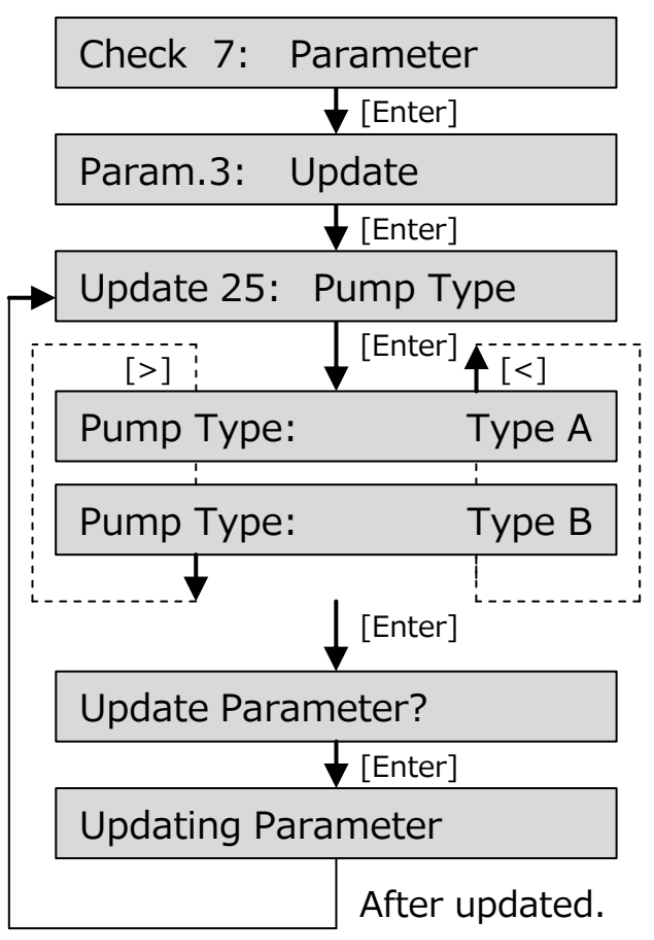
- "Pump count" has been added in the Diagnostics / Counter menu
- For more information, check TIB 832 - XPJ-1641SR & XPJ-1682SR Introduction of a new pump type
Release date: 25 february 2021
2.00
New Features
- Feed master Function
Automatic paper feed adjustment by means of the incorporated color sensor.More info in the operation manual v05 under topic “Automatic PF Adjustment method”.

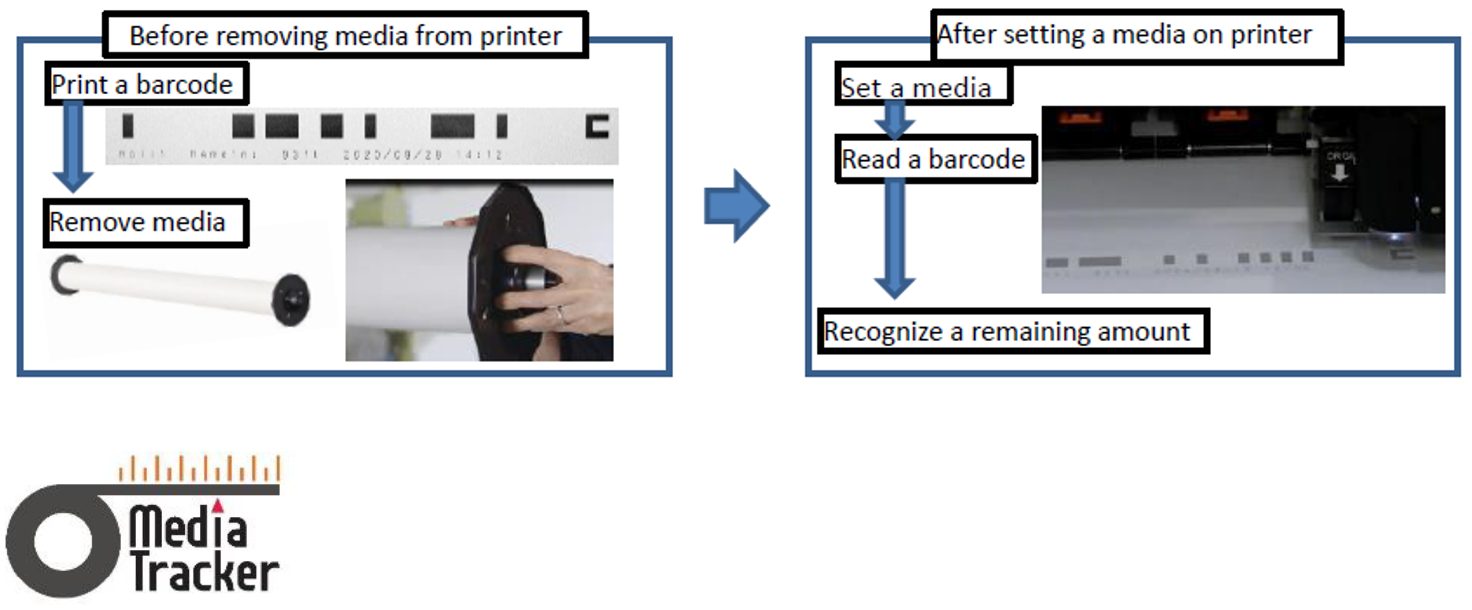
Media tracker Function
A bar code, including the remaining roll length, can be printed on the media before removing it from the printer.
When this roll is loaded again, the printer reads the bar code and recognizes the remaining amount of media on the roll. More info in the operation manual v05 under topic “Menu 9: Roll Length Manage”.
- Nozzle Area select Function
By selecting specific nozzle areas of the print head not to be used, the influence of misfiring or missing nozzles can be annulled. More info in the operation manual v05 under topic “Setup 33: Select Nozzle”.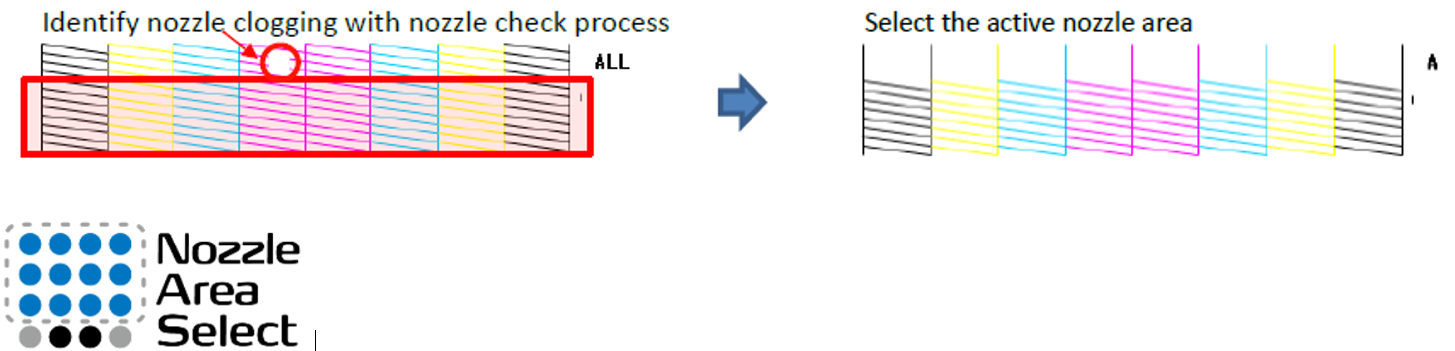
Changes
- If the remaining amount of ink in the sub tank changes during the cap-in state, it is judged that the ink is leaking. The date, time and the slot number of occurrence are recorded in the log.
- In the system information menu following parameters are added (in addition to the firmware version and accumulated print area): the model name, serial number, ink type and ink color.
- Ability to use a new H-cont board which will be produced because of discontinuation of the previous version.
- Add the possibility to select a new pump in Self-Diagnosis menu (future use)
Fixes
- For the models including the smart charge function, if "ignore" is set when the ink remaining level is zero, printing does not start and the panel shows "Subtank refill". However, the subtank refill has not actually started because the two-way valve remains closed. It is now changed that the two-way valve is opened when "ignore" is set.
- If automatic adjustment is made when the origin setting in the CR direction is enabled, the print position is reflected but the reading position is not. It is changed that the reading position is also reflected in the origin setting.
- In the remaining amount setting of the roll media length, 0m could be input for the setting range of 1m to 1500m. It is changed not to enter 0m.
- If the network cable is disconnected during data transfer using the FTP protocol, the connection cannot be established even if the cable is reconnected. The signal reception timeout of FTP protocol is now set to 5 minutes.
- An error that the panel display may not return to "Ready to print", is now fixed.
- When sucking with a pump, calculation of consumption is not right. It is now fixed.
- The word of "Ex high" in the languages other than Japanese and English, are not right. It is now corrected.
Release date: 29 october 2020
1.04
Changes
- Small internal changes (production related)
Release date: 27 february 2020
1.03
Changes
- The power of vacuum in the self-diagnosis mode, is automatically changed to the one set in the user mode.
Bug Fixes
- The power of the vacuum fan now works properly according to the setting on RIP Software, when changing the vacuum fan setting on the RIP software.
*PS function(Vacuum fan) on PM command can work now properly. - French is corrected from "PG:Lent" to "PG:Bas".
- While Ignore is set and ink is not filled, "[All] Not filled" is unnecessarily displayed just for 1 to 2 seconds when started in the user mode.
*PS function(Vacuum fan) on PM command can work now properly.
New Item
- One of the choice, "Ex High" is added in the vacuum fan setting to power up.
Release date: 21 november 2019
1.02
Changes
- The ink type used is now determined when ink is filled. It was previously done at the time of initial cleaning
Bug Fixes
- The current time of printer is set to Japan time at factory. After it is set to a local time at installation, actions of cleaning and online printing are not recorded in the maintenance log. In addition, a CPU error may occurs.
- A failure that "Menu Option" was not initialized when the printer was initialized, is now fixed.
- A function of cleaning by pressing and holding the direct key (right arrow) now works.
- Just after power on, a customized media name is now displayed correctly. "Type**" was displayed instead in the past.
New Item
- A new effect type "i-WeaveEx" can now be selected.
Release date: 21 november 2019
1.01
Changes- UMS ink chips support enabled
Release date: 24 september 2019
1.00
First release
Was this article helpful?
That’s Great!
Thank you for your feedback
Sorry! We couldn't be helpful
Thank you for your feedback
Feedback sent
We appreciate your effort and will try to fix the article