Necessary tools
In order to be able to install firmware, the following tools are required:
- Personal computer with MS Windows
- Network cable to connect the XpertJet wit the pc
- The latest MSA-tool (Mutoh Service Assistance)
Detailed instructions how to install the firmware, are described in the maintenance manual.
The latest current firmware can be downloaded below this article.
Release date:12 December 2024
Current version - 2.04
Bugfixes:
- A CPU error occurs when connecting to a PC with antivirus software (AVG AntiVirus) installed.
- The backlight of the control panel keys may flickers momentarily while the setting screen is displayed.
Changes:
- Added Soak cleaning menu to user mode.
- Users may mistake "Longstore" for a stronger version of cleaning and perform "Longstore" in user mode. The printer will be left in an unfilled state and will be difficult to recover from.
- Before "Longstore" is performed, a message will be displayed on the panel indicating that a cleaning cartridge is required.
- Before "Longstore" is performed, make it possible to exit the menu by pressing the Cancel key. - Display CR maintenance log when DS3 is selected as ink type.
(Self-diagnosis mode>Test>Record>Maintenance)
Installed Ver 2.04 Serial number:
XPJ-1682WR JN6U001585~
Version history
Release date: 03 October 2022
2.03
Bugfix
- If the Cancel key is pressed just before the printhead is capping in, all keys become disabled except the main switch. This is now fixed.
- When performing a "Longstore" in Self-Diagnostics mode and the waste ink tank got full at a time when no cartridge was in the printer then the message "no pack" was incorrectly displayed. This is now fixed and will display "ink discharge" or "head cleaning".
- When "Page gap" is set to "Narrow" and "Output" is switched from "Take-up" to another setting then a "front interlace" will be executed when printing. This is now fixed.
- When a scan of the barcode is executed from the panel's "roll length manage" menu it incorrectly detects the front edge of the media and displays a read failure. This is now fixed.
- The printer freezes when the printer tries to perform a print or cleaning from Self-Diagnostics mode when a "S/C ink end" is displayed.
Changes
- Revised nozzle check sequence: when printing the Nozzle check via the short key on the panel the nozzle check F will always be printed.
- After the ink pack has been replaced the message "replace SC card" will be displayed. The printer will not work until the card has been replaced.
Installed FW v2.03 as of XPJ-1682WR JN6U001555.
Release date: 15 September 2021
2.02
Bugfix
- Fixed an issue where the fan is not stopping after performing "Test 6: Fan" in diagnostics
- Fixed an issue where the printed area log was not updated when printing 0,01m² or less
- Fixed an issue where the amount of ink counted in the smart chip during subtank filling was not exactly the same as that of the actual amount consumed.
- Fixed an issue where the printer commands were not properly sent to the printer, when printing data is sent via the Mutoh Print Server (through the MSM)
- An unnecessary character "_" is displayed when requesting an activation code on the panel
- Fixed a panel display failure in the following conditions:
- When displaying the version information after turning on the power
- When displaying system error messages
- Fixed an issue when the "alert buzzer" setting is changed by the MSM that only took effect after rebooting.
- Fixed an issue with the "alert buzzer" which could not be stopped, when the "alert buzzer" is switched off
- When the user type is changed, the effect settings are not properly switched. This issue has been fixed.
Changes
- Implementation of a new feature to handle smart-chip related issues, with the new S/C Recovery procedure.
For more information check the following article: TIB818 - Smart Chip Recovery - The "Ink End" detection, software-handling and ink-consumption have been improved.
Release date: 06 April 2021
2.01
Bugfixes
- In some cases the media feeding doesn't stop when operated by the control panel. This has been fixed.
- A CR overload error occurred when the cover is opened or closed, at the moment the carriage is capping out.
Changes
- "Pump type" has been added in the Diagnostics / Parameter menu ("Type A" or "Type B).
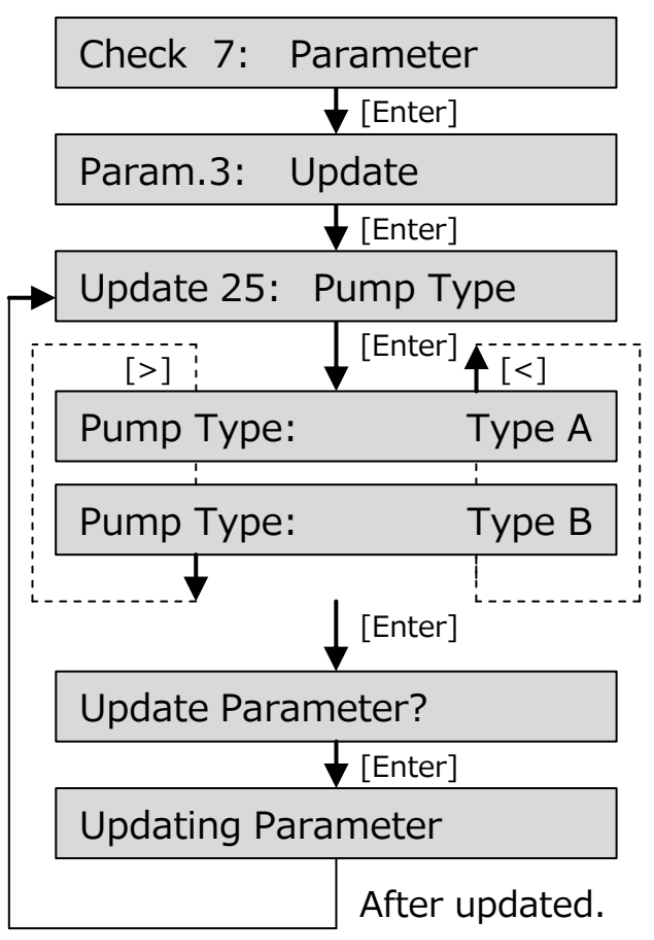
- "Pump count" has been added in the Diagnostics / Counter menu
- For more information, check TIB 832 - XPJ-1641SR & XPJ-1682SR Introduction of a new pump type
Release date: 25 February 2021
2.00
Initial release
Was this article helpful?
That’s Great!
Thank you for your feedback
Sorry! We couldn't be helpful
Thank you for your feedback
Feedback sent
We appreciate your effort and will try to fix the article