In order to be able to install the Mutoh Rotary option on a VJ-626UF or XPJ-661UF the units have been equipped with “mounting bases” on both sides of the printing table.
These are located under the “attachment covers L/R”. If correctly assembled the mounting bases should have the small hole on top and the larger hole below.
Please check the correct configuration illustrated here:
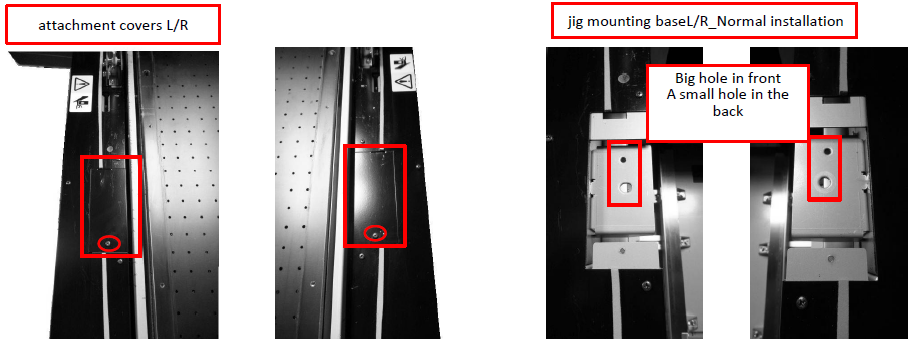
We have been informed by the factory that there is a small possibility that some units have been equipped with a wrong base. For XPJ-661UF this could be the case on units with serial number lower than JM2U000053.
Following configurations are not correct:
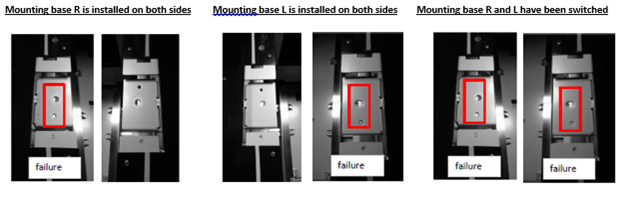
In case your unit has one of the above faulty set-ups, the installation of the rotary unit will not be possible and you will need to do a small modification.
Solution:
If you have 2 identical mounting bases as in example 1 and 2 then please inform MUTOH Europe Service department via the support-desk or mail us to hardware.support@mutoh.eu and inform us which one is missing. We will send you the correct base.
Sending a picture to illustrate the problem might help to assure the correct part is sent. If the 2 bases have been switched from place, as in example 3, then please re-install them in the correct location. In order to be able to change the “mounting base” the “side outer cover” needs to be removed. How to do this is explained in the maintenance manual.
Was this article helpful?
That’s Great!
Thank you for your feedback
Sorry! We couldn't be helpful
Thank you for your feedback
Feedback sent
We appreciate your effort and will try to fix the article