A new ink type VJ-MS31 has been introduced. As a consequence VJ-MSI3A inks will be discontinued shortly. It will be replaced by VJ-MS31 inks instead.
This technical bulletin contains some important points of attention, when you switch inks to VJ-MS31.
MS31 inks react with the shipping liquid inside new printers and causes the print head to clog. In order to avoid this problem, a special cleaning process has been added in the production line of the VJ series.
Ink charge procedure
The chart below gives you an overview which models are supported for VJ-MS31 inks and how it should be charged.
| New Installations | Installed Base (loaded with VJ-MSI3A inks) | |
| VJ-628 SN° HH1U001702 or higher | VJ-MS31 inks can be charged after the initial cleaning with either VJ-MS31-CL220E or VJ-MSI3A-CL220E cleaning solution. Ink charge procedure is only applicable for these 3 models with the following mentioned serial numbers (or higher) | On all these models, MS31 inks can be charged immediately when MSI3A inks is inside, because VJ-MSI3A inks and MS31 inks can be mixed. It's not necessary to discharge inks or to clean the ink path. Additionally it's not required to upgrade firmware because smart chips are compatible. |
| VJ-1324X SN° HT5U001630 or higher | ||
| VJ-2638X SN° HXAU000298 or higher | ||
| VJ-628 Until SN° HH1U001701 | When charging MS31 into these discontinued stock models, the ink reacts with the shipping liquid remaining in the print head. This might cause clogging. So before using MS31 inks:
| |
| VJ-1324X Until SN° HT5U001630 | ||
| VJ-2638X Until SN° HXAU000298 | ||
| VJ-1624(X) | ||
| VJ-1638(X) | ||
| VJ-2638 | ||
| VJ-1204 | ||
| VJ-1304 | ||
| VJ-1604(X) | ||
| VJ-1324 | ||
| VJ-1614 |
Spare parts - Print heads
It's very important to use the correct spare part number because in particular for MS31 inks, these heads have been specifically pre-treated with the same special cleaning process as in the production line for usage with MS31.
| NOTE Using the incorrect spare print head part number, in combination with VJ-MS31 ink might result in a clogged head! |
As a consequence when a print head is replaced on a machine using MS31 inks, the following spare head part numbers must be used, depending of the ink kind which is charged inside the printer.
The spare head does not need to be pre-rinsed with MS31 cleaning liquid, however the dampers need to be flushed with MS31 cleaning liquid prior to loading the ink.
Please also refer to the following article (Ink Shelf life, SDS & cleaning) to find a complete overview of the compatibility between the offered cleaning liquids and ink kinds.
Spare head to be usedwith VJ-MS31 inks | |
| VJ-628 | DH-40274 |
| VJ-628X | |
| VJ-1324X | |
| VJ-1624X | |
| VJ-1324 | |
| VJ-1624 | |
| VJ-1638X | |
| VJ-2638X | |
| VJ-1638 | |
| VJ-2638 | |
| VJ-1604X | DH-40990 |
| VJ-1204 | |
| VJ-1304 | |
| VJ-1604 | |
| VJ-1614 |
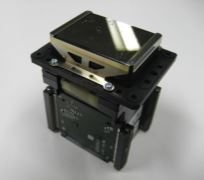
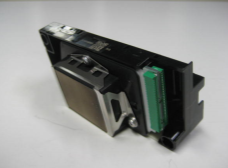
IMPORTANT:
In order for the ValueJet to accept the DH-40274 head following Firmware versions (or higher) should be used:
| VJ-628 | 1.09 |
| VJ-1324X | 3.07 |
| VJ-1624X | 3.07 |
| VJ-1638X | 3.17 |
| VJ-2638X | 3.17 |
| VJ-1324 | 3.09 |
| VJ-1624 | 3.09 |
| VJ-1638 | 3.18 |
| VJ-2638 | 3.18 |
Was this article helpful?
That’s Great!
Thank you for your feedback
Sorry! We couldn't be helpful
Thank you for your feedback
Feedback sent
We appreciate your effort and will try to fix the article