Phenomenon
When replacing the MAIN board on certain models, the panel may automatically power on upon inserting the AC cable after the maintenance board is installed.
In this state:
All panel buttons become unresponsive.
The printer cannot enter Board Manager mode.
Firmware installation is not possible.
Target Parts and Models
| Parts No. | Name | Model |
|---|---|---|
| DH-41737 | MAIN Board | XPJ-1462UF |
| DH-42216 | MAIN Board | XPJ-1682UR |
Market Action / Solution
To address this issue during MAIN board replacement:
Temporarily turn OFF the DIP switch on the panel before powering on the device.
Once firmware installation is complete, turn the DIP switch back ON.
⚠️ This behavior only occurs if the replacement MAIN board does not have the product firmware pre-installed.
After firmware installation, future firmware updates do not require DIP switch changes.
Board Replacement Procedure
Connect the MSA and start the Board Replacement Wizard.
Use the wizard to back up the prm file from the defective board.
Power off the printer as instructed by the wizard.
Set the DIP switch on the panel to OFF.
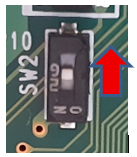
Replace the MAIN board with the new maintenance board.
Start the printer in Board Manager mode:
Press the power button.
Within 2 seconds, press the left key on the panel to switch to Board Manager mode (before auto power-off).
Follow the wizard to install the firmware and restore the prm file.
Power off the printer.
Set the DIP switch back to ON.
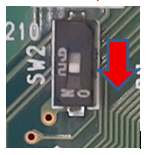
⚠️ Important Notes if DIP Switch is Not Returned to ON:
Automatic power recovery during a power outage will not function.
The printer may malfunction due to ink settling.
On first power-up, the panel may flash, and the printer will not start.
Normal startup will only occur after pressing the power button a second time.
Perform adjustments and calibrations as needed in self-diagnosis and user mode.
Reference: Models with DIP Switch ON Configuration
| Model |
|---|
| XPJ-461UF |
| XPJ-661UF |
| XPJ-1462UF |
| XPJ-1682UR |
Was this article helpful?
That’s Great!
Thank you for your feedback
Sorry! We couldn't be helpful
Thank you for your feedback
Feedback sent
We appreciate your effort and will try to fix the article